
 View on Asset Store (opens in new tab)
Package details
- Latest version
- 1.0
- Last updated
- First released
- Unity version
- 2021.3.0 or later
- Package size
- 36 KB
- Files
- 14
- Favorites
- 13
- Views in the past week
- 7
Price tracking
- Last checked
- Tracked since
- Lowest recorded
- Free on
Keywords
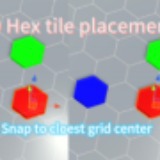
Hex Tile Placement Snapper
If you need your hexagon tiles to be placed perfectly, this free tiny tool will automatically snap the object to the closest grid center. No complexity, just a tiny tool to be used immediately.
Affiliate link · Purchases support this site
Price history
Last 6 months
USDAsset preview
1 / 2

Hex Tile Placement Snapper screenshot 1

About this asset
This tiny script can help you place the hexagon tiles into perfect positions if you are going to craft a level or world with hexagon tiles manually. With the tool enabled, when you change the positions of objects in Unity editor, the object automatically snaps to the closest hex grid center. You can also adjust the grid size, number of grids, and the helper grid line color to best fit your needs.
From the publisher's Asset Store listing.
Technical details
Maybe not performant if the number of grid tiles is too large, but in common cases it should be great. 100*100 tiles work without any problem.
This tool is meant to be used in the editor only, and it won't store any kind of data of the grid tile map. The only thing it does is to snap the object to the closest grid center.
Compatibility
| Unity version | Built-in | URP | HDRP |
|---|---|---|---|
| 2021.3.0f1 | Compatible | Compatible | Compatible |
This asset is rendering pipeline independent. The example scene is created in the built-in pipeline though, so if you are using different than built-in, please change the material of objects in the scene to see better.
As listed on the Asset Store.