
 View on Asset Store (opens in new tab)
Package details
- Latest version
- 1.0
- Last updated
- First released
- Unity version
- 6000.0.45 or later
- Package size
- 141 KB
- Files
- 4
- Favorites
- 5
- Views in the past week
- 0
Price tracking
- Last checked
- Tracked since
- Lowest recorded
- $4.99 on
Keywords
Search Result Pro
- Price drop
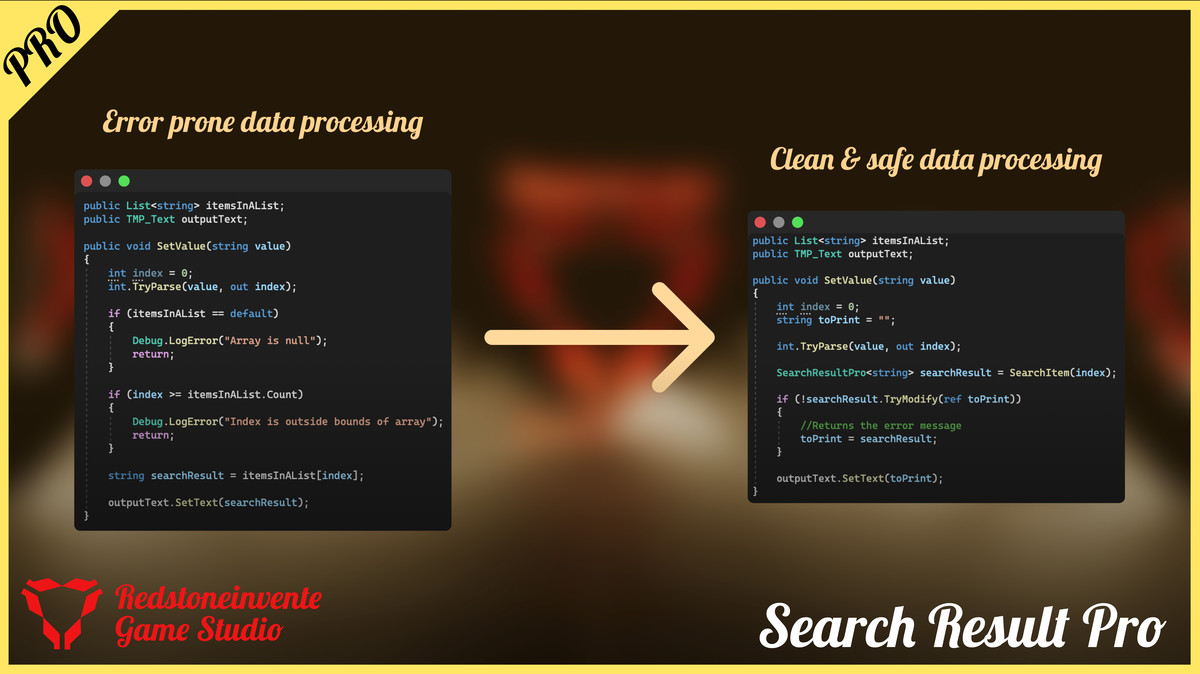
This package provides structured success and error handling for Unity projects, enabling efficient debugging and flexible result management for any data type.
Lowest recorded price
Get 50% off on Asset Store (opens in new tab)Affiliate link · Purchases support this site
Price history
Last 6 months
USDAsset preview
1 / 4
Search Result Pro screenshot 1

About this asset
*Remove SearchResult Lite when downloading this package.
Search Result Pro takes Unity data handling to the next level, providing developers with advanced, flexible error-handling options. Designed with professional projects in mind, it delivers more comprehensive control over data retrieval, modifications, and comparison.
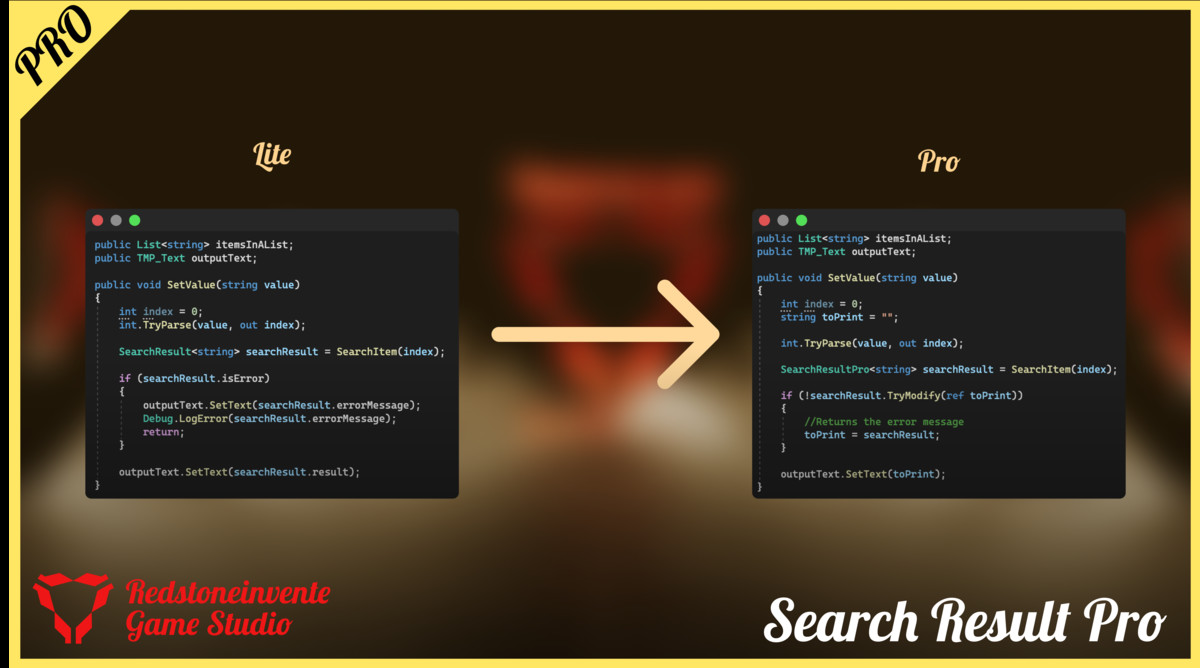
Search Result Pro builds upon the simplicity of the Lite version, adding expanded functionality for developers seeking a powerful, adaptable solution.
🌐 Website: https://doshagyasinggowardun.weebly.com
💡 Support: https://discord.gg/BkgHX5VnKC
🌱 Lite Version: https://u3d.as/3q4c
Key Features
- Use Search Result Pro to manage and track errors in complex workflows. Customizable error messages and error-state tracking empower you to isolate issues faster.
- Modify data dynamically with TryModify(), giving you an easy way to update values when error-free or to debug when errors are flagged.Advanced Error Control
- Compare error states effortlessly with custom operators (== and !=) to check for successful or faulty data retrieval without additional checks.Flexible Modifications
- Intuitive Boolean ComparisonAccess ToString() for detailed data and error output, streamlining the debug process and error message handling, even for complex data types.Enhanced Debugging Tools
Key Use Cases in Unity Projects
1. Safe Data Access
- Lists and Arrays: The SafeGet extension methods for lists and arrays help retrieve elements without worrying about null references, out-of-bounds errors, or runtime crashes. For example:
- This is especially useful when working with dynamically sized collections, such as inventories, object pools, or runtime-generated datasets.
2. Error Messaging with Context
- The use of [CallerMemberName] and [CallerLineNumber] attributes in SafeGet methods allows developers to quickly identify where an error occurred in the code. This makes debugging faster and more intuitive.
Example: “Index is outside bounds of array at MyMethod at line 42.”
3. GameObject Modifications
- Custom logic based on runtime checks.The SafeModify method provides a structured way to modify GameObjects while handling potential exceptions gracefully. This can be used for tasks such as:Adding or removing components.
Updating properties (e.g., transform.position, Renderer.material).
4. Preventing Common Errors in Unity
- Null Reference Exceptions: These extensions ensure that null references are caught and handled before they cause crashes.
- Index Out-of-Bounds: Improves safety when accessing indices, reducing runtime errors caused by invalid inputs.
- Runtime Exception Handling: Provides a unified approach to catching exceptions across different object types, ensuring smoother gameplay and debugging.
5. Customization and Extendability
- By providing a generic structure (SearchResult<T>), this framework allows developers to easily extend functionality to other data types, like custom structs or objects.
- For instance, a custom extension method could be created for retrieving specific components from a list of GameObjects.
6. Collaborative Development and Modular Code
- Enables safer code when multiple developers are working on a project. The clear separation of error handling (e.g., using onError callbacks) and functional logic (e.g., onSuccess) helps streamline debugging and maintenance.
7. Error Logging for QA and Bug Tracking
- With precise error messages and contextual information, QA testers can pinpoint issues and provide detailed reports. Developers can also integrate these error messages with bug tracking tools.
Benefits for Unity Developers
- Reduced Debugging Time: Eliminates the need to manually write boilerplate error checks for common operations.
- Improved Stability: Prevents crashes caused by common mistakes like accessing null objects or out-of-range indices.
- Enhanced Collaboration: Clear error reporting ensures team members can quickly identify and resolve issues.
- Code Reusability: The generic approach and extensible design ensure that these utilities can be reused across various projects and scenarios.
By integrating these utilities into a Unity project, developers can focus on building features and gameplay mechanics rather than worrying about runtime stability.
Use Case: Safe Inventory Management in a Game (Using PRO version)
Scenario
You are building an inventory system for an RPG game. Players can access their inventory to view items or equip them during gameplay. However, there may be cases where the player tries to access an item that doesn’t exist or the inventory is empty. The SearchResultPro class ensures these operations are handled gracefully without breaking the game flow.
Features Demonstrated:
- Use SafeGet to avoid runtime errors when accessing inventory items, especially when indices are out of range.Safe Retrieval:
- Inline onSuccess and onError callbacks provide immediate and readable handling of success or failure scenarios.Error Handling with Callbacks:
- Ensure retrieved items meet specific criteria by adding a defaultCheck. For example, prevent equipping items with invalid names.Custom Default Checks:
- Simplifies error checking with implicit conversion (if (result)), making the code cleaner and easier to understand.Implicit Conversion:
- The extended functionality adds safety and clarity when working with collections like arrays and lists, reducing potential errors and debugging time.Pro Extensions:
Example Output:
List is empty at TestSafeGet at line 17
Successfully retrieved item: Shield
Failed to retrieve item: Index is outside bounds of array at TestSafeGet at line 24
Failed to retrieve item: Index is outside bounds of array at TestSafeGet at line 25
Equipping item: Sword
Cannot equip item: Index is outside bounds of array
This use case highlights how the Pro Version enhances development by providing robust, reusable, and error-resilient data handling tools. It reduces the need for repetitive null checks, making your codebase more efficient and readable.
Supported Platforms
- Desktop
- Android
- iOS
- WebGL
- MacOS
- Consoles
Why Choose Search Result Lite & Pro?
This asset solves real-world problems faced by Unity developers, making your projects safer, smoother, and easier to manage. The Lite version is perfect for those looking to try safe access methods, while Pro unlocks advanced tools and customization for professional-grade projects.
Take the hassle out of debugging and let Search Result Lite & Pro do the heavy lifting for you.
Get started with Lite for free or upgrade to Pro to unlock the full potential of your workflow!
With ongoing development and user feedback-driven enhancements, Search Result Pro is designed to meet professional-level needs in Unity development. Join our community to share ideas and stay updated on new features!
From the publisher's Asset Store listing.
Technical details
Key Features:
- Success/Error Encapsulation: Provides structured handling for both success and error states.
- Data Customization: Supports any data type, allowing flexible usage across projects.
- Automatic Error Logging: Logs errors on detection, aiding quick debugging.
- Safe Data Modification: Modifies variables only if there are no errors, preventing unwanted changes.
- Boolean and String Conversions: Supports implicit conversions for simpler logic and messaging.
- Operator Overloads: Easy comparison with boolean values for quick checks.
- Comprehensive Documentation: Includes setup, usage examples, and detailed method explanations.
Compatibility
| Unity version | Built-in | URP | HDRP | Custom |
|---|---|---|---|---|
| 6000.0.45f1 | Compatible | Compatible | Compatible | Compatible |
Remove SearchResults Lite when downloading this package.
As listed on the Asset Store.