
 View on Asset Store (opens in new tab)
Package details
- Latest version
- 1.0
- Last updated
- First released
- Unity version
- 6000.0.24 or later
- Package size
- 51.8 MB
- Files
- 31
- Favorites
- 10
- Views in the past week
- 13
Price tracking
- Last checked
- Tracked since
- Lowest recorded
- $13.30 on
Keywords
- Search for mobile template battleship
- Search for turn based ship
- Search for battleship mobile
- Search for casual game ship
- Search for mobile template
- Search for mobile templates
- Search for template mobile
- Search for mobile games
- Search for mobile game
- Search for mobile battleship
- Search for battleship
- Search for battleship mobile template

Battleships | Battleship / Turn Based Ship Destroy Game Template
Experience classic Battleship gameplay! This asset offers a grid-based game with AI, custom ship placement, missile animations, and visual feedback. Easy to Use Template!. Ready to ship Game!
Affiliate link · Purchases support this site
Price history
Last 6 months
USDAsset preview
1 / 6

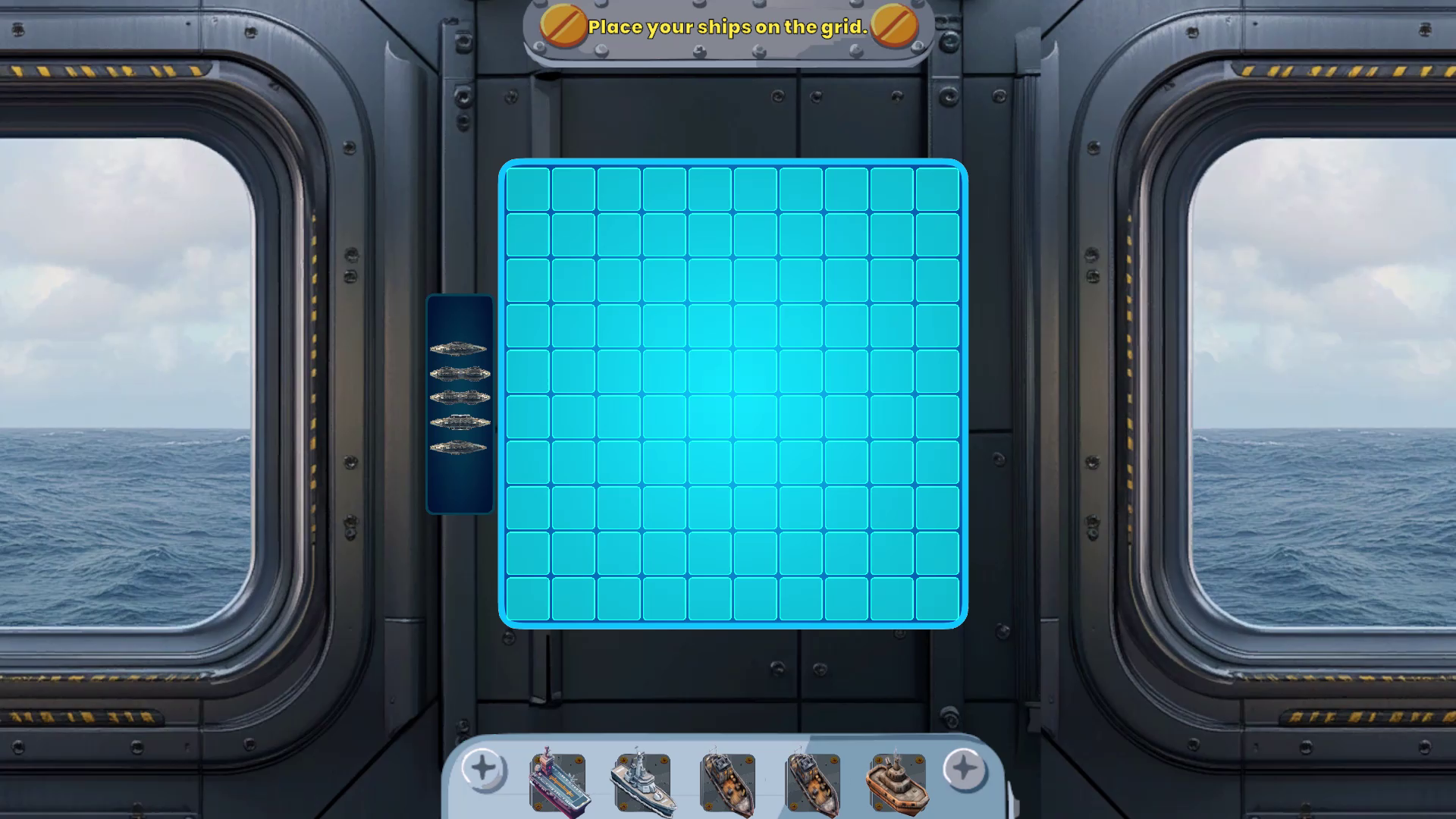
Battleships | Battleship / Turn Based Ship Destroy Game Template screenshot 1


About this asset
Dive into classic naval combat with the Classic Battleship Game for Unity! This fully-featured Battleship game asset offers a robust, grid-based gameplay experience with a blend of strategy and tactical AI-driven opponents. Players can place ships, strategize attacks, and witness dynamic feedback with each move. The system is highly customizable, making it perfect for developers looking to integrate Battleship-inspired mechanics into their own games or projects.
Key Features
- Grid-Based Gameplay
Intuitive 10x10 grid layout for ship placement and attacks, with a separate player and AI grid for strategic gameplay. - Custom Ship Placement
Players can choose from multiple ship sizes and directions, using visual cues to validate ship placement on the grid. - Strategic AI Opponent
Built-in AI system that makes random, yet strategic moves against the player, creating a balanced challenge. - Missile Animations and Visual Feedback
Missile animations, hit/miss popups, and ship icons that update based on the current game state, adding polish to gameplay. - Dynamic UI and Gameplay Events
Visual elements that enhance the player experience, including endgame panels, win/lose titles, and status updates. - Comprehensive Inspector Controls
Easily customize various elements through serialized fields, ensuring a smooth development experience.
Usage and Setup
- Place the Grid Prefabs
Drag and drop the grid prefabs for the player and AI into your scene. Use the inspector to set up cells and buttons as needed. - Configure Ship Prefabs
Customize ship prefabs, assign sprites for ship previews, and set ship lengths as per your design requirements. - Add Missile Animations
Set up missile start points and missile prefabs to visually represent attacks on the AI and player grids. - Customize AI Behavior
Modify AI settings via the inspector to create different difficulty levels. - Set Up the UI
Customize the UI elements like the status text, start button, end game panels, and reset options to align with your game's visual style.
Example Use Cases
- Classic Battleship Game
Add this asset to your project for a standalone Battleship experience, complete with customizable UI and win conditions. - Strategic Mini-Game in Larger Projects
Integrate the Battleship game as a mini-game or hidden game mode in larger projects, offering players a break from main gameplay while enhancing game engagement. - Educational Games
Use Battleship’s grid-based logic and visual feedback as a base for educational games focusing on math or problem-solving.
Package Contents
- Full Battleship game script with customizable inspector fields
- Grid-based UI elements for both player and AI
- Visual assets for ships, missiles, hit/miss feedback
- Comprehensive documentation and setup guide
From the publisher's Asset Store listing.
Technical details
Key Features
- Grid-Based GameplayIntuitive 10x10 grid layout for ship placement and attacks, with a separate player and AI grid for strategic gameplay.
- Custom Ship PlacementPlayers can choose from multiple ship sizes and directions, using visual cues to validate ship placement on the grid.
- Strategic AI OpponentBuilt-in AI system that makes random, yet strategic moves against the player, creating a balanced challenge.
- Missile Animations and Visual FeedbackMissile animations, hit/miss popups, and ship icons that update based on the current game state, adding polish to gameplay.
- Dynamic UI and Gameplay EventsVisual elements that enhance the player experience, including endgame panels, win/lose titles, and status updates.
- Comprehensive Inspector ControlsEasily customize various elements through serialized fields, ensuring a smooth development experience.
Compatibility
| Unity version | Built-in | URP | HDRP |
|---|---|---|---|
| 6000.0.24f1 | Compatible | Not listed | Not listed |
As listed on the Asset Store.