
 View on Asset Store (opens in new tab)
Package details
- Latest version
- 1.1
- Last updated
- First released
- Unity version
- 6000.3.10 or later
- Package size
- 558.3 MB
- Files
- 1,203
- Favorites
- 4
- Views in the past week
- 7
Price tracking
- Last checked
- Tracked since
- Lowest recorded
- $19.99 on
Keywords

RoomSmith
- Price drop
Building/Room/Level/Maze Creator. Create single rooms or entire multi-storey buildings with just one click. Create a floorplan, build in scene and immediately explore in first-person.
Lowest recorded price
Get 56% off on Asset Store (opens in new tab)Affiliate link · Purchases support this site
Price history
Last 6 months
USDAsset preview
1 / 27
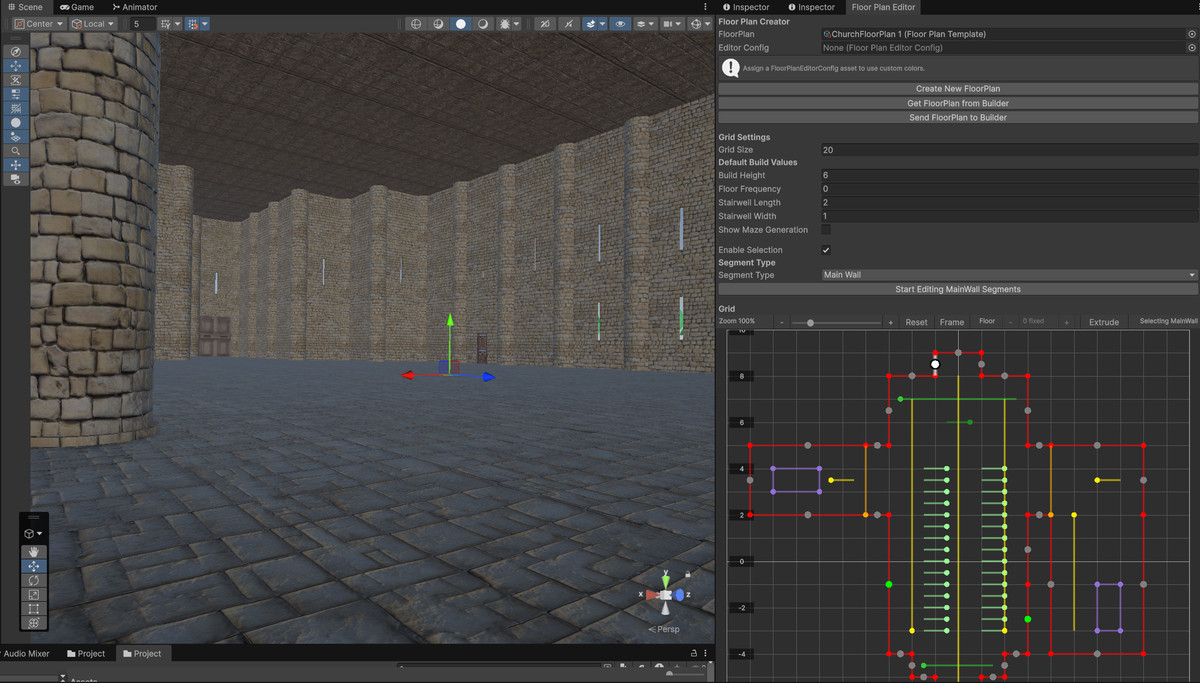
RoomSmith screenshot 1


About this asset
Sketch & Build.
Draw your room or building shape and build with a single click.
RoomSmith is a simple to use Floor plan editor and builder using prefab modular tilesets. The Floorplans and Room Templates are scriptable objects and many examples are included in the package.
There are several sets of starter/prototype tile prefabs included to get you started. These include wall and window sections, floors, ceilings, doors and staircases.
Compatible with any modular building assets e.g. Synty Dungeons, Dungeon Realms, Fantasy Kingdom etc. Works with any tile size and pivot position.
Rooms or Buildings are instantly explorable in First-Person.
Includes a simple First-Person controller script and prefab to allow instant exploration of level.
Includes Door controller scripts to automate opening and closing of doors. Door movement can be by rotation or translation. All example door tile prefabs have door script included.
Buildings can be any size and have any number of floors. Single floor dungeons with no ceiling for topdown or multi-storied skyscrapers with navigable staircases in first or 3rd person can be created. Different room layouts can be created on each floor.
You can easily add decorations to the floor, walls , exterior or exterior ground.
Easily add doors, windows and courtyard sections to you buildings.
Add surrounding ground sections to the exterior of the building or room.
Add exterior walls , gates etc.
Add Object segments to further enhance the building adding any prefab object at any position.
Once created levels can be combined and saved as prefabs. Combining the building will create a single mesh per material used to optimize the level for real-time. If you are using a single material then there will be a single mesh. All particle effects will remain in their original position. This allows you to create many sections of a building and then build a final level from the optimized sections for more complex levels.
AI used to create texture maps for included test tilesets for learning. Texture maps were created using the polycam texture generator. https://poly.cam/tools/ai-texture-generator.
FBX model Tiles created and UV mapped in Blender. Materials created in Unity.
From the publisher's Asset Store listing.
Technical details
- Floor Plan Editor tool. Create multi or single storey floorplans using a simple editor. Floorplans are scriptable objects. Example floorplans included.
- Builder script. Easy to modify build settings for walls, floors and exteriors and all decorations.
- Room Templates to easily change style of rooms and buildings on the fly. Room templates are scriptable objects. Example Room Templates included.
- Supports all 3rd party modular tilesets e.g. Synty Dungeons, Dungeon Realms, Fantasy Kingdom etc.
- Simple First-Person Contoller script included.
- Door Controller script included - works with any player controller tagged with "Player".
- Automated placement of staircases between any floor levels or spanning all floors.
- Includes 3D Maze Generator using various algorithms.
- Example Modular Tile Prefab sets included. Brick, Castle, Egypt and Maya in various coordinated sets. Also included example decoration assets.
Compatibility
| Unity version | Built-in | URP | HDRP |
|---|---|---|---|
| 6000.3.10f1 | Not listed | Compatible | Not listed |
The editor and scripts are compatible with all render pipelines depending on the modular assets used. The included materials used by the included test/prototype prefabs are for URP pipeline only. These materials can be easily converted to other pipelines.
As listed on the Asset Store.