
 View on Asset Store (opens in new tab)
Package details
- Latest version
- 1.0
- Last updated
- First released
- Unity version
- 2022.3.35 or later
- Package size
- 2.5 MB
- Files
- 16
- Favorites
- 3
- Views in the past week
- 9
Price tracking
- Last checked
- Tracked since
- Lowest recorded
- $4.99 on
Keywords
- Search for frame counter
- Search for frame rate counter system
- Search for frame rate controller
- Search for FPS Timer
- Search for frame rate timer
- Search for framerate
- Search for FPS
- Search for fps counter
- Search for frame rate
- Search for frame rate counters
- Search for frame rate systems
- Search for fps timers

FPS Counter | Frame Counter Display System And Framework
The FPS Counter tracks real-time FPS, memory, and device info. Offering a simple FPS tracking and an advanced version with customizable FPS thresholds, memory usage, and detailed device stats.
Affiliate link · Purchases support this site
Price history
Last 6 months
USDAsset preview
1 / 4

FPS Counter | Frame Counter Display System And Framework screenshot 1


About this asset
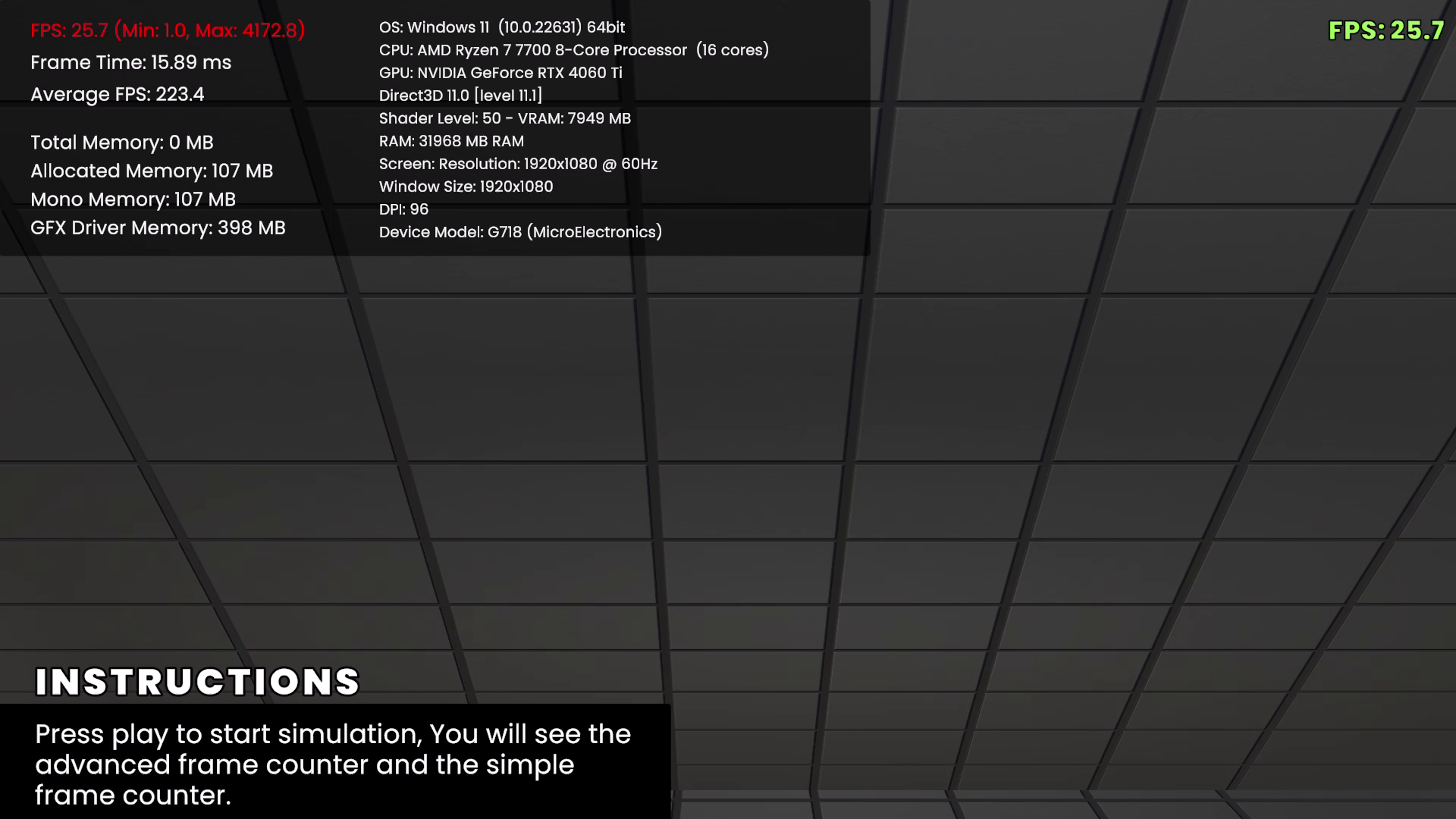
The FPS Counter tool provides real-time performance tracking in Unity, offering both a simple and advanced version. The Simple FPS Counter displays frames per second (FPS) using TextMeshProUGUI, updating every second for efficient monitoring. It’s perfect for basic FPS tracking with minimal overhead.
The Advanced FPS Counter expands on this by also tracking frame time, memory usage, and device information. It allows customizable FPS thresholds (high, medium, low) with color-coding for visual feedback. Memory tracking includes private memory, allocated memory, Mono memory, and GFX driver memory. Additionally, device information like CPU, GPU, OS, and screen resolution is displayed. This version also supports a prewarm time for more accurate min/max FPS tracking and provides options for average FPS over customizable sample sizes.
The tool is ideal for both quick performance checks and detailed analysis, making it a versatile solution for Unity developers who need in-depth performance metrics. Easy to integrate and customize, this FPS counter can fit a wide variety of project needs.
Key Features of the FPS Counter:
- Real-Time FPS Display: Tracks and displays frames per second, updated every second for accurate monitoring.
- TextMeshPro Integration: Uses customizable TextMeshProUGUI elements for flexible UI display.
- Customizable FPS Colors (Advanced): Set color thresholds for high, medium, and low FPS, providing visual performance feedback.
- Memory Usage Tracking (Advanced): Monitors private memory, allocated memory, Mono memory, and GFX driver memory (Unity 2018+).
- Device Information (Advanced): Displays detailed system info, including OS, CPU, GPU, VRAM, and screen resolution.
- Frame Time Tracking (Advanced): Shows frame time in milliseconds for detailed performance analysis.
- Average FPS Calculation (Advanced): Averages FPS over a customizable sample size for smoother monitoring.
- Prewarm Time (Advanced): Allows prewarm time for more accurate min/max FPS calculations after startup.
- Easy Integration: Simply attach to a GameObject and assign TextMeshPro fields in the Inspector to start tracking immediately.
From the publisher's Asset Store listing.
Technical details
Key Features of the FPS Counter:
- Real-Time FPS Display: Tracks and displays frames per second, updated every second for accurate monitoring.
- TextMeshPro Integration: Uses customizable TextMeshProUGUI elements for flexible UI display.
- Customizable FPS Colors (Advanced): Set color thresholds for high, medium, and low FPS, providing visual performance feedback.
- Memory Usage Tracking (Advanced): Monitors private memory, allocated memory, Mono memory, and GFX driver memory (Unity 2018+).
- Device Information (Advanced): Displays detailed system info, including OS, CPU, GPU, VRAM, and screen resolution.
- Frame Time Tracking (Advanced): Shows frame time in milliseconds for detailed performance analysis.
- Average FPS Calculation (Advanced): Averages FPS over a customizable sample size for smoother monitoring.
- Prewarm Time (Advanced): Allows prewarm time for more accurate min/max FPS calculations after startup.
- Easy Integration: Simply attach to a GameObject and assign TextMeshPro fields in the Inspector to start tracking immediately.
Compatibility
| Unity version | Built-in | URP | HDRP |
|---|---|---|---|
| 2022.3.35f1 | Compatible | Not listed | Not listed |
As listed on the Asset Store.