
 View on Asset Store (opens in new tab)
Package details
- Latest version
- 2.0
- Last updated
- First released
- Unity version
- 6000.3.23 or later
- Package size
- 49 KB
- Files
- 29
- Favorites
- 6
- Views in the past week
- 9
Price tracking
- Last checked
- Tracked since
- Lowest recorded
- $9.99 on
Keywords

LayZLogger - Logging & Console Tools
Category-based Unity logging with a custom dockable console. Toggle recording and filter history instantly, without commenting out logs or recompiling scripts.
Affiliate link · Purchases support this site
Price history
Last 6 months
USDAsset preview
1 / 3
LayZLogger - Logging & Console Tools screenshot 1
About this asset
Keep useful logs in your code and control them from LayZ Console.
LayZLogger 2.0 combines a scene-independent logging API with a dockable Unity Editor console. Categories appear automatically when used in code. Change their settings instantly, including during Play Mode, without editing scripts or waiting for recompilation.
RECORD WHAT YOU NEED. REVEAL WHAT YOU SAVED.
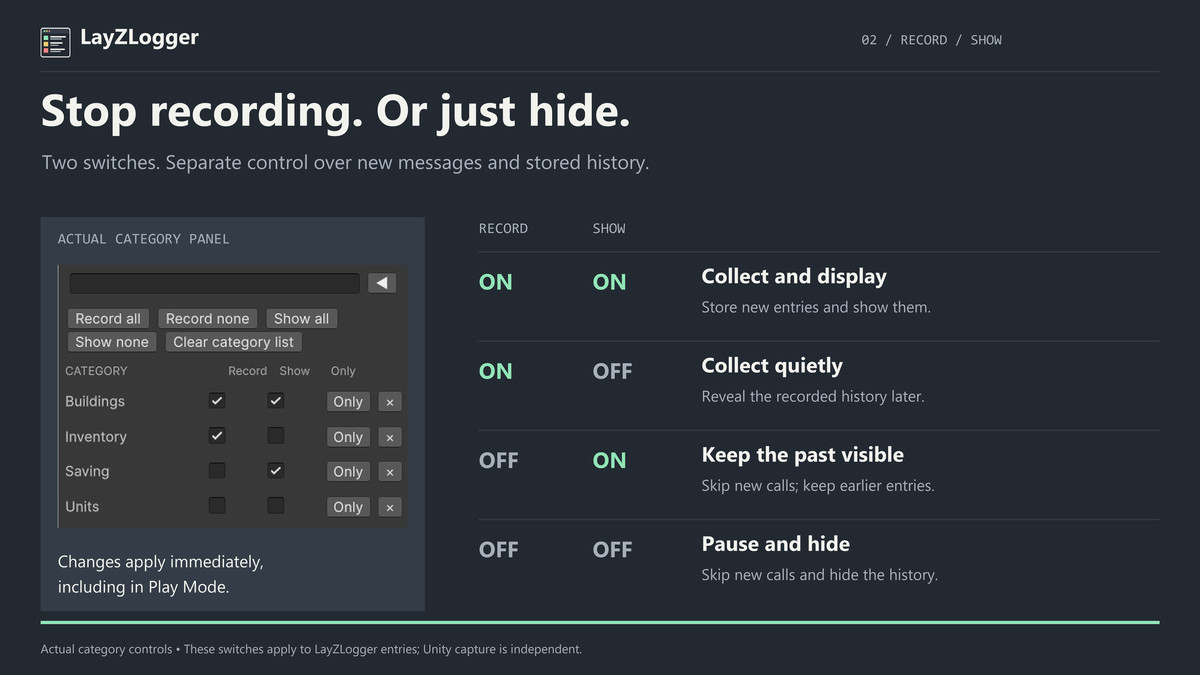
Each category has separate Record and Show controls. Stop accepting new messages to reduce logging work, or hide a category while continuing to collect its messages. Show it again later to inspect the retained history.
ONE PLACE TO INVESTIGATE
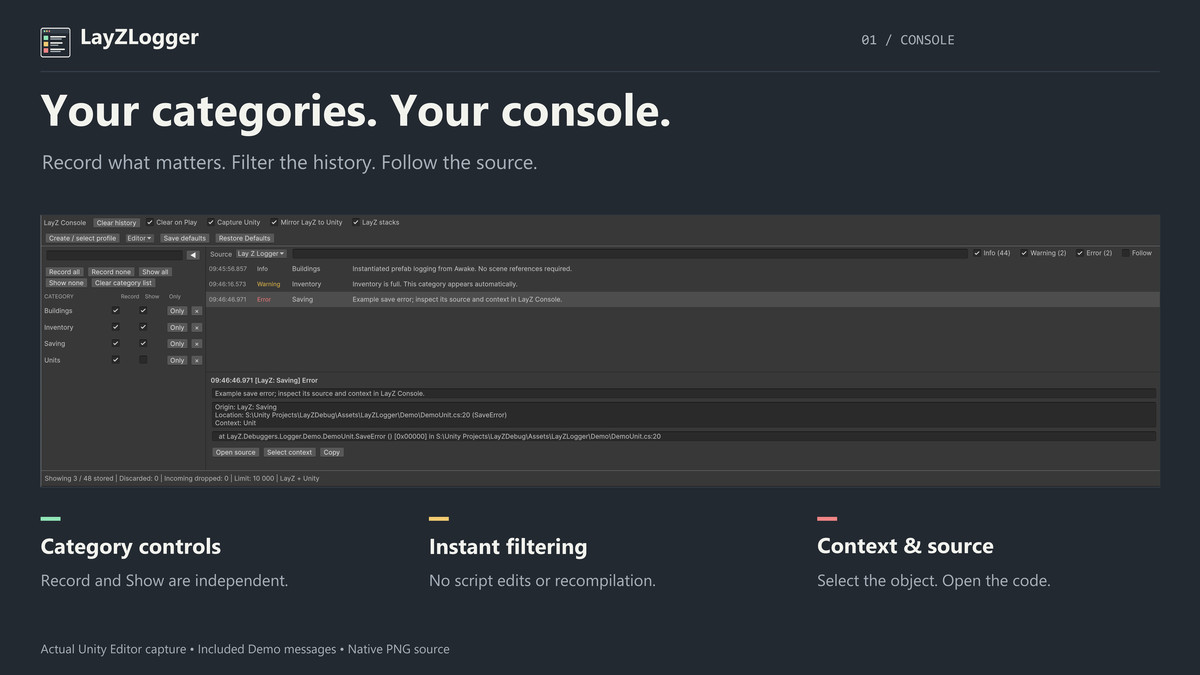
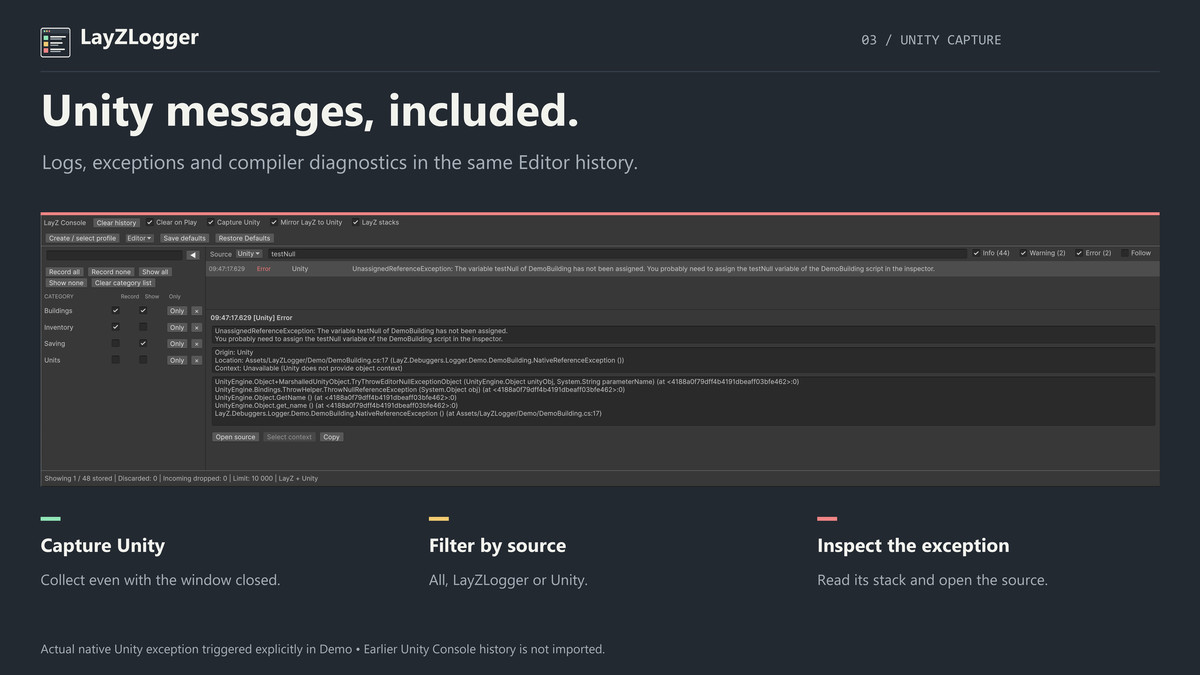
Browse LayZLogger messages alongside new Unity logs, engine exceptions and compiler diagnostics. Search messages, filter by source and severity, check severity counters, and collapse the category panel when you need more room. Inspect entry details, open the source location and select a supplied Unity object context when available.
NO SCENE SETUP
Log from Awake without a manager GameObject or category components. Use individual LayZDebug calls or a bound category logger for shorter calls that retain object context.
EDITOR AND PLAYER DEFAULTS
Use optional profiles for separate Editor, Development and Release settings. Local console preferences stay separate from the shared profile. Accepted player messages use Unity logging, including Player.log where supported.
INCLUDED
Runtime API, LayZ Console, an optional settings profile, a working Demo, a complete offline User Guide and an optional AI coding assistant skill with manual installation instructions.
From the publisher's Asset Store listing.
Technical details
REQUIREMENTS
- Verified with Unity 6000.3.23f1 on Windows.
- No additional runtime packages. Runtime and Editor code use separate assembly definitions.
- Render-pipeline independent: no custom shaders, materials or pipeline-specific APIs.
LOGGING API
- Namespace: LayZ.Debuggers.Logger. Custom assemblies reference LayZLogger.Runtime.
- Log, LogWarning, LogError, LogException, IsEnabled and SetCategoryEnabled.
- Bound logger: LayZDebug.For("AI", this).
- Categories use trimmed, case-sensitive names; blank names use General.
- The wrapper API supports the Unity main thread only. IsEnabled can guard expensive message preparation.
CONSOLE AND HISTORY
- Open Window > LayZ Logger > Console. The custom console and native capture are Editor-only.
- Shared, bounded history of 10,000 entries; oldest entries are discarded when full.
- History survives Stop and script recompilation, but not an Editor restart. Clear on Play is enabled by default and can be disabled.
- Capture Unity collects new Unity messages and compiler diagnostics after integration startup; it does not import earlier standard Console history.
- Native Unity messages from worker threads use a bounded 10,000-message input queue. This does not make wrapper calls thread-safe.
- Caller file/line/member information, optional wrapper warning/error stacks, source navigation and supplied object context. Native Unity callbacks do not provide object context.
- Optional mirroring forwards accepted LayZLogger entries to Unity Console without duplicating them in LayZ Console.
PROFILES AND BUILDS
- Optional Editor / Development / Release defaults; local Editor preferences are stored in UserSettings.
- Built-in defaults: all levels in Editor and Development; warnings and errors in Release.
- Players use Unity logging and do not contain the custom console or history buffer.
- Development and Release players verified with Windows Mono. Other platforms, IL2CPP and other Unity versions have not been verified.
DOCUMENTATION
Complete offline instructions: Assets/LayZLogger/Documentation/UserGuide.md.
Includes the optional layz-logger skill for Codex and Claude Code. It guides coding assistants through categorized logging, object context, profiles and troubleshooting. Installation is manual and scoped to your project.
Skill setup and AI assistant integration: Assets/LayZLogger/Documentation/AI/README.md.
Compatibility
| Unity version | Built-in | URP | HDRP | Custom |
|---|---|---|---|---|
| 6000.3.23f1 | Compatible | Compatible | Compatible | Compatible |
LayZLogger is render-pipeline independent. It does not use custom shaders, materials, or render-pipeline-specific APIs. No render pipeline conversion or additional rendering setup is required.
As listed on the Asset Store.