
 View on Asset Store (opens in new tab)
Package details
- Latest version
- 1.0.0
- Last updated
- First released
- Unity version
- 2022.3.40 or later
- Package size
- 2.8 MB
- Files
- 22
- Favorites
- 2
- Views in the past week
- 3
Price tracking
- Last checked
- Tracked since
- Lowest recorded
- $4.99 on
Keywords
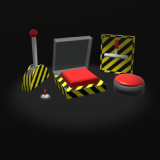
Switches, Levers, and Buttons
A collection of skinnable switches, levers, and buttons.
Price $4.99
Buy on Asset Store (opens in new tab)
Affiliate link · Purchases support this site
Price history
Last 6 months
USDAsset preview
1 / 2

Switches, Levers, and Buttons screenshot 1

About this asset
Includes the following models and prefabs:
- Lever
- Button
- Switch
- Large Lever
- Flip Button
- Incremental Button
All prefabs are separated into components so custom materials can be applied to individual pieces.
Includes scripts for each object type that allows the subscription to an OnInteract event in order to be able to easily hook up the switches, levers, and buttons to any interaction you want! Please see the demo to check out how each interactable object is hooked up to a light for example.
Check my discord for support.
From the publisher's Asset Store listing.
Technical details
Details:
- Triangles:
- Lever: 636
- Button: 890
- Switch: 2314
- Large Lever: 876
- Flip Button: 64
- Incremental Button: 284
- Textures:
- Base texture for all models: 2048x2048
URP Compatibility:
- In order to get the materials to work properly with URP make sure that the Universal RP package is installed.
- In Unity navigate to Window > Rendering > Render Pipeline Converter.
- Select "Build-in to URP" in the dropdown in the window that pops up.
- Check the box next to "Material Upgrade".
- Click "Initialize and Convert" at the bottom right.
HDRP Compatibilty:
- In order to get the materials to work properly with HDRP make sure that the Hight Definition RP package is installed.
- In Unity, navigate to Edit > Rendering > Materials > Convert all Built-in Materials to HDRP.
Compatibility
| Unity version | Built-in | URP | HDRP | Custom |
|---|---|---|---|---|
| 2022.3.40f1 | Compatible | Compatible | Compatible | Compatible |
As listed on the Asset Store.