
 View on Asset Store (opens in new tab)
Package details
- Latest version
- 2.2.1
- Last updated
- First released
- Unity version
- 6000.0.25 or later
- Package size
- 8.8 MB
- Files
- 74
- Favorites
- 34
- Views in the past week
- 21
Price tracking
- Last checked
- Tracked since
- Lowest recorded
- Free on
Keywords
MyInteractionKit
- Price drop
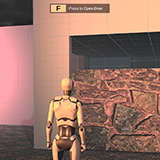
MyInteractionKit is a comprehensive toolkit designed to simplify your development process and enhance interactivity in your games or simulations.
Affiliate link · Purchases support this site
Price history
Last 6 months
USDAsset preview
1 / 5
MyInteractionKit video 1


About this asset
Update: We fixed the reference errors! Please write to us at support @langitworks.com to let us know if there are any more problems. Thank you for your emails. Sometimes we overlook things. For that we are sorry and we promise to be better
You know the thing where you get near an object in games, where this UI plane-like thing appears with the letter E, and the words "Open" or "Interact"? view photo
Yep this is the premade kit that gives you that and takes it further to with other prefabs and components that allow you to quickly build interactions, interactive galleries, and small scale games.
The core of all this is called Interactable Box. When Interactables are detected, an interaction popup appear so that you know to press E or what key you set it to interact with. From there you can do:
- Customize and optimize your Interactables - Set sensor size, one-time action or multiple, Objects can be highlighted when the player is close, indicating they are interactable. The highlight color is customizable, and the interaction key can be set per object.Great for making interactive objects stand out in a scene.
- Play Animation
- Toggle - A very fancy name for an On/Off switch. Have you ever created an OnTriggerEnter action to switch on light and wish that the same action could turn of the light if it is on? Yep.
- Turn Light On/Off aka Enable/Disable GameObject using SetActive
- Play Audio
- Timer - Allows you to delay an action after Interaction
- Play Video
- Popup Information
- Simple Tween
- Basic FPS Controller - Just in case you don't have one. It walks, runs and jump. Has footsteps sound.
Demo scenes are included!
Who is This is For:
- Educators: Looking to teach basic Unity interactions.
- Beginners: Who want to learn Unity without diving deep into coding.
- Prototypers: Developers who need to quickly prototype interaction mechanisms in their games.
- Last Minuters and Desperate people: The fact that you reading this now, things are not looking well isn't it? Its okay, I understand, don't cry, don't cry, you got this. Check to see if this is what you need. If this actually helps you, you're welcome!
What This Kit is Not:
- Advanced Interaction System: This kit does not provide complex interaction systems like those found in AAA games. It's designed for basic interactions.
- Complete Game Framework: MyInteractionKit is a toolkit for specific interactions, not a full-fledged game engine or framework.
- Plug-and-Play for All Scenarios: While it is designed to be easy to use, some customization or additional coding may be required depending on your specific needs.
Third-Party Assets Used in MyInteractionKit:
MyInteractionKit utilizes the following third-party assets, all of which are legally cleared and compliant with their respective licenses:
- Footsteps - Stone Tile Floor by Soundmary (License: Creative Commons 0, Source)Audio:Dark Fantasy Theme by Solarpsychedelic (License: Creative Commons 0, Source)
- Earth Map Texture:Created by Dawn Hudson using NASA public domain imagery (License: Public Domain, Source)
All third-party assets are public domain or Creative Commons licensed, making them free for commercial use.
For more information on the usage of third-party assets, please refer to the included documentation or here.
From the publisher's Asset Store listing.
Technical details
The asset's key are the Interactors and the Interactors.
Interactors - A sphere that scans the surrounding for Interactables. It activates the Interactables when in range.
Interactables - When Interactables are detected, an interaction popup will appear so that players know object is Interactable. There are also Highlighting option, which will highlight an object when the object is interactable.
UnityEngine.Events based OnInteract() - Once Interacted, it will invoke a public UnityEvent called OnInteract(), which you can use to patch in whatever action that you wanted to execute. This is how we are able to do a lot of things with no code.
Premade Scripts that are OnInteract() suitable - Provided are some scripts that can be used with OnInteract(). I left comments on the code, and there docs at here
Compatibility
| Unity version | Built-in | URP | HDRP |
|---|---|---|---|
| 6000.0.25f1 | Not listed | Compatible | Not listed |
As listed on the Asset Store.