
 View on Asset Store (opens in new tab)
Package details
- Latest version
- 2.1.1
- Last updated
- First released
- Unity version
- 6000.3.18 or later
- Package size
- 90.8 MB
- Files
- 647
- Favorites
- 138
- Views in the past week
- 117
Price tracking
- Last checked
- Tracked since
- Lowest recorded
- Free on
Keywords
Photon Fusion Starter - Multiplayer
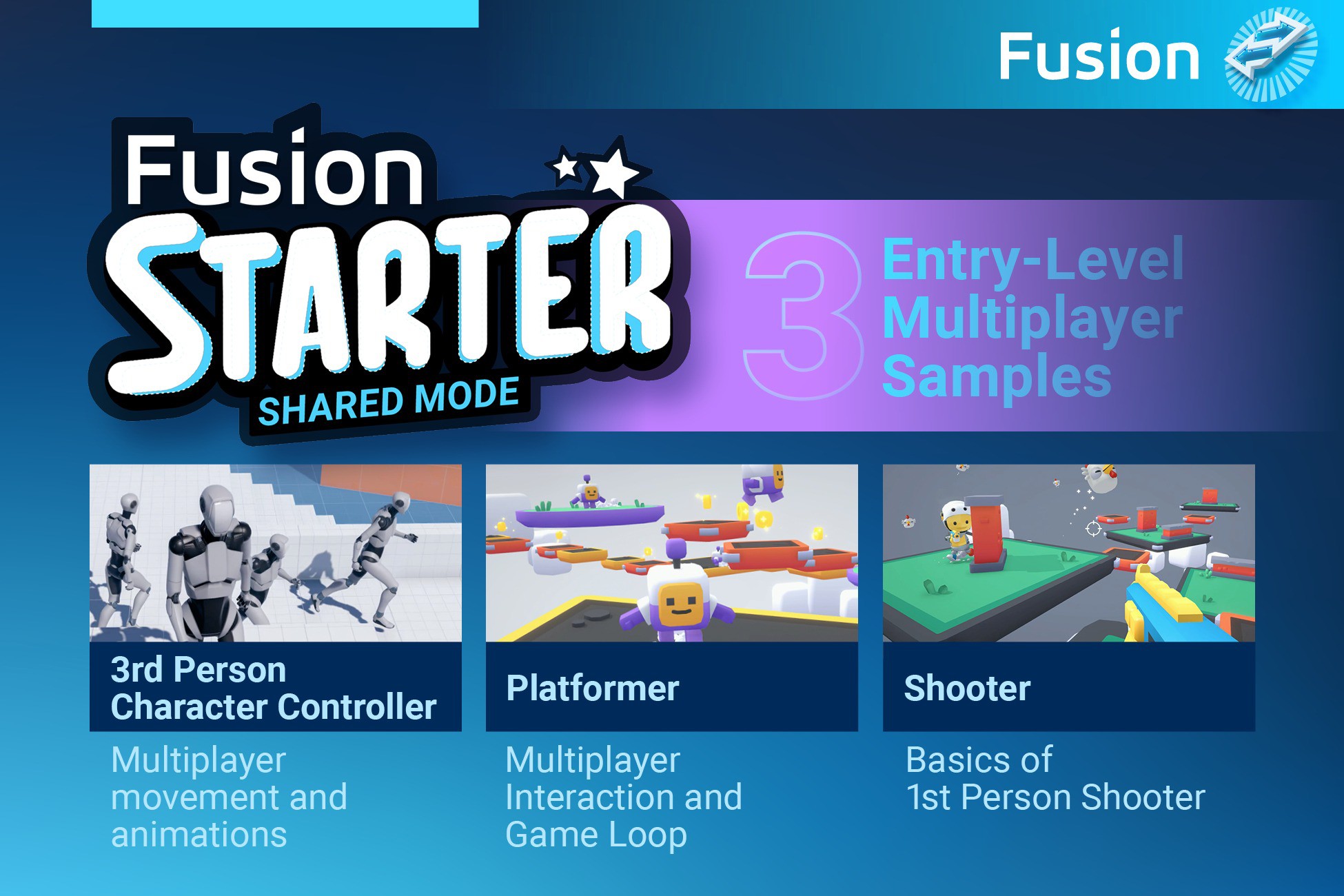
Photon Fusion Starter offers entry-level game samples for testing and learning multiplayer game development with Photon Fusion. Three samples included: Third Person Character, Platformer, and Shooter.
Affiliate link · Purchases support this site
Price history
Last 6 months
USDAsset preview
1 / 7

Photon Fusion Starter - Multiplayer screenshot 1


About this asset
The Fusion Starter sample gives you a strong foundation for various types of multiplayer gameplay, with tick-accurate, lag-compensated (Host mode) networking, rollback, and resimulation loop best practices. This all-inclusive asset integrates Photon Fusion, a Unity Verified Solution, as a foundation for your Unity projects.
Fusion Starter provides best practices for developers building high-performance, scalable multiplayer games, complete with detailed examples and comprehensive documentation. This sample is available in both Fusion Shared and Fusion Host topologies to support beginners and professionals.
📖 Fusion Starter documentation
💎 CORE FEATURES 💎
- Ready-to-Use Samples: Includes three fully functional game samples to demonstrate core multiplayer concepts.
- Extensive Code Comments: Detailed code comments to help you implement features effortlessly.
- Customizable Components: Easily extend and customize the provided templates to suit your specific game requirements.
- Seamless Multiplayer Integration: Photon Fusion enhances Unity for smooth, real-time multiplayer experiences with minimal setup.
- Optimized Performance: Built with performance in mind to ensure smooth gameplay even under high-stress scenarios.
⚡ MULTIPLAYER SAMPLES ⚡
🚶♀️Third Person Character Controller🚶♀️
➕ Multiplayer movement and animations
The Third Person Character sample transforms Unity's Starter Assets - Third Person into a playable multiplayer environment. Players spawn as third-person characters and can walk and run around a prototype environment. This sample replaces the default CharacterController component with the Simple KCC addon, a kinematic character controller (KCC) solution specifically tailored for Fusion. It provides smooth movement and rotation even under challenging networking conditions, optimized to handle dozens or even hundreds of characters on a single CPU server core.
Key Features:
- Multiplayer Adaptation: Experience Unity’s third-person character in a fully networked environment.
- Smooth Movement: Utilizes the Simple KCC addon for optimized, smooth movement and rotation.
- Optimized Performance: SimpleKCC ensures smooth movement and rotation, optimized for performance even in harsh network conditions.
Where to Go Next:
- Animations Technical Sample: Learn more about character animation with our Animation Sample.
- Simple KCC Sample: Explore simple character movement.
- Advanced KCC Sample: Dive deeper into advanced character movement mechanics.
- BR200 Sample: Advanced/Expert level sample for tick-based animations and controls.
🤾 Platformer 🤾
➕ Multiplayer Interaction and Game Loop
The Platformer sample builds on the Third Person Character foundation and introduces interaction with game objects, such as collecting coins and avoiding falling platforms. It uses RPCs to display nameplates above player heads and features a simple game loop where players race to collect 10 coins and reach the top flag. After each round, all players restart at the starting point.
Key Features:
- Interactive Gameplay: Collect coins, avoid obstacles, and race to the finish.
- RPCs Utilization: Display nameplates above heads.
- Basic Game Loop: After a player reaches the top, announce the winner and start a new round.
Where to Go Next:
- Multi Climb Tutorial Series: Comprehensive guide covering platformer basics and advanced techniques.
- Razor Madness Sample: Explore a 2D platformer example.
🔫 Shooter 🔫
➕ Basics of First-Person Shooter
The Shooter sample demonstrates a simple first-person shooter where players compete to be the best hunter by shooting flying chickens. The chicken counter resets when a player dies, either by falling off a platform or being killed by another player. In Host Mode, this sample utilizes Fusion's Lag Compensation to ensure precise hits even under poor networking conditions.
Key Features:
- Competitive Gameplay: Shoot flying chickens and compete against other players.
- Lag Compensation: Ensures precise hits despite network latency. (Host mode)
- Player Death: Simple player death loop with UI and stats reset.
Where to Go Next:
- Simple FPS: First-Person Shooter sample with a complete game loop, ammo handling, various weapons, and more.
- Projectiles Advanced: Advanced solutions for different types of projectiles and real-world multiplayer shooter challenges.
- BR200 Sample: Focus on large player counts and advanced techniques like tick-accurate animations and sub-tick accurate shooting with BR200.
============= Quantum Starter or Fusion Starter? =============
Quantum Starter and Fusion Starter teach the same game examples, yet rely on two radically different networking philosophies—state replication (Fusion) versus deterministic input (Quantum). The concise advantages below spotlight why you might start with Fusion Starter or Quantum Starter for your project.
Quantum Starter
1. Deterministic fairness: Deterministic gameplay guarantees identical state on every client, delivering esports‑grade fairness and precision with built-in physics, pathfinding, AI bots, and more.
2. Ultra‑low bandwidth: Transmits only player inputs, slashing bandwidth on constrained rural and mobile networks.
3. Rollback resilience: Built‑in rollback keeps gameplay butter‑smooth under high latency, and deterministic simulation naturally limits client hacks.
Fusion Starter
1. Unity‑friendly workflow: NetworkBehaviour extends Unity’s MonoBehaviour, so you can reuse existing GameObjects, physics, and assets—with faster onboarding, minimal rewrites.
2. Flexible topologies: Choose Shared, Host or Server; scale from small to high player-count sessions with the same API.
3. Shared Mode: is recommended for WebGL/mobile; distributes simulation across clients, avoids resimulations, and stays smooth on low‑end devices.
To help decide between Quantum and Fusion for your project, check out our Photon Quadrant or contact our support team.
====================================================
🤑 200 CCU per month for only 95$ USD a year 🤑
Our 100 CCU Free package combined with Photon Fusion Plus is perfect for developers to build, launch, and grow a multiplayer game efficiently.
🤝 Gaming Circle 🤝
Join the conversation and become a part of an exclusive community by engaging with the Photon Gaming Circle. Kickstart your project with a robust foundation and unlock limitless creativity with 100+ exclusive samples. Benefit from our fully networked samples to save time and resources while ensuring the highest quality for your project.
Members of the Gaming Circle not only have access to all the samples but also to our latest SDKs, our private Circle Discord, and premium development support. The Photon Gaming Circle is a hub for developers to discuss ideas, seek advice, and collaborate on exciting projects. Dive deeper into multiplayer game development and explore the Photon Gaming Circle today.
This asset is governed by the Photon Engine license terms.
From the publisher's Asset Store listing.
Compatibility
| Unity version | Built-in | URP | HDRP |
|---|---|---|---|
| 6000.3.18f1 | Not listed | Compatible | Not listed |
As listed on the Asset Store.