
 View on Asset Store (opens in new tab)
Package details
- Latest version
- 2.0
- Last updated
- First released
- Unity version
- 2021.3.31 or later
- Package size
- 211.3 MB
- Files
- 351
- Favorites
- 2
- Views in the past week
- 2
Price tracking
- Last checked
- Tracked since
- Lowest recorded
- $15.00 on
Keywords
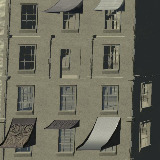
OWA Window Awnings 02
Window & Shop Awnings that will give your buildings character and variation. Includes 36 prefabs to jazz up your structures with some serious style!
Affiliate link · Purchases support this site
Price history
Last 6 months
USDAsset preview
1 / 5

OWA Window Awnings 02 screenshot 1


About this asset
Contains a collection of 36 window awning prefabs.
Meshes share a single material atlas for performance. Textures include albedo, metallic, normal, occusion, emission, detail normal textures). A very simple package with batching out fo the box. Average vertices are around 260 per prefab. Atlas uses 8k textures (Additional demo level texture not needed for the awnings)
The windows on your buildings don't have to be boring!
Also includes a few BONUS demo buildings that are enterable!
From the publisher's Asset Store listing.
Technical details
(albedo, metallic, normal, occusion, emission, & detail normal)
1 (single atlas for performance)
Texture dimensions: 8192.8192
Minimum polygon count: 200
Maximum polygon count: 300
Number of meshes/prefabs: 36
Rigging: No
Animation count: 0
UV mapping: Yes, manually mapped
LOD: no LOD included
Types of materials and texture maps (e.g., PBR): Standard Shader for default pipeline, single material atlas.
Compatibility
| Unity version | Built-in | URP | HDRP |
|---|---|---|---|
| 6000.0.40f1 | Not listed | Compatible | Not listed |
| 2021.3.31f1 | Not listed | Compatible | Not listed |
This package uses a single material atlas using the default standard shader. Converting to other pipelines is just a matter of changing one material or using Unity automatic material upgrade.
As listed on the Asset Store.