
 View on Asset Store (opens in new tab)
Package details
- Latest version
- 2.0.2
- Last updated
- First released
- Unity version
- 6000.0.45 or later
- Package size
- 170.1 MB
- Files
- 991
- Favorites
- 198
- Views in the past week
- 116
Price tracking
- Last checked
- Tracked since
- Lowest recorded
- $20.00 on
Keywords
Combat System Framework
As long as you have animation assets, you can quickly create a variety of combat feel. To use this asset, you must have basic knowledge of the Unity engine. (Animation events, animation curves, etc.)
Affiliate link · Purchases support this site
Price history
Last 6 months
USDAsset preview
1 / 7
Combat System Framework screenshot 1


About this asset
Tag-Driven Combat Framework — Production-Ready Action Combat System
Build action combat on a fully data-driven architecture.
Every Ability, Buff, and Attribute is defined through ScriptableObjects and driven by a powerful Gameplay Tag system.
Gameplay Tag System
- Identify and control states, abilities, and effects through hierarchical tags (e.g. Ability.Combat.Attack).
- Fast tag comparison powered by FNV-1a 64-bit hashing.
Data-Driven Ability System
- ScriptableObject-based abilities
- Cooldown support
- Instancing policies
Includes 20 ready-to-use abilities, including:
- Light Attack
- Heavy Attack
- Charge Attack
- Aerial Attack
- Hold Attack
- Block
- Dodge
- Dash
- Jump
- Double Jump
- Teleport
- Throw
- Equip / Unequip
- And more.
Attribute System (WIP)
- Tag-based attributes such as Health and Mana
- Automatic regeneration
- Attribute change events for gain, loss, and depletion
Buff & Debuff System
- ScriptableObject-based buff system
- Supports stacking
- Supports periodic effects (Damage-over-Time)
Included examples:
- Heal
- Poison
- Barrier
- Speed Buff
- AoE Heal
Damage & Hit Reaction System
- Clean IDamageable / IDamager interfaces
- Extensible damage types
- Priority-based hit reaction system
Weapons, Projectiles & Skills
- Melee and ranged weapon systems
- Bezier-arc projectiles
- Spiral, radial, and wave projectile spawn patterns
- Particle collision-based area damage spells
Built-In Animation Editing Suite (Standout Feature)
A complete in-editor animation authoring workflow with no external tools required.
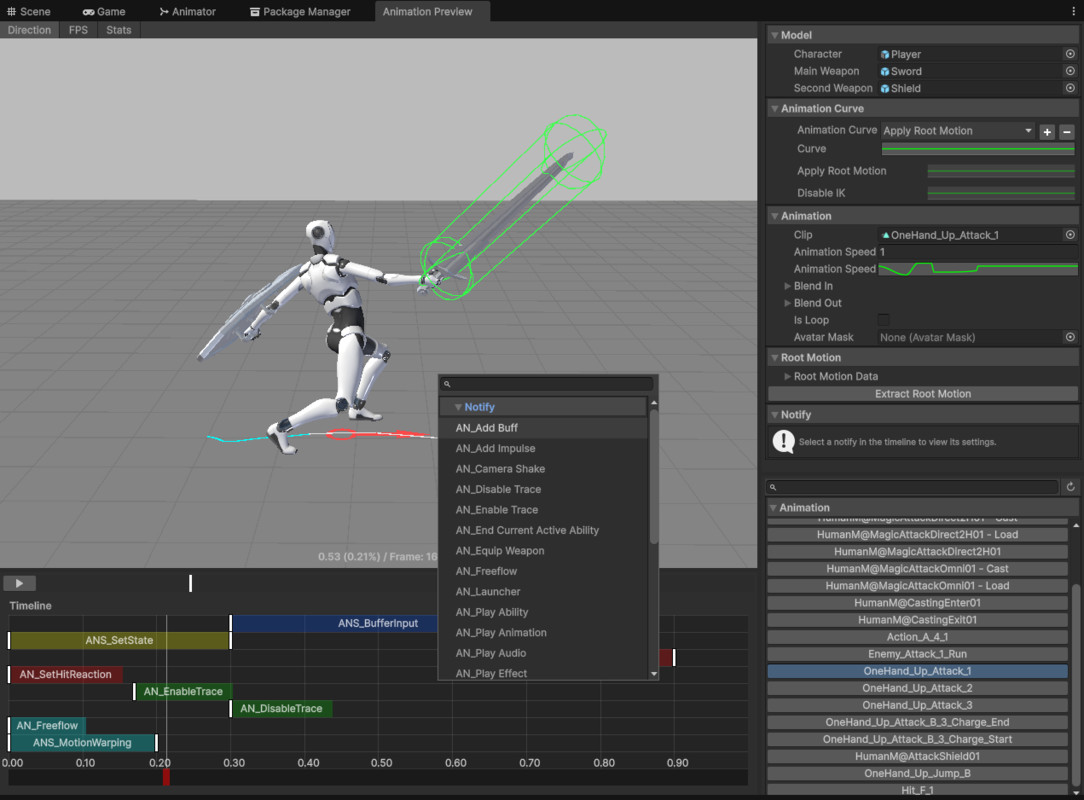
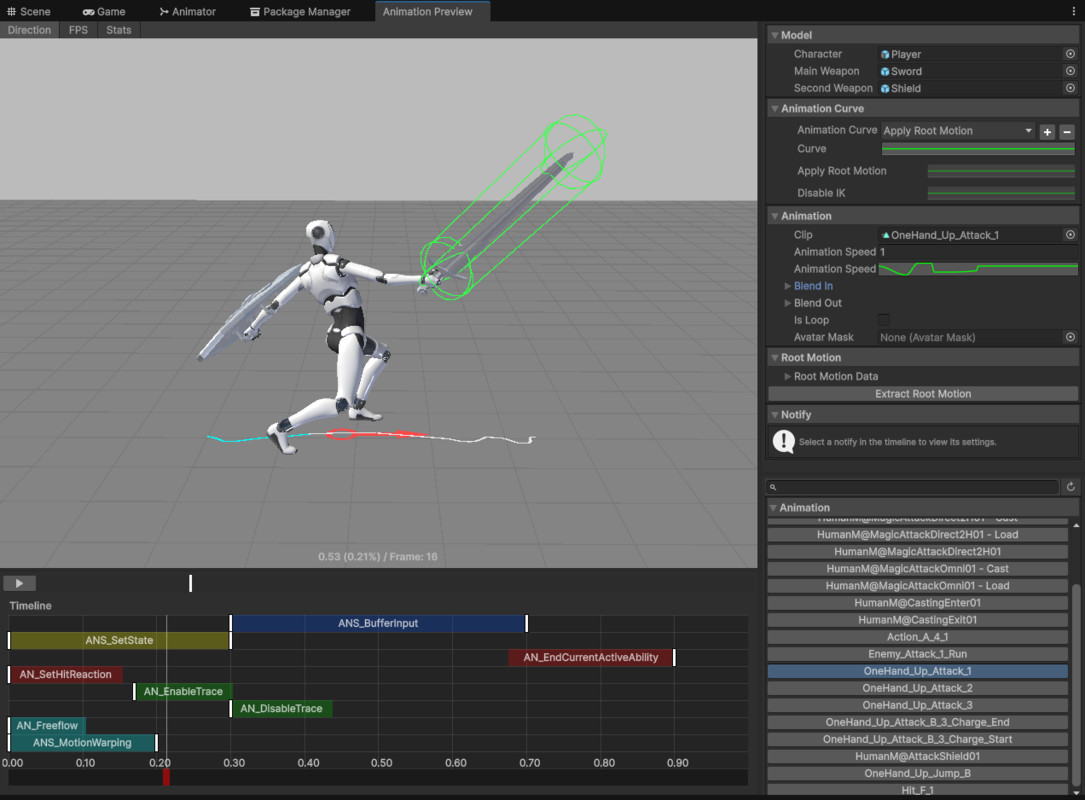
Visual Notify Timeline Editor
Place animation events directly on the timeline.
Features include:
- Drag & Drop editing
- Box selection
- Copy / Paste
- Delete
- Full Undo support
- Right-click context menu
Dedicated Preview Window
Includes:
- 3D Preview
- Timeline
- Inspector
Also features:
- Resizable splitters
- Real-time playback
- Pause
- Timeline scrubbing
Real-Time Effect Preview
- Preview particle effects synchronized with animation playback
- Verify VFX timing before entering Play Mode
Root Motion Tools
- One-click root motion extraction
- On-screen trajectory visualization
26 Built-In Animation Notifies (Fully Extensible)
Includes:
- Spawn Effects
- Play Audio
- Trigger Abilities
- Equip Weapons
- Apply Knockback
- Apply Airborne
- Launch Projectiles
- Camera Shake
- And more.
Creating Custom Notifies
Creating your own Notify is effortless.
- Derive from the base Notify class.
- Override a single method.
- Your Notify automatically appears in the Timeline Add menu.
No editor code required.
7 Built-In Notify States (Fully Extensible)
Includes:
- Motion Warping
- Collision Ignore
- Input Buffering
- Rotate / Look At Target
- Camera Data
- State Setting
Notify States support adjustable start and end handles, and custom implementations are automatically registered.
Additional Features
- AI Controller
- Player Controller
- Object Pooling
- Gameplay Tag ID Generator
- Animation Clip Editor
- Custom Property Drawers (Tag Filter, Notify, and more)
Perfect For
- Action Games
- Soulslikes
- Hack-and-Slash Games
- Any project requiring a scalable and extensible combat framework
Stop rebuilding combat systems from scratch. Start building your game.
Please Read Before Purchasing
- This asset is under active development. Features, workflows, and implementation details may be refined, modified, removed, or expanded in future updates. While every effort is made to maintain stability, functionality may evolve as the framework continues to grow. Please purchase with this in mind.
- Basic Unity knowledge is required to use and configure the included systems.
- Refunds are not available. Please review the documentation and tutorials before purchasing to ensure the asset meets your needs.
- The included controller uses Unity's Character Controller. Character movement is code-driven, not root-motion-driven.
- Compatible with Built-in Render Pipeline, URP, and HDRP. The sample project is built using HDRP.
- Includes only free animation assets.
Documentation ( The document is still being drafted )
https://app.notion.com/p/Quick-Start-0b065330a7d140af97e8d12d55eef224
Discord
From the publisher's Asset Store listing.
Technical details
Cinemachine and input system are required.
Please read the documentation to understand the scripts included in these assets.
Compatibility
| Unity version | Built-in | URP | HDRP |
|---|---|---|---|
| 6000.0.45f1 | Compatible | Compatible | Compatible |
The default template uses HDRP, If you want to downgrade, use the Built-In and URP packages included in the package.
As listed on the Asset Store.