
 View on Asset Store (opens in new tab)
Package details
- Latest version
- 1.0.0
- Last updated
- First released
- Unity version
- 2022.3.20 or later
- Package size
- 21.0 MB
- Files
- 62
- Views in the past week
- 1
Price tracking
- Last checked
- Tracked since
- Lowest recorded
- $7.50 on
Keywords
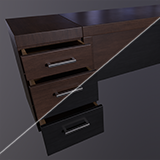
ASGS Interactable Desk
This desk has a cabinet set up to be fully interactable. Additionally included are non-interactable prop versions. Each complete with LODs. Optimized and game ready. Removeable drawers also included.
Affiliate link · Purchases support this site
Price history
Last 6 months
USDAsset preview
1 / 11

ASGS Interactable Desk screenshot 1


About this asset
Interested in this asset? You might be interested in the Bundle it's a part of: https://u3d.as/3aSD
Like our products? Check out our studio: https://asquaregamesandsimulation.com/
CONTAINS THE FOLLOWING ASSETS
- Desk
- Desk Cabinet
- Large Drawer
- Small Drawer
- LODs
- Textures
-Brown and Black color variant textures included
-The Desk Cabinet have 3 main variants, a rigged variant that has been skinned with joints applied, a parented/rigid animation variant where the moving parts are set as parented meshes with local pivots at their movement points, and a prop variant where the internals have been removed and the cabinet is essentially a shell and no longer interactable.
-A custom collision mesh has been provided for the interactive version of the cabinet that allows the user to reach inside when the drawers are open, as well box colliders for the drawers and the desk being applied in the prefabs.
-URP and HDRP test scenes have been set up for each, renders were collected in the provided HDRP scene aside from the cover image and the LOD render shot.
-Materials have been set up for URP Lit in both Metallic Smooth and Specular Smooth workflows, HDRP Materials has been setup for the HDRP standard/Mask Map workflow
-Prefabs have been created for all of the primary assets, with materials in both color variants for both URP and HDRP
-Additional textures have been included whether used in the project or not including ORM, Normal for Direct X platforms, etc. So that the asset can be used for basically any workflow.
-All provided textures are 2K, with color and normal maps being set to use high quality compression. Adjust as needed for your project.
-Additional prefabs/models for the drawers have been included, as well as the emptied cabinet for setting up custom scenes or making the drawers completely removeable if desired.
-Colliders for handles have been set up under an empty object, these can be useful for setting up VR hand positions if needed or simply deleted from their prefabs.
-Polygon Counts provided in Technical Detail are for the interactable versions. Prop versions will generally have a lower polycount.
-Gray background render images captured in Marmoset
-Tan background render images captured in the provided HDRP Unity Scene
From the publisher's Asset Store listing.
Technical details
Number of textures: 15 (5 used)
Texture dimensions: 2048
Polygon count of Max LODs: Desk Cabinet - 864 tri's, Desk - 124 tri's,
Minimum polygon count LODs: Desk Cabinet - 276, Desk - 28 tri's
Number of meshes/prefabs - Meshes - 7, Collision Meshes - 4, Prefabs - HDRP: 14, URP: 14
Rigging: Yes
UV mapping: Yes
LOD information : 3 LOD levels for each asset (0-2)
Types of materials and texture maps - PBR/ORM, Specular, Specular Smooth, Metallic Smooth
Compatibility
| Unity version | Built-in | URP | HDRP | Custom |
|---|---|---|---|---|
| 2022.3.20f1 | Compatible | Compatible | Compatible | Compatible |
Textures are included for additional pipelines, but prefabs are only ready to use for URP and HDRP. If using a different pipeline, simply use the existing prefabs as a base and apply a material with corresponding textures supported by your project.
As listed on the Asset Store.