
 View on Asset Store (opens in new tab)
Package details
- Latest version
- 1.0.3
- Last updated
- First released
- Unity version
- 2022.3.17 or later
- Package size
- 4.2 MB
- Files
- 25
- Favorites
- 40
- Views in the past week
- 45
Price tracking
- Last checked
- Tracked since
- Lowest recorded
- Free on
Keywords
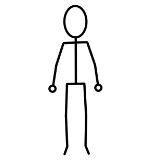
2D Character Stick 001 by Memstow
This package contains a 2D stick figure character. This is intended as an aid for someone interested in trying out 2D animation without having to create the artwork. It includes some example work.
Affiliate link · Purchases support this site
Price history
Last 6 months
USDAsset preview
1 / 2

2D Character Stick 001 by Memstow screenshot 1

About this asset
This character was created with the intent to give someone a shortcut to getting started with 2D character animating. When I first started, I took a look in the Unity Asset Store for something free to download to tinker with. Ideally I wanted something simple like a stick figure, but didn’t find it. So, after some practice, I made one.
This package contains two different stick figures to tinker with. There is a version in black and a copy in red. The forward facing stick figure in black has been rigged and animated in a simple environment. It supports the basic WASD controls. The version in red is the version for someone else to try to rig and animate on their own, using the black version as an example.
Regarding the side facing stick figure in black, that I may rig and animate in the future. It will be included it as an update to this package.
The images are 480x640 pixels with a resolution of 300 dpi. The forward facing stick figure is a single layer image. The side facing stick figure is a multi-layered PSD file.
In regard to animating, for myself, for single layer images I use the method of weighted bending/deformation of the skinned mesh. But, for multiple layered images I use an additional technique of putting limb segments on separate layers with points of rotation between them. With rotation points, the limbs do not get deformed when adjustment them for animations. Some of my other characters I made include this method.
Sample Animations:
- Idle
- Walk
- Twinkle Toes (The run, faster moving)
- Jump Up
- Jump Down
- Show Off
No AI/ML was used during the creation of this content.
From the publisher's Asset Store listing.
Technical details
The package contains the following:
- 1 character prefab
- 7 animation files
- 1 animation controller
- 1 demonstration scene - 2D (Built-In Render Pipeline) Core
- 1 demonstration scene - Universal 2D Core
- 1 single layer PSD file, 640x480, 300 dpi, Raster Image
- 1 PNG image file, 640x480, 300 dpi, Raster Image
- 2 multi-layer PSD file, 640x480, 300 dpi, Raster Layers
- 2 scripts: Camera Movement, Player Movement
- 1 Tag Manger file
Compatibility
| Unity version | Built-in | URP | HDRP |
|---|---|---|---|
| 2022.3.17f1 | Compatible | Compatible | Not listed |
The demo scenes provided are intended for use with projects using the 2D game templates:
- 2D (Built-In Render Pipeline) Core
- Universal 2D Core
As listed on the Asset Store.