
 View on Asset Store (opens in new tab)
Package details
- Latest version
- 1.9.5
- Last updated
- First released
- Unity version
- 2022.3.21 or later
- Package size
- 175.8 MB
- Files
- 416
- Favorites
- 3
- Views in the past week
- 31
Price tracking
- Last checked
- Tracked since
- Lowest recorded
- $42.00 on
Keywords

DOTS Traffic Core
Powerful city traffic simulation powered by DOTS Entities! Simulate thousands of vehicles with extreme performance, fully compatible with traditional MonoBehaviour workflows.
Affiliate link · Purchases support this site
Price history
Last 6 months
USDAsset preview
1 / 13

DOTS Traffic Core screenshot 1


About this asset
DOTS Traffic Core is a powerful tool for creating city traffic - Design it from the ground up or customise any existing asset pack to fit your vision!
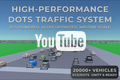
It uses the extremely powerful DOTS Entities package to simulate thousands of vehicles with unbelievable performance!
Seamlessly integrates into classic workflows: fully compatible with your standard MonoBehaviour and GameObject-based systems.
- Mobile friendly
Simulate thousands of interacting vehicles and pedestrians, even on mobile devices. - Performance
Experience the performance firsthand in our various platform-specific demo projects or just check out the final screenshots to see the results. - Rapid integrationIntegrate any city asset pack in a heartbeat with our convenient templates and tools.
- SimulationSimulate thousands of entities without relying on physics or raycasting (although physics simulation is also available).
- Monobehaviour support
Not familiar with DOTS? No problem! The project is fully compatible with MonoBehaviour scripts in hybrid mono mode (check out the Hybrid Mono sample scene). - EditorMany flexible tools to bring life to the city of your dreams.
- Demo
Demo sample scene included! - Sound
Integration of the FMOD sound engine into bursted jobs (the built-in Unity audio engine is also supported). - Documentation
All components of DOTS Traffic Core are linked to online documentation. - Source codeAll code included.
- Vehicle controllerDOTS physics vehicle controller included!
- You can also use Edy's, RCC or NWH & other custom vehicle controllers for both player and traffic.
- Modular architecture
Allows you to integrate the project into your existing game without hassles. - Netcode For Entities
A new demo scene showcases a network solution based on pure DOTS. - A* navigation
Set to follow a car to a given node using the built-in A* pathing. - Upgrade
The tool can be upgraded to DOTS Traffic City.
🔌 3rd-Party Integrations:
- EasyRoads3D.
- Road Constructor for editor.
- MicroVerse Roads.
Key features:
🚗 Traffic
- Physics
Vehicles can use either: - Simple physics.
- Custom physics (custom physics controller included).
- Hybrid mono physics.
Any monobehaviour controller can be integrated into the traffic. - No physics.
- Trailers
Support for vehicles with trailers (supported for both DOTS Entities and Hybrid Mono). - Motorcycles & 3-Wheelers
Support for two-wheeled bikes and three-wheeled vehicles (supported for Hybrid Mono mode only). - Speed controlAutomatic vehicle speed control depending on lane speed limit, traffic lights and other traffic.
- Lane changingAutomatic vehicle lane changing based on traffic congestion or road type, including overtaking via the oncoming lane when safe and permitted.
- Traffic groupsRestrict lanes to certain traffic group types.
- Fast creationQuick and easy tool for adding any vehicle into the city.
- AvoidanceThe avoidance system makes sure that vehicles don’t collide with each other and will stop and move away if another vehicle is blocking their path.
- Obstacle AvoidanceBypassing a player or specified custom obstacles.
- Driving stylesThere are different types of driving styles on the road: considerate, passive, and aggressive.
- PriorityVehicles pass through the intersections according to road priority.
- Emergency vehiclesSupport for AI and player-controlled priority vehicles (police, ambulances, etc.) with dynamic traffic avoidance (yielding, pulling over, lane changing).
- AntistuckAn Antistuck system that automatically despawns the entity if it gets stuck for a while and isn't visible in the player's camera.
- Traffic JamsGridlock prevention: Vehicles hold before intersections if the exit lane is blocked.
- Custom PathAllows vehicles to navigate directly to target nodes via A* pathing.
- Left-hand traffic
Starting with version 1.1.0, driving on the left is available. - CullingVehicles only spawn around the player.
- Combined physicsLimit physics to only the vehicles closest to the player in order to improve performance.
- LODsLOD system for the vehicles depending on the distance to the camera.
- TestsA handy traffic test scene where most traffic situations can be tested with all available parameters.
🏙️ City
- Traffic roadMultiple road templates and custom road customization tools.
- Road APIGenerate road segments from raw data or unity splines.
- CullingAll entities in the city change their behaviour depending on the culling state (including traffic).
- Physics cullingOnly the physics objects close to the player are involved in the physics evaluation.
- Traffic lightQuick and easy creation of traffic lights. Automatically connect hundreds of traffic lights across your entire city in just one click.
- DebugConvenient visualisation of data on scene.
🛠️ Tools
- Road segment creatorA Tool containing the 10 most commonly used road templates, allowing you to quickly and easily set waypoints and route settings of any complexity.
- Auto-crossroad generationNew option to create crossroads with a single click.
- Car prefab creatorA Tool that quickly converts 3D models of vehicles to traffic entities in just a few clicks.
- Global traffic light settingsA tool to connect traffic lights and traffic nodes, crossroads, and visually display the timings of each traffic light on the scene.
🎮 Demo Scenes
- Demo TrafficDemo sample scene.
- Demo Traffic Mono
Same scene as Demo Traffic, but all simulations run in hybrid mode of monobehaviour scripts with DOTS. - Demo Traffic MobileMobile demo sample scene.
- Demo Traffic Mobile Mono
Same scene as Demo Traffic Mobile, but all simulations run in hybrid mode of monobehaviour scripts with DOTS. - Traffic Stress SceneA scene that is extremely crowded with vehicles in order to stress test vehicle amounts.
- Vehicle Physics Stress SceneStress scene for thousands of cars with vehicle physics.
For more information about the scenes, read the Project Scenes.
Tutorial Playlist
Demo
To get started
Contact me
Read the Limitations in the Technical Details section.
Third-party usage:
Projects:
- Extenject (upm version)[optional] under the MIT license
- UGizmo under the MIT license
- Custom Physics Authoring
Please read Third-Party Notices.txt for more information.
From the publisher's Asset Store listing.
Technical details
Limitations
- Only works with Unity 2022.3.21 & Entities 1.2.0 or higher.
- WebGL not supported.
- Built-in RP only works with Hybrid Mono vehicles.
- Vehicles with trailers are supported with physics (DOTS Entities & Hybrid Mono), but not currently supported for NoPhysics.
Compatibility
| Unity version | Built-in | URP | HDRP |
|---|---|---|---|
| 2022.3.21f1 | Compatible | Compatible | Compatible |
As listed on the Asset Store.