
 View on Asset Store (opens in new tab)
Package details
- Latest version
- 1.0.3
- Last updated
- First released
- Unity version
- 2022.3.12 or later
- Package size
- 155 KB
- Files
- 14
- Favorites
- 5
- Views in the past week
- 6
Price tracking
- Last checked
- Tracked since
- Lowest recorded
- $5.00 on
Keywords
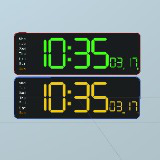
Animated Digit Clock
There is an animated digit clock model. The model is one mesh and one material. It displays current time .You can adjust time to shift hours and minutes.
Affiliate link · Purchases support this site
Price history
Last 6 months
USDAsset preview
1 / 12

Animated Digit Clock screenshot 1


About this asset
This package allows you to add an animated digital clock to your scene that will display the current time, days of the week, date and month.
Simply place a digital clock prefab in your scene and the digital clock will display the current time.
Notes: This package only contains one model, it is a digital clock model, and other items such as furniture with marketing images are not included in this package.
From the publisher's Asset Store listing.
Technical details
The model is a low poly mesh with one custom shader.
You can separately adjust the appearance of the face and body to suit your scene, from reflective to matte to replacing textures with other textures you have.
You can duplicate prefab and materials and create a set of clocks with different looks and times.
There are 7 textures TGA
DigitClock01 : 1 mesh 188 triangles
One prefab ,
Rigging : No
UV mapping: Yes
Custom Shader : Yes
Compatibility
| Unity version | Built-in | URP | HDRP |
|---|---|---|---|
| 2022.3.12f1 | Compatible | Not listed | Not listed |
I tested it with Unity 2020.3.10f1 and 2022.3.12ff1 and it works good. No problem.
It doesn't work with a spot light when shadows are activated and the clock in spot ligh area.
As listed on the Asset Store.