
 View on Asset Store (opens in new tab)
Package details
- Latest version
- 1.2
- Last updated
- First released
- Unity version
- 2021.3.23 or later
- Package size
- 76 KB
- Files
- 3
- Favorites
- 16
- Views in the past week
- 4
Price tracking
- Last checked
- Tracked since
- Lowest recorded
- Free on
Keywords
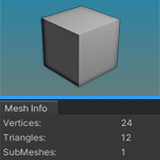
Lightweight Mesh Info
Lightweight Mesh Info is designed to quickly provide information about the mesh of a GameObject. Displays the total count of vertices, triangles, and submeshes in a simple editor window.
Affiliate link · Purchases support this site
Price history
Last 6 months
USDAsset preview
1 / 2

Lightweight Mesh Info screenshot 1

About this asset
Lightweight Mesh Info is a script designed to provide information about the mesh of a GameObject.
Displays the total count of vertices, triangles, and submeshes in a simple editor window.
This tool provides read-only information and doesn't modify the mesh or GameObject in any way. It's useful for debugging meshes in your Unity project.
From the publisher's Asset Store listing.
Technical details
This script is intended to be used as an editor script. It doesn't require any specific setup on the GameObject itself. You can access the tool from the Unity Editor's menu.
Go to "Tools" > "Mesh Info" to open the Mesh Info window.
- Vertices: This indicates the total number of vertices in the mesh of the selected GameObject.
- Triangles: This shows the total count of triangles (or faces) in the mesh.
- SubMeshes: This displays the number of submeshes present in the mesh. Submeshes are useful for applying different materials to different parts of a mesh.
Compatibility
| Unity version | Built-in | URP | HDRP |
|---|---|---|---|
| 2021.3.23f1 | Compatible | Compatible | Compatible |
As listed on the Asset Store.