
 View on Asset Store (opens in new tab)
Package details
- Latest version
- 1.0.8
- Last updated
- First released
- Unity version
- 2021.3.31 or later
- Package size
- 5.7 GB
- Files
- 2,991
- Favorites
- 573
- Views in the past week
- 334
Price tracking
- Last checked
- Tracked since
- Lowest recorded
- $18.00 on
Keywords

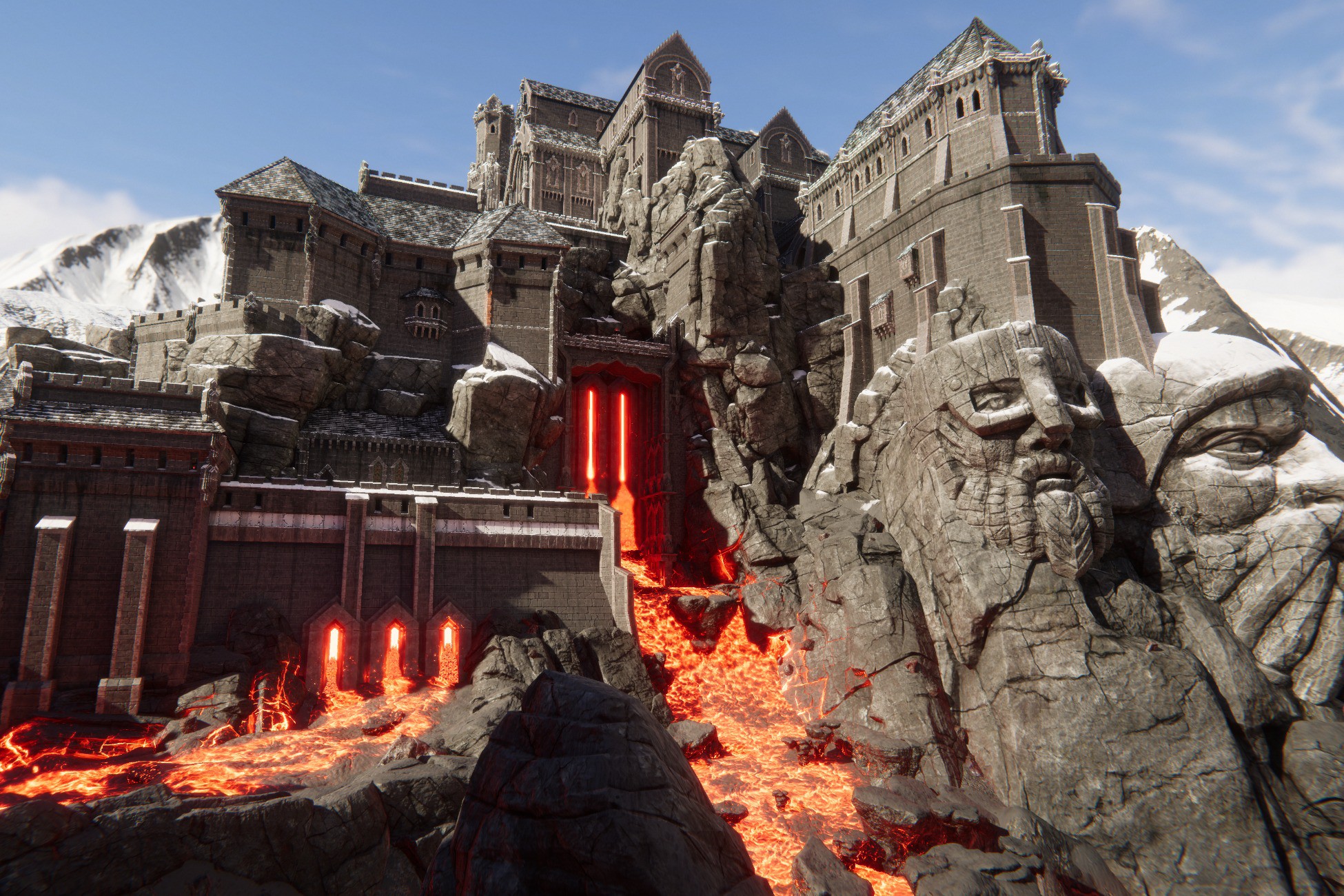
Modular Castle & Dungeon (Medieval Stronghold, Dwarven Town)
Build medieval, fantasy, castles, dungeons, towns, towers, and temples. Over 1300 prefabs, built from over 1990 meshes. Fast shaders used to save texture and GPU usage, The Demo scene is 1km square!
Affiliate link · Purchases support this site
Price history
Last 6 months
USDAsset preview
1 / 69

Modular Castle & Dungeon (Medieval Stronghold, Dwarven Town) screenshot 1



About this asset
Discord Channel|Website & Support|Facebook|Twitter (X)
The pack is suitable for building medieval and fantasy towns, castles, dungeons, and strongholds. The demo scene is complex from outdoor to indoor, 1km square in size.
With this pack, you gain over 1000 models, 1990 meshes (LODs), and 1300 prefabs, more will come (models and prefabs). Assets are from small single construction set elements up to batched or complex prefabs like whole building parts. They will help you easily build your structures.
In models and prefabs, you will find:
- towers, castle gates, temple, houses, and their parts with interiors,
- walls in multiple different configurations and shapes;
- ornaments with multiple different configurations and shapes;
- sculptures scanned from clay models;
- decals for HD and URP;
- ornaments used like decals but on 3d meshes (more info at features video)
- roofs in different parts and shapes;
- columns with their parts;
- windows with glass and without;
- merlons in multiple configurations and styles;
- statues;
- balconies and barriers;
- doors from small to big gates;
- torches and braziers;
- chains which are also suitable for spline tools;
- stairs which are also suitable for spline tools;
- rocks, stones, and cliffs;
- background mountains from hills up to mountains and volcanos;
In everything in batched and construction set versions.
Assets shading is flexible and it supports Unity Muse AI texture generation system. With our Mask Generator script, you can easily fill materials with proper textures. For details check the video attached to the pack.
Collider vertex color painter allows you to easily remove snow from interiors or places under the roof.
Vertex Color Painter: allows you to paint additional effects on our surfaces.
The pack contains lava river and rock, particle shaders from our L.V.E 2023 - Lava & Volcano Environment 2023, If you need more variants visit that pack.
Roadmap:
- New new prefabs: buildings, houses, townhall, walls, small stone ornaments
- More profiles for L.V.E 2023 fence system ( barriers, walls on spline)
To run HD or URP please import the pack to the HD or URP project and then import the support pack which is inside the asset in "HD and URP support" folder ". It will replace scene and materials files so they will work with RP out of the box. Please also check the readme files inside those folders.
You could also look at our other packs:
Assets bundle:
Unity Tools:
- R.A.M 3 - River Auto Material 3
- L.V.E 2023 - Lava & Volcano Environment 2023
- River Auto Material 2019
- River Auto Material
- Lava & Volcano Environment 2019
- Lava & Volcano Environment
- World Streamer 2
- Terrain Stitcher Tools
- Multiple Terrain Brush
Environment:
- Coast & Dunes Environment
- Modular Castle & Dungeon
- Mountain Environment - Dynamic Nature
- Forest Environment - Dynamic Nature
- Meadow Environment - Dynamic Nature
- Mountain Trees - Dynamic Nature
- Dynamic Nature - Starter
- Ice World
- Advanced Rock Pack
- Advanced Foliage Pack
- PBR Graveyard Pack
- Fire & Smoke - Dynamic Nature
- Winter Mountains and Stamps
- Photo Scanned Park Assets
- Mountain Tree Pack
- Realistic Tree Pack
- Realistic Grass Pack
Levels:
Ground Textures:
VR & FP Models:
From the publisher's Asset Store listing.
Technical details
- Shaders:
- Top cover shape shaders feature:
- Base: texture shader between multiple materials like marble, rock, clay, and sand so all objects look like built from the same source. It can use UV0,UV2, Planar
- Cover: texture for top cover, vertex color, heightmap blend for example snow, sand. It can use UV0,UV2, Planar
- Shape: Normal and MaskMap C(R) AO (G) H(B) LM(A) textures that hold the shape information of the object. Curvature (R) and AO (G) influence on the material. It's used for heightmap (B) blending between base and cover. Leaks masking (A). It can use UV0, UV2, and Planar.
- Leaks: Texture for leaks mostly uses the same UV as shape. It adds noise, color changes to objects so they do not look generic. It can be colored.
- Wet/Heat: Materials can be heated or become wet via vertex color. Even at runtime. with our L.V.E 2023.
- Shape shaders use AO as an emission mask to avoid adding another texture just for emission.
- The shader contains a large number of sliders to control blending between the base and cover and shape influence.
- With very few textures you can populate the whole world by using these shaders.
- Lava 2023 sample shaders. Pack contains lava river and rock, particle shaders from our L.V.E 2023. If you need more variants visit that pack.
- Decals: Decal shading is only available at URP and HDRP as only these render pipelines support decals. Pack contains dirt, mud, ornaments, and ice decals.
- Particles and VFX: Pack contains fire, smoke, and distortion particles. Distortion at HD and URP needs a unity VFX package from the package manager (at HD RP it's by default inside the project). VFX are much faster particles.
- All shaders support vertex color the basic idea is:
- R: make object wet or heat (checkbox)
- G: cull top cover (snow, sand, 2nd texture)
- B: overlay surface via cover (snow, sand)
- There is also a layered shader for those who want to have a base, base 2, and top cover textures at the same time. it's available at URP and HDRP. It has huge potential.
2. Textures:
Most of them are 4k atlases. A few atlases are not finished, have a space for upcoming details.
- Base Color - Base Color (RGB) Smothness (A)
- MaskMaps MT_AO_H_SM - Metallic (R) Ambient Occlusion (G) Heightmap (B) Smothness (A)
- Emission (A)MaskMaps Emissive MT_AO_H_E - Metallic (R) Ambient Occlusion (G) Heightmap (B)
- Shape: Curvature(R) Ambient occlusion (G) Height(B) Leaks mask(A)
- Normal: Normal maps textures
Assets are atlased and used only a small amount of textures, mostly 4k but you can reduce them for your goals. It's better to have a reducing option than no option to upscale.
3. Scripts:
- Vertex painting tool: You can cover, uncover, heat, and make the surface wet via vertex colors.
- Collider: vertex painting tool (to remove snow from interiors) or just for any other effects
- Mask Generator: You can prepare textures for our shaders for example from Muse.
- Manage Light Visibility: You can optimize lights at big scenes, it culls light, and shadows via distance. It helps to save CPU at a big scene with a big amount of lights. Helpful in real-time lighting.
4. Models and prefabs
A huge amount of models and prefabs contain LODs. The triangle number depends on the object's size and complexity. Prefabs also have re-defined LODs so they work together as one object, to avoid situations when one wall from the building disappears earlier than the whole building.
Models have:
UV0 - for tiled textures base or non-tilled shape.
UV1 - lightmaps
UV2 - shape, leaks uv
Compatibility
| Unity version | Built-in | URP | HDRP |
|---|---|---|---|
| 6000.3.9f1 | Compatible | Compatible | Compatible |
| 6000.1.0f1 | Compatible | Compatible | Compatible |
| 6000.0.1f1 | Compatible | Compatible | Compatible |
| 2023.2.10f1 | Compatible | Compatible | Compatible |
| 2022.3.20f1 | Compatible | Compatible | Compatible |
| 2021.3.31f1 | Compatible | Compatible | Compatible |
To run HD or URP please import the pack to the HD or URP project and then import the support pack which is inside the asset in "HD and URP support" folder ". It will replace scene and materials files so they will work with RP out of the box. Please also check the readme files inside those folders.
As listed on the Asset Store.