
 View on Asset Store (opens in new tab)
Package details
- Latest version
- 1.0
- Last updated
- First released
- Unity version
- 2021.3.5 or later
- Package size
- 855 KB
- Files
- 12
- Favorites
- 14
- Views in the past week
- 17
Price tracking
- Last checked
- Tracked since
- Lowest recorded
- Free on
Keywords

Package Exporter Tool FREE
Streamline Your Unity Package Export Workflow Configuration-based package management for Unity developers
Affiliate link · Purchases support this site
Price history
Last 6 months
USDAsset preview
1 / 3
Package Exporter Tool FREE screenshot 1
About this asset
Why Package Exporter?
Tired of manually selecting assets every time you export a Unity package? Package Exporter transforms the tedious package export process into a simple one-click operation. Save your export configurations as reusable presets and never lose time re-selecting assets again.
Perfect for:
- 🔌 Plugin Developers - Export updates quickly with consistent configuration
- 🎨 Asset Creators - Streamline Asset Store submissions with preset workflows
- 👥 Development Teams - Share export configurations across the team via version control
- ⚡ Power Users - Manage multiple export presets for different package variants
✨ Key Features
📋 Configuration-Based Workflow
Stop manually selecting assets for every export. Create reusable export presets stored as ScriptableObject assets that persist in your project.
- Save Once, Export Forever - Configure your package contents once, export unlimited times
- Version Control Ready - Commit presets alongside your code for team collaboration
- Multiple Presets - Manage different export configurations for various use cases
- Asset Protection - Configurations are regular Unity assets, easy to back up and organize
🎯 Intuitive Dual-Mode Interface
List View Mode:
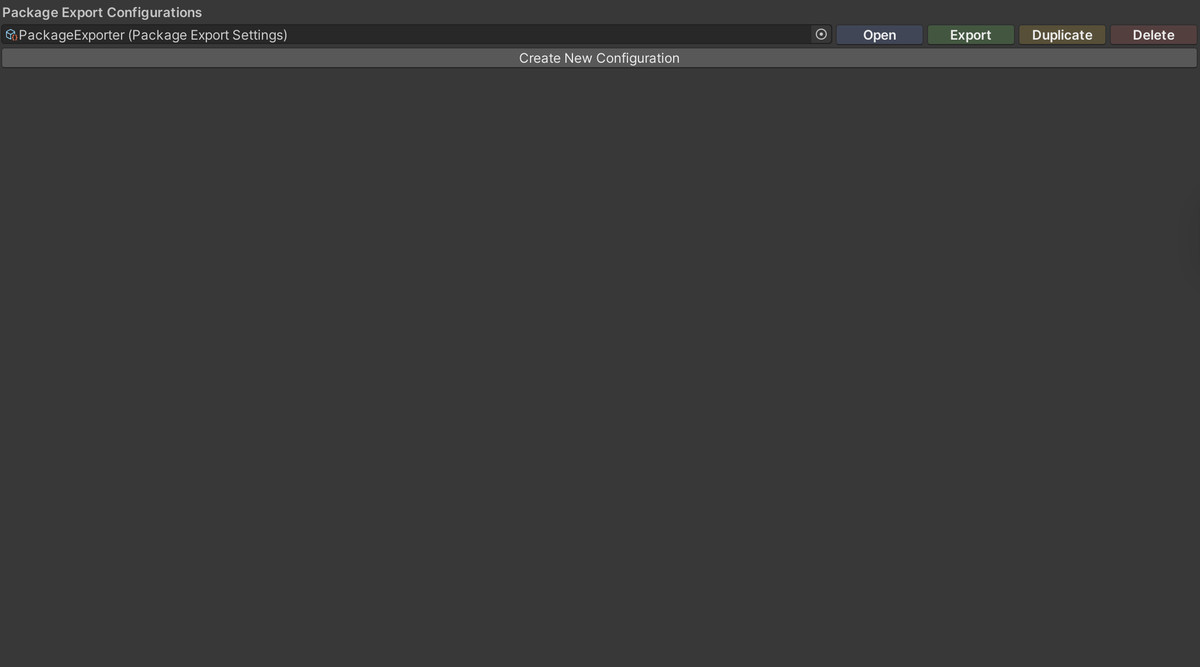
- See all your export configurations at a glance
- One-click export directly from the list
- Quick access to Edit, Export, Duplicate, and Delete actions
Edit Mode:
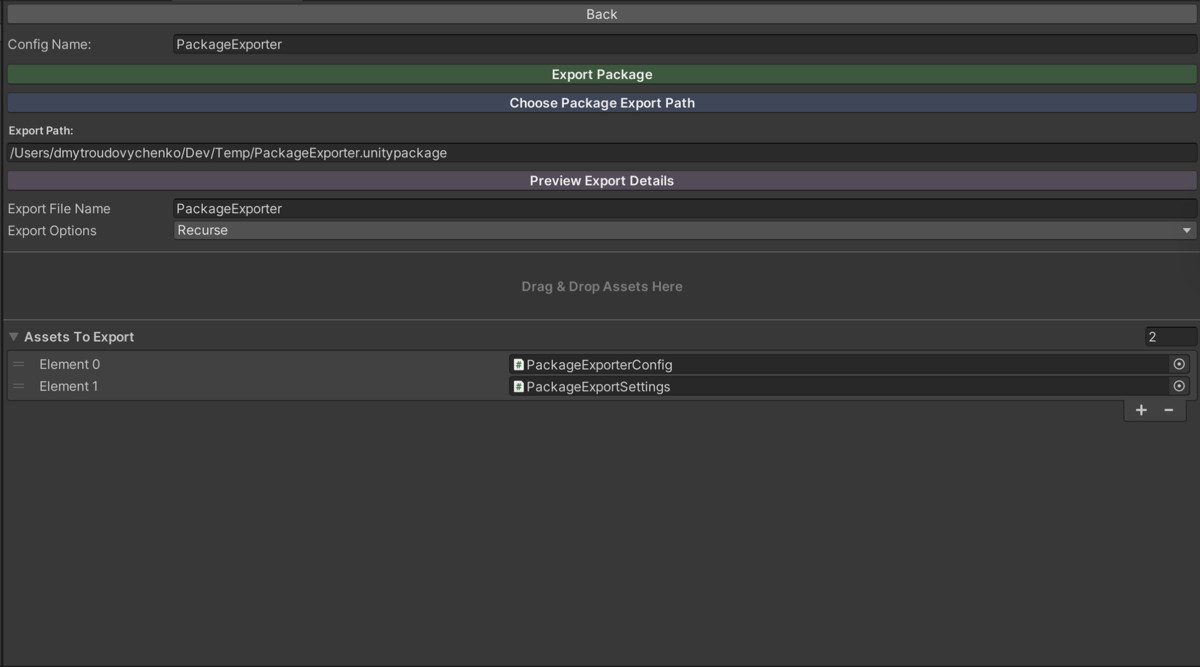
- Detailed configuration editor with preview capabilities
- Drag-and-drop asset management with duplicate detection
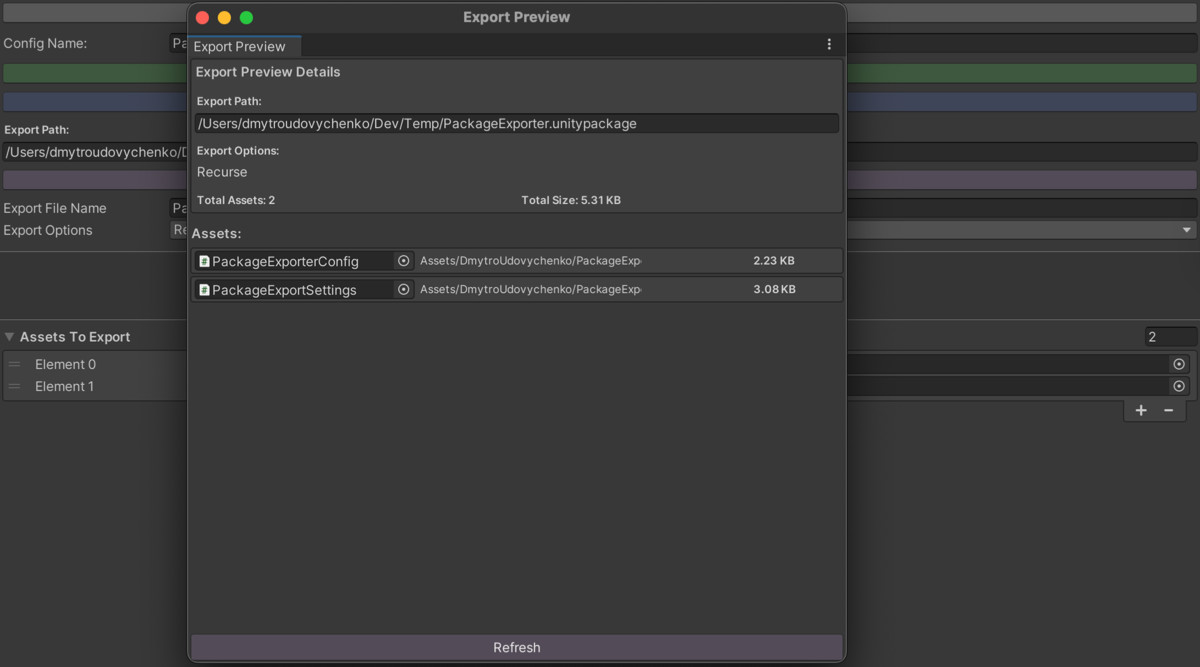
- Real-time package size calculation
🚀 Export Features
- One-Click Export - Export packages instantly from any configuration
- Preview Before Export - Review included assets, individual sizes, and total package size
- Drag-and-Drop Support - Add assets naturally with automatic duplicate prevention
- Full Export Control - Configure all Unity ExportPackageOptions (Recurse, IncludeDependencies, etc.)
- Custom File Naming - Set unique names and paths for each export configuration
From the publisher's Asset Store listing.
Technical details
🚀 Quick Start Guide
1. Open the Plugin
Navigate to: Tools > DmytroUdovychenko > Package Exporter
2. Create Your First Export Configuration
- Click Create New Configuration in the list view
- Click Open to enter edit mode
- Set your package name in the Config Name field
3. Add Assets to Export
Choose one of these methods:
- Drag-and-drop assets or folders into the designated drop zone
- Use the Assets To Export list field to manually add assets
- The plugin automatically prevents duplicates
4. Configure Export Settings
- Click Choose Package Export Path to select the destination folder
- Set a custom Export File Name (or use the default config name)
- Configure Export Options:
✅ Recurse - Include subdirectories in folders
✅ IncludeDependencies - Automatically include asset dependencies
✅ IncludeLibraryAssets - Include assets from Library folder
✅ Interactive - Show Unity's export dialog (for advanced control)
5. Preview and Export
Option 1 - Quick Export:
- Return to list view
- Click Export button next to your configuration
Option 2 - Preview First:
- In edit mode, click Preview Export Details
- Review the complete asset list with individual and total sizes
- Click Export Package to proceed
6. Managing Configurations
- Open - Edit configuration in detail mode
- Export - Immediately export without opening
- Duplicate - Create a copy with _duplicate suffix (perfect for variants)
- Delete - Remove configuration (with confirmation dialog)
📂 Project Structure
Assets/DmytroUdovychenko/PackageExporter/
-Scripts/
--Editor/
---PackageExporterConfig.cs # Global configuration constants
---PackageExportSettings.cs # ScriptableObject preset class
--- PackageExporterWindow.cs # Main editor window (dual-mode)
--- PackageExporter.cs # Export orchestration logic
--- PackageExportSettingsEditor.cs # Custom inspector for settings
--- PackageExportPreviewWindow.cs # Preview window for export details
--Configs/ # Default location for export presets
📷