
 View on Asset Store (opens in new tab)
Package details
- Latest version
- 1.0
- Last updated
- First released
- Unity version
- 2021.3.27 or later
- Package size
- 337 KB
- Files
- 14
- Favorites
- 3
- Views in the past week
- 12
Price tracking
- Last checked
- Tracked since
- Lowest recorded
- Free on
Keywords
Essential Attributes [ElementName]
Customize how array and list elements are named in the Unity Inspector — replace "Element 0" with meaningful labels like "Waypoint 0", "Enemy 1", and more.
Affiliate link · Purchases support this site
Price history
Last 6 months
USDAsset preview
1 / 1
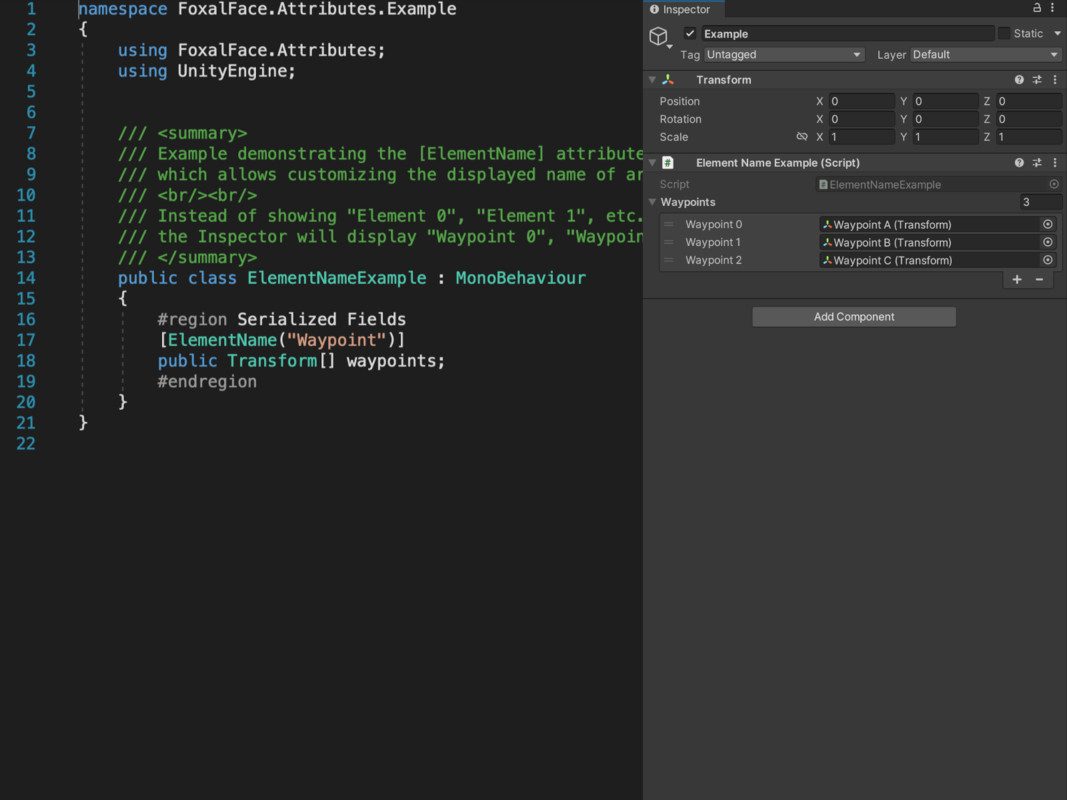
Essential Attributes [ElementName] screenshot 1
About this asset
[ElementName] is a lightweight and powerful Unity attribute that improves the clarity of serialized arrays and lists by customizing how their elements are labeled in the Inspector.
Instead of generic labels like "Element 0", this attribute lets you define custom prefixes such as "Waypoint", "Step", or "SpawnPoint" — making your data more readable and accessible, especially for designers and large teams.
This is a purely editor-side enhancement and requires no runtime code. It’s perfect for improving workflow clarity without modifying any data structure.
Use it anywhere you have serialized arrays and want better context.
From the publisher's Asset Store listing.
Technical details
- ✅ Rename serialized array/list element labels in the Inspector.
- 🏷️ Replace "Element X" with any custom prefix: "Waypoint X", "Enemy X", etc.
- 🎯 Works with any Unity-supported serialized type (int[], GameObject[], Transform[], etc.).
- 🧪 Editor-only utility, no runtime overhead or dependencies.
- 💡 Ideal for enhancing clarity in complex components or designer-facing tools.
- 🔁 Supports both arrays and generic List<T> fields.
- 🧩 Plug-and-play: just add the [ElementName("YourLabel")] attribute.
Compatibility
| Unity version | Built-in | URP | HDRP | Custom |
|---|---|---|---|---|
| 2021.3.27f1 | Compatible | Compatible | Compatible | Compatible |
As listed on the Asset Store.