
 View on Asset Store (opens in new tab)
Package details
- Latest version
- 1.0
- Last updated
- First released
- Unity version
- 2021.3.27 or later
- Package size
- 921 KB
- Files
- 39
- Views in the past week
- 2
Price tracking
- Last checked
- Tracked since
- Lowest recorded
- $8.99 on
Keywords
Essential Attributes [NotDefault]
Detect and highlight serialized fields with default values — includes red visual indicators in the Inspector and error logs in the Console.
Affiliate link · Purchases support this site
Price history
Last 6 months
USDAsset preview
1 / 1
Essential Attributes [NotDefault] screenshot 1
About this asset
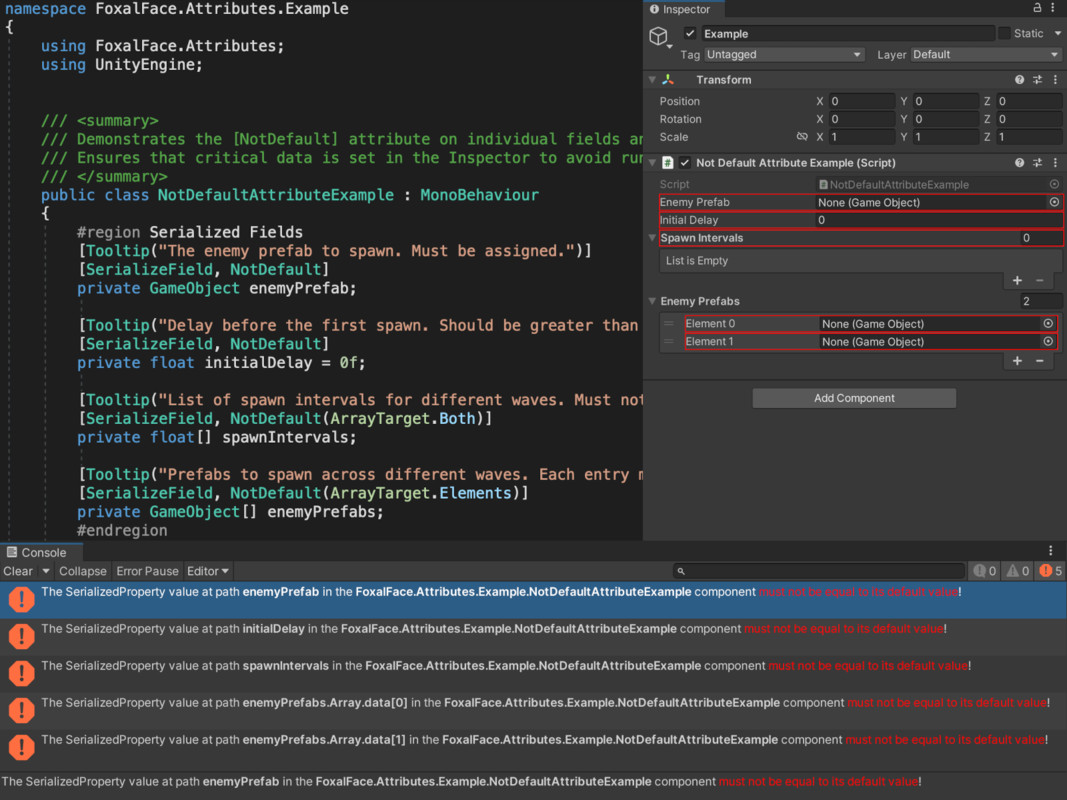
The [NotDefault] attribute helps catch uninitialized or forgotten fields in your serialized data. It highlights any field that still holds its default value (e.g., 0, null, Vector3.zero, etc.) with a red outline in the Inspector, making it easy to spot at a glance, and logs a clickable error in the Console to guide you directly to the issue.
It works recursively with nested serializable classes and structs, and supports arrays/lists with fine-grained control over what is checked:
- Just the array/list container
- Just the elements
- Or both (using ArrayTarget)
Error detection is triggered automatically when components are loaded, modified, or displayed — but you can also manually trigger or clear errors from the Tools menu. To optimize performance, you can disable automatic checking and only validate on demand.
💡 Try Before You Buy
This attribute is also included in the Essential Attributes asset — or try [ElementName]and [TexturePreview] for free on the Unity Asset Store.
From the publisher's Asset Store listing.
Technical details
- 🟥 Highlights fields with default values directly in the Inspector
- ❗ Logs error messages in the Console, clickable to ping the relevant GameObject
- 🧠 Works recursively with nested serialized types (structs/classes)
- 🧮 Compatible with arrays and lists
- 🎛️ ArrayTarget enum to control scan scope:
・Array (array size & buttons)
・Elements
・Both - 🛠️ Automatic detection can be toggled in:
Tools > FoxalFace > Attributes > NotDefault - 🧰 Also includes:
・Manual validation
・Clear error logs
・Customizable scan targets - ✅ Helps enforce data integrity before runtime, especially in configuration-heavy projects
⚠️ Internal Usage
- Reflection
- CustomEditor (UnityEngine.Object)
Compatibility
| Unity version | Built-in | URP | HDRP | Custom |
|---|---|---|---|---|
| 2021.3.27f1 | Compatible | Compatible | Compatible | Compatible |
As listed on the Asset Store.