
 View on Asset Store (opens in new tab)
Package details
- Latest version
- 1.0
- Last updated
- First released
- Unity version
- 2021.3.9 or later
- Package size
- 41.7 MB
- Files
- 95
- Favorites
- 7
- Views in the past week
- 4
Price tracking
- Last checked
- Tracked since
- Lowest recorded
- $7.90 on
Keywords
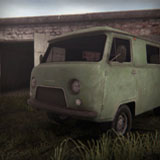
Versatile Environment Cars Pack Vol. 1 (Mobile Friendly)
This pack of cars for environment is suitable for games in such genres as "Shooter", "Horror", "Adventure", "Quest", "Racing" etc., as well as for games in the Post-Apocalypse setting.
Price $7.90
Buy on Asset Store (opens in new tab)
Affiliate link · Purchases support this site
Price history
Last 6 months
USDAsset preview
1 / 8

Versatile Environment Cars Pack Vol. 1 (Mobile Friendly) screenshot 1


About this asset
Package content:
- 14 environment car prefabs.
- LODs of all models are also made as separate prefabs as "Low-Poly" models for the background (14 prefabs).
- Built-In demo scene including all models and optimized lighting baking settings.
On the project website you can learn more about these assets: https://sites.google.com/view/versatile-studio/
Model parameters:
- The number of polygons varies from 2878 to 3792 for level 0 models.
- LODs are provided for each model.
- Texture resolution varies from 1024 to 2048 pixels.
Note:
- The models in this pack contain the necessary number of polygons for good compatibility and excellent performance on any platform.
- The same goes for textures.
From the publisher's Asset Store listing.
Technical details
- 24 models in FBX format (including LODs).
- 33 textures in PNG format (including normal maps and occlusion maps).
- 28 set up prefabs.
- A total of 16 materials for all models (overlapping reduces the number of draw calls).
- PBR materials (normal maps and occlusion maps included).
- Correct and optimized topology of 3D models.
- No animations and animators.
Compatibility
| Unity version | Built-in | URP | HDRP |
|---|---|---|---|
| 2021.3.9f1 | Compatible | Compatible | Compatible |
Render pipeline compatibility:
- Only built-in materials are included in the pack. To convert materials to your render pipeline go to: Edit > Render Pipeline > "Your Render Pipeline" > Upgrade Materials.
As listed on the Asset Store.