
 View on Asset Store (opens in new tab)
Package details
- Latest version
- 1.0
- Last updated
- First released
- Unity version
- 2022.2.6 or later
- Package size
- 12.5 MB
- Files
- 5
- Favorites
- 1
- Views in the past week
- 3
Price tracking
- Last checked
- Tracked since
- Lowest recorded
- $5.00 on
Keywords
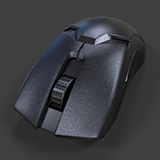
Cordless Mouse
Affiliate link · Purchases support this site
Price history
Last 6 months
USDAsset preview
1 / 34

Cordless Mouse screenshot 1


About this asset
This Mouse 3d model has been created with the intention of being able to customize the material as desired and as such only uses a Normal map texture.
UVs were made to utilize the space as best as possible while maintaining distortion as low as possible with the fewest UV seams.
The color, roughness, and metallic maps are all open and customizable. This makes it possible to swap out tileable textures for each material and change up the look of the Keyboard.
Beauty renders were made to show off the prop using custom lighting, backround, animation, materials, post effect and other setting that are not included.
This asset only includes the 3d models using Standard Unity materials for your use which can be seen at the end.
From the publisher's Asset Store listing.
Technical details
Technical details: All textures are 2,048. Textures includes only the Normal Map. Texture uses lossless .png file format to keep quality and reduce file size.
Number of textures - 1
Texture dimensions - 2,048
Number of meshes/prefabs - 1/1
Rigging: No
UV mapping: Yes
LOD information - No
Types of materials and texture maps - PBR
Triangles - 2292
Compatibility
| Unity version | Built-in | URP | HDRP |
|---|---|---|---|
| 2022.2.6f1 | Compatible | Not listed | Not listed |
Built-in Core and can be converted depending on the render pipeline, simply use the converter/upgrade wizard. The Plane in Demo scene is only used to show lighting and physics.
Built-in - No need to edit.
URP - Under Edit>Rendering>Materiasl>Convert materials
HDRP - Under Edit>Rendering>Materiasl>Convert materials and adjust remapping.
As listed on the Asset Store.