
 View on Asset Store (opens in new tab)
Package details
- Latest version
- 3.1.5
- Last updated
- First released
- Unity version
- 2021.3.30 or later
- Package size
- 2.1 MB
- Files
- 81
- Favorites
- 224
- Views in the past week
- 46
Price tracking
- Last checked
- Tracked since
- Lowest recorded
- Free on
Keywords

Automated QA with modl:test
Automate your QA testing with modl AI Engine. Let AI bots explore your game levels to expand your test coverage. Detect and report errors, events, and crashes on the modl.ai cloud platform.
Affiliate link · Purchases support this site
Price history
Last 6 months
USDAsset preview
1 / 10

Automated QA with modl:test screenshot 1





About this asset
modl:test is well suited for game projects with an individual character per player in 2D or 3D environments. The AI bots take over the player controls and explore the current scene as long as the test runs.
modl:test is not currently recommended for GUI-driven gameplay but can extend to, e.g., explore menu options or dialogue trees through scripting.
GET STARTED WITH MODL:TEST
You can try the plug-in in the editor and experiment with your game or our sample game project. To run complete tests, you'll need an account. To sign up for an account, fill in your details at https://modl.ai/demo-signup/. Once you have an account:
Add the plug-In - Configure the modl.ai plug-in to control your player character and collect data from your game build. Setup map captures to enable heatmaps.
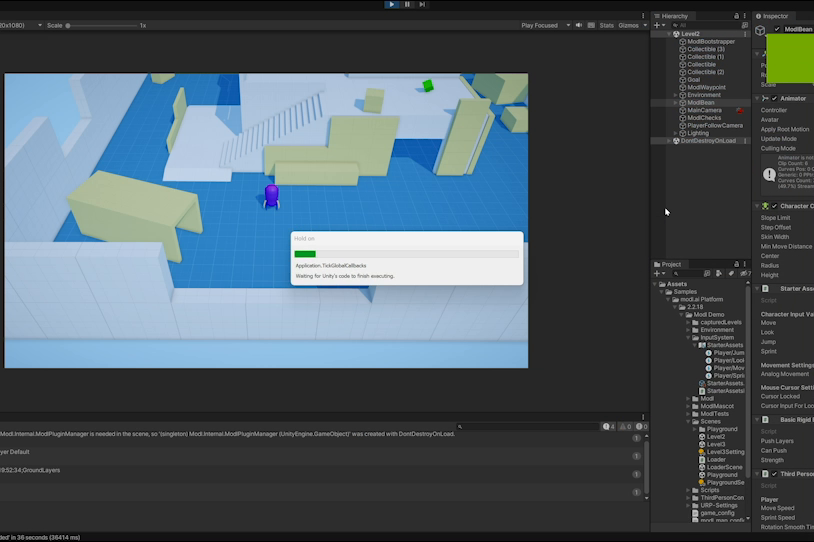
Review in editor - Use the local Preview function to check bot behavior and preview testing in the editor.
Upload the build - Create and upload builds to the modl.ai platform to prepare tests for running.
Run a test - Add your custom settings and run the tests you need.
Review the report - Evaluate the generated reports for detected issues and events.
Fix and repeat - Find and address performance issues and bugs; address and repeat as needed.
Resources
WHY MODL:TEST?
⚙️ Automated exhaustive testing
Test large amounts of game content in the cloud. Run exploratory tests and receive results on the modl.ai platform. Execute multiple tests in parallel to scale how much testing your team can accomplish. Run tests while you are away or doing something else.
🔑 Easy setup, low maintenance
One-time setup, and you are ready to start testing. The configuration for player inputs and game state tracking applies to all existing and new scenes.
🧠 No training necessary
The AI bots start from scratch and learn while playing a scene. When you add new scenes, no training or waiting is required. The AI bots can play new scenes automatically as long as the player inputs and game state tracking are the same.
📊 Data-rich feedback
Do deep run-time data collection from your tests and review the results on the modl.ai platform once the tests complete.
MODL:TEST FEATURES
🦾 Data-driven quality assurance with AI driven testing
Let modl:test exploratory AI bots visit every corner of your scenes and report back on errors and performance data. Leverage your experience with the data provided by the bots for an in-depth view of your game’s functioning.
🚨 Detect issues and events
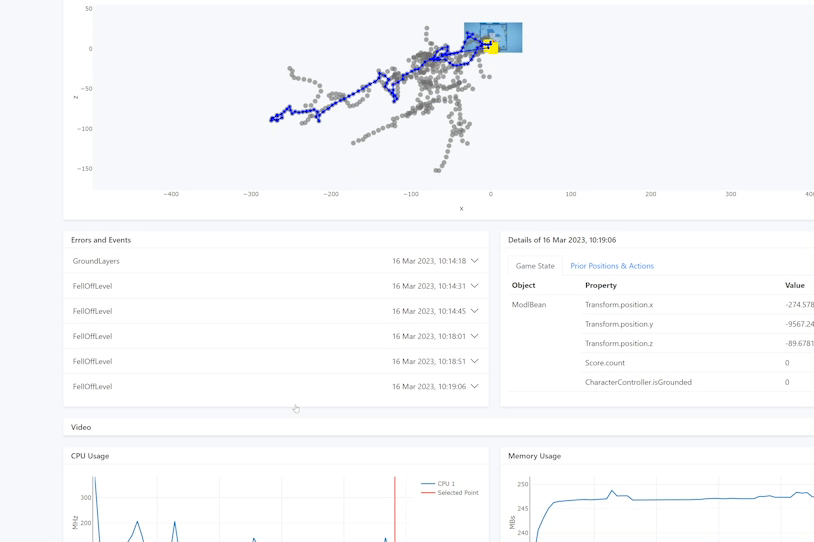
The exploratory test bot automatically reports on the following:
- Errors: Error messages logged by Debug.LogError in the console log.
- Exceptions: Exceptions logged in the console log.
- Crashes: Events where the game crashes.
- Custom events: Event messages logged by Modl.EventReporter.ReportEvent
- Bot’s actions: Actions taken by the bot during a run.
- Bot’s positions: Positions the bot has visited during a run.
- Track values: Select variables to track and see how the values change over the course of the test.
🗺️ Heatmaps and path data for easy analysis
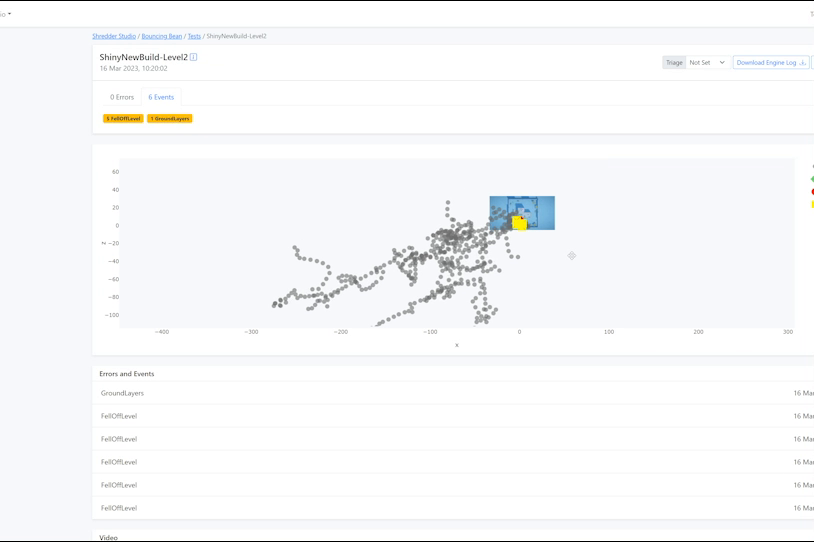
2D and 3D games generate heatmaps showing where AI bots went during a test. Use the heatmaps to make sense of accessible areas, problem spots, or geometry issues.
📹 Full recording of test runs
The modl.ai platform records video of every run from a virtual screen rendering. Review the full time-stamped video recording of the test bot's run to understand errors and events in context.
📈 Performance assessment for every build
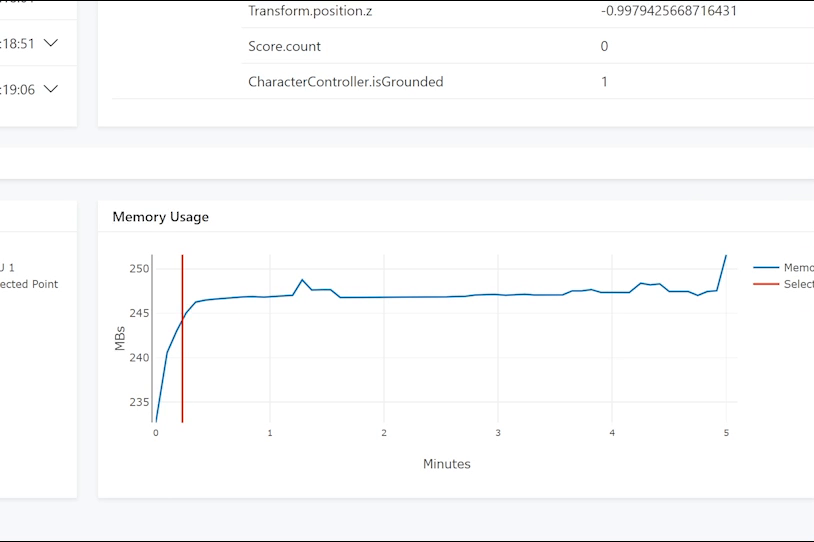
Understand your build's performance with timelines for CPU and memory consumption. Pinpoint CPU spikes and memory leaks while optimizing with continuous feedback.
From the publisher's Asset Store listing.
Technical details
Supported editor platforms:
- Windows
- Linux
- macOS (Intel only, Apple Silicon support coming soon)
modl:test Cloud Platform Support:
- Windows x64 builds supported
modl:test Subscription Details:
- Running tests on the modl.ai platform requires a subscription with modl.ai.
Contact [email protected] to get started and find a plan with the right amount of testing hours for you.
Compatibility
| Unity version | Built-in | URP | HDRP | Custom |
|---|---|---|---|---|
| 2021.3.30f1 | Compatible | Compatible | Compatible | Compatible |
As listed on the Asset Store.