
 View on Asset Store (opens in new tab)
Package details
- Latest version
- 1.0.2
- Last updated
- First released
- Unity version
- 2020.3.44 or later
- Package size
- 35.7 MB
- Files
- 186
- Favorites
- 11
- Views in the past week
- 4
Price tracking
- Last checked
- Tracked since
- Lowest recorded
- $36.00 on
Keywords

Venn Console - Runtime Console, Command Input and Hotkeys Dashboard
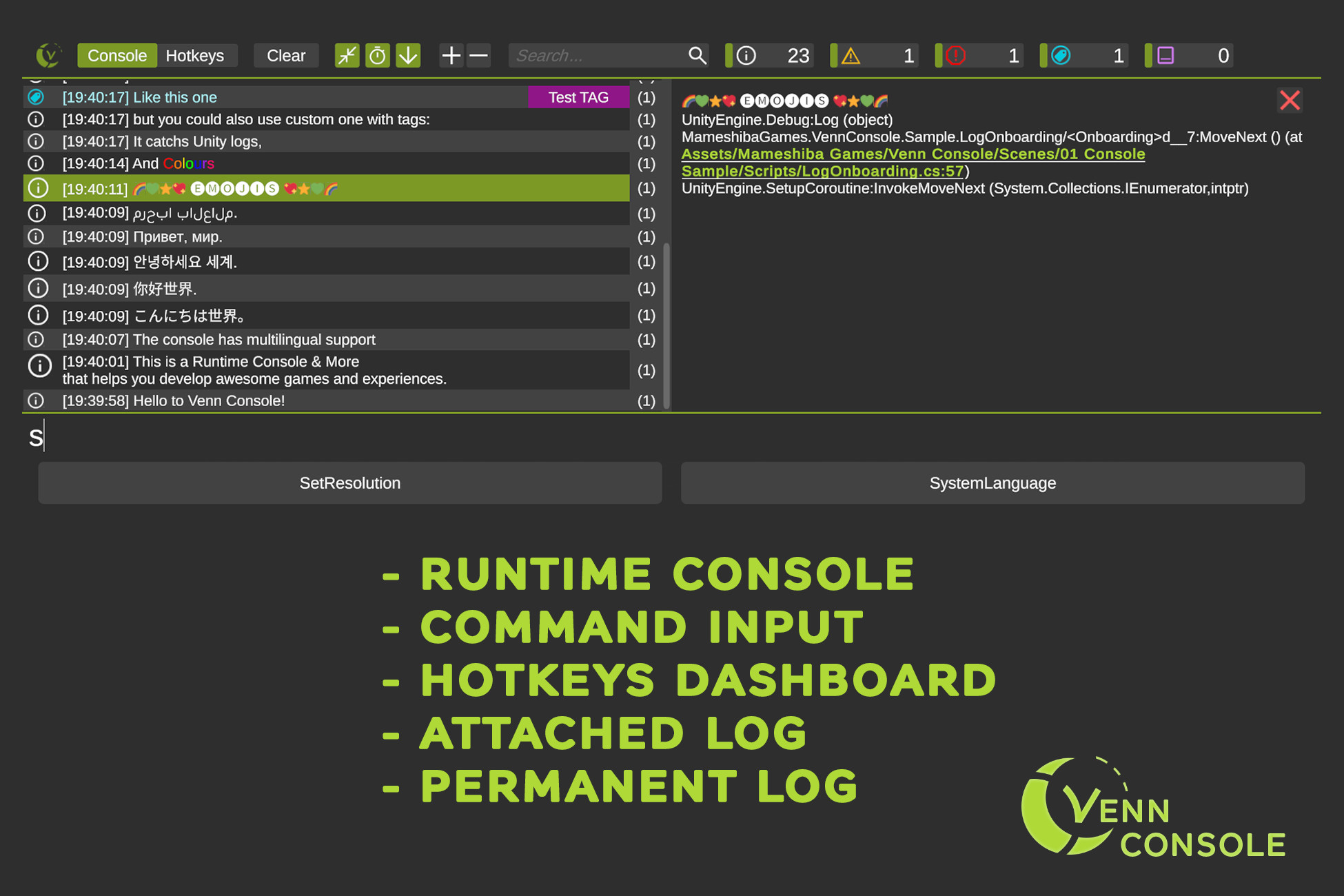
Venn Console is a Multiplatform Runtime Console to see Unity's and your logs in a build, a Command Line to run cheats or instructions in realtime, a Hotkey dashboard for fast actions, and some utils.
Affiliate link · Purchases support this site
Price history
Last 6 months
USDAsset preview
1 / 9

Venn Console - Runtime Console, Command Input and Hotkeys Dashboard screenshot 1


About this asset
Venn Console is a set of tools that helps you to develop games and experiences more efficiently.
🔥🔥🔥🔥🔥 FEATURES 🔥🔥🔥🔥🔥
- Fully functional runtime console. You will show Logs, warnings, errors, and custom logs. You can search, filter, etc.
- VR Compatible. Save a lot of time for this use case.
- Responsive design. Adapting the elements to portrait or landscape designs in different screen sizes.
- Multilanguage support. Latin languages, Japanese, Chinese, Korean, Russian, and Arabic.
- Emoji support. 🌈🌈🌈
- Enriched text support. Bold, colors, etc. for your Logs.
- Visual Themes to customize the console visuals.
- Remember the last execution settings to avoid extra steps.
- Full source code.
- Good documentation inside the package.
- 3 example scenes with different use cases.
🔨🔨🔨🔨 6 USEFUL MODULES 🔨🔨🔨🔨
- Full Runtime Console. See Logs, Warning, Errors, Custom Logs. Filter by Type, Search, etc. Compatible with VR (incredibly useful for this use case).
- Command Input. Create commands and execute in runtime for cheats or ingame helps ir information. Some core commands are included.
- Hotkeys Dashboard. Bind in-game actions to buttons, toggles, and sliders. Especially useful in mobile and VR development.
- Attached Log. Show per-element information in a panel attached to the object.
- Permanent Log. Show permanent log info such as server ping, distance to the goal, or any useful information for the game.
- Script Debug Utils. A few useful functions.
✨✨✨✨===================================✨✨✨✨
Complete your project with some KEKOS visual assets:
👦 KEKOS - Customizable 3D Character Cartoon Kids
🐎 KEKOS Horses, Unicorns and Pegasus
Or improve your productivity with our tools:
🎨 Colorinchis - Recolor at Runtime and Bake Textures Tool
✨✨✨✨===================================✨✨✨✨
❓ - Have any questions or bug reports?
💬 Drop your question in the forum thread, email, Twitter or Discord.
* Provide the following information if needed: Unity version, Pipeline (built-in, URP or HDRP), Package version, Description of the problem, screenshots, and invoice number.
From the publisher's Asset Store listing.
Technical details
=> REQUIREMENTS
Requires Text Mesh Pro
For VR requires XR Interaction Toolkit and the New Input System Package installed and active.
=> PLATFORMS COMPATIBILITY
Existing Modules (Console, Commands, Hotkeys Dashboard, Attached Log, Permanent Log):
- PC: FULL COMPATIBLE
- Mobile (Android & iOS): FULL COMPATIBLE
- VR: Console, Hotkeys Dashboard and Attached Log FULL COMPATIBLE. Commands PARTIAL COMPATIBILITY *1 *2. Permanent Log NOT COMPATIBLE *3.
- Consoles: Attached Log and Permanent Log FULL COMPATIBLE. Console PARTIAL COMPATIBILITY and Commands and Hotkeys Dashboard NOT COMPATIBLE *4.
=> LICENSES
"Asset uses Twemoji under CC-BY-4.0; NotoSansJP-Regular, NotoSansKR-Regular, NotoSansSC-Regular, NotoSansTC-Regular and Tajawal-Regular Fonts under OFL; see Notices.txt file in the package for details."
Compatibility
| Unity version | Built-in | URP | HDRP | Custom |
|---|---|---|---|---|
| 2020.3.44f1 | Compatible | Compatible | Compatible | Compatible |
As listed on the Asset Store.