
 View on Asset Store (opens in new tab)
Package details
- Latest version
- 1.0.0
- Last updated
- First released
- Unity version
- 2021.1.4 or later
- Package size
- 66 KB
- Files
- 26
- Favorites
- 26
- Views in the past week
- 19
Price tracking
- Last checked
- Tracked since
- Lowest recorded
- Free on
Keywords
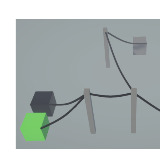
Electrical power/energy system
A power system like in the game “Satisfactory”
Affiliate link · Purchases support this site
Price history
Last 6 months
USDAsset preview
1 / 7

Electrical power/energy system screenshot 1


About this asset
Its good for games that uses machines that need power and a system for the player to build a power system.
Please let me know about bug you encounter so that i can fix them.
From the publisher's Asset Store listing.
Technical details
Setup:
-Have a "PowersystemNetworkController" in your scene, because its there to connect and disconnect systems
How it works:
-To connect two power system use the "PowersystemNetworkController", when 2 system objects are given it connects them -> always have a "PowersystemNetworkController" in your scene
-When a generator, consumer, ... is created it creates a power system for it. Connect two system with the "PowersystemNetworkController" to make one bigger system
-Set power input/output in the prefab of the generator/consumer
-When power consumption > power generation the power system sets all mashines to have no power
-To restart the system in the example scene there is a button to restart in other in other cases call the "RestartPowerSystem" function in the power system script -> returns a bool if the power system restart has succeeded or not(true/false)
Look at the example scene to see in action how it works
Compatibility
| Unity version | Built-in | URP | HDRP | Custom |
|---|---|---|---|---|
| 2021.1.4f1 | Compatible | Compatible | Compatible | Compatible |
It works in every render pipline but when you don't use the universal render pipline you must update the materials to your render pipline, but this dosen't effect the logic.
As listed on the Asset Store.