
 View on Asset Store (opens in new tab)
Package details
- Latest version
- 1.0
- Last updated
- First released
- Unity version
- 2021.3.3 or later
- Package size
- 276 KB
- Files
- 7
- Favorites
- 2
- Views in the past week
- 12
Price tracking
- Last checked
- Tracked since
- Lowest recorded
- $4.99 on
Keywords
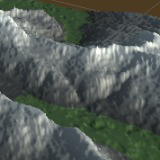
Terrain Generation Tool
Terrain renderer that takes a heightmap as an input and generates a 3D terrain mesh with the specified height.
Affiliate link · Purchases support this site
Price history
Last 6 months
USDAsset preview
1 / 3

Terrain Generation Tool screenshot 1


About this asset
The TerrainRenderer is a tool that generates a 3D terrain mesh from a 2D heightmap texture. It allows users to adjust the height of the terrain and apply a custom shader to control the visual appearance of the terrain, there's already one . The tool provides a simple user interface with keyboard controls for adjusting the terrain height and orientation in real-time, allowing for easy exploration and customization of the generated terrain. Overall, the TerrainRenderer is a versatile tool for quickly and easily generating detailed terrain meshes for use in Unity projects.
- Attach the TerrainRenderer script to the empty game object.
- In the Inspector window, you will see the properties of the TerrainRenderer script. Assign a height map texture to the "heightMap" field by dragging and dropping a texture onto the field. The height map texture should be a grayscale image where the darker pixels represent lower terrain and the lighter pixels represent higher terrain.
- Assign a shader to the "shader" field by selecting an appropriate shader from the list of shaders in your project.
- Adjust the "terrainHeight" field to set the initial height of the terrain. If you want to change it in the Play mode, open your GameObject with TerrainRenderer, in the bottom you will see the material, change those values to fit your generated terrain. To save these settings - open shader with any text editor and change the values inside the shader file.
From the publisher's Asset Store listing.
Technical details
Key features of this package include:
- TerrainRenderer class: This class generates the terrain using a height map and applies the specified shader. It contains the necessary methods and variables to generate and update the terrain mesh.
- Shader: The package contains a custom shader named "Custom/VertexColorShader". It allows users to adjust properties such as the minimum and maximum height, colors, shininess, and texture of the terrain.
- Heightmap: The package includes a DEMO height map that is used to generate the terrain. The script reads the height map and creates a mesh from it.
Compatibility
| Unity version | Built-in | URP | HDRP | Custom |
|---|---|---|---|---|
| 2021.3.3f1 | Compatible | Compatible | Compatible | Compatible |
As listed on the Asset Store.