
 View on Asset Store (opens in new tab)
Package details
- Latest version
- 1.0
- Last updated
- First released
- Unity version
- 2022.2.6 or later
- Package size
- 14.2 MB
- Files
- 12
- Views in the past week
- 4
Price tracking
- Last checked
- Tracked since
- Lowest recorded
- $5.00 on
Keywords
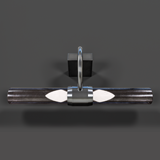
Mirror Light
Simple Mirror Light that uses standard Unity materials for maximum compatibility. Low Poly - (game-ready), perfect for AR and VR applications. Real-World Scale
Affiliate link · Purchases support this site
Price history
Last 6 months
USDAsset preview
1 / 54

Mirror Light screenshot 1


About this asset
Simple Mirror Light.
This is a High Quality asset using PBR materials.
The Color and transparency of the Glass can be changed in the material options as well as the emission amount and color.
Beauty renders were made to show off the prop using custom lighting, backround, animation, materials, post effect and other setting that are not included.
This asset only includes the 3d model using Standard Unity material for your use which can be seen at the end.
From the publisher's Asset Store listing.
Technical details
This Mirror Light uses PBR Materials/Textures - 2,476 Tris Total.
Technical details: All textures are 2,048. Textures includes Albedo, Normal Map, Metallic/Smoothness and Emissive. Each texture uses lossless .png and .tga file format to keep quality.
Has a RigidBody and Box Collider included.
Compatibility
| Unity version | Built-in | URP | HDRP |
|---|---|---|---|
| 2022.2.6f1 | Compatible | Not listed | Not listed |
Built-in Core and can be converted depending on the render pipeline, simply use the converter/upgrade wizard. The Plane in Demo scene is only used to show lighting and physics.
Built-in - No need to edit.
URP - Under Edit>Rendering>Materiasl>Convert materials
HDRP - Under Edit>Rendering>Materiasl>Convert materials and adjust remapping.
As listed on the Asset Store.