
 View on Asset Store (opens in new tab)
Package details
- Latest version
- 0.0.1-Patch3
- Last updated
- First released
- Unity version
- 2021.3.25 or later
- Package size
- 505 KB
- Files
- 28
- Favorites
- 2
- Views in the past week
- 4
Price tracking
- Last checked
- Tracked since
- Lowest recorded
- $10.00 on
Keywords

Yggdrasil - Console
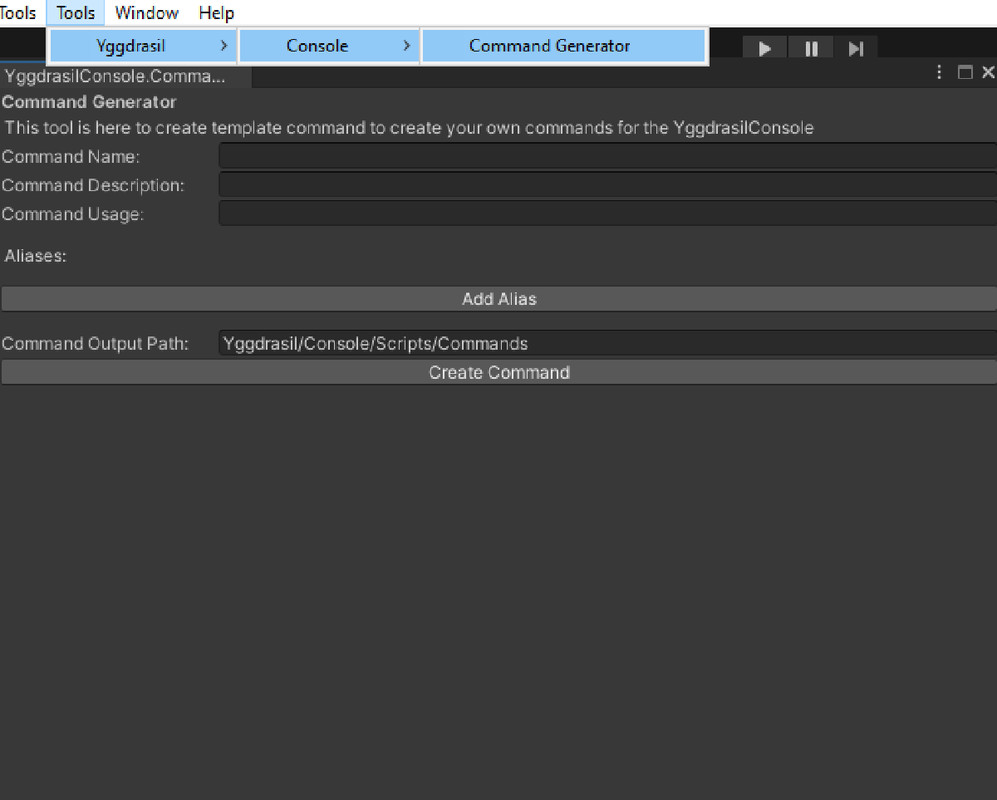
Yggdrasil Console is a really neat Unity Asset that makes it super easy to create console commands for your game. You can use its GUI to set the command name, description, usage, and aliases quickly.
Affiliate link · Purchases support this site
Price history
Last 6 months
USDAsset preview
1 / 6

Yggdrasil - Console screenshot 1


About this asset
Yggdrasil Console by PancakeBoiii
Yggdrasil Console is a really neat Unity Asset that makes it super easy to create console commands for your game. You can use its user-friendly graphical user interface (GUI) to set the command name, description, usage, and aliases quickly. To function, it requires TextMeshPro.
Features:
Gameobject selection and advanced Gameobject Details (Transform position, Rotation, Scale)
Fully customizable
A Live Debug Log Feature that shows the unity Log in the console (Log, Warn and Error are all toggleable)
Predictive command input
Tab auto complete
Comes with 11 example commands that you can modify or delete as desired
Includes 3 example styles, including Default, Default_Top, Default_Detached
Has a First person example level
Supports rich text
Supports custom fonts
To get started, just type "help" in the console to display a list of available commands.
Creating a command is as easy as following these steps:
Open the Command Creator window in the Unity Editor by navigating toTools > Yggdrasil > Console > Command Generator
Fill in the Command Name, Description, Usage, and Aliases fields in the GUI.
Set the Command Output Folder field to the folder where you want the new command script to be generated (default folder: "Yggdrasil/Console/Scripts/Commands").
Click the "Create Command" button to generate the new command script.
Open the generated command script in your code editor and implement the command logic.
Save the command script, and the Yggdrasil Console will automatically load the new command.
If you have any questions or concerns, please reach out to us at [email protected]. We're always happy to help!
From the publisher's Asset Store listing.
Compatibility
| Unity version | Built-in | URP | HDRP | Custom |
|---|---|---|---|---|
| 2021.3.25f1 | Compatible | Compatible | Compatible | Compatible |
As listed on the Asset Store.