
 View on Asset Store (opens in new tab)
Package details
- Latest version
- 1.2.8
- Last updated
- First released
- Unity version
- 2020.3.23 or later
- Package size
- 10.9 MB
- Files
- 151
- Favorites
- 26
- Views in the past week
- 8
Price tracking
- Last checked
- Tracked since
- Lowest recorded
- $10.00 on
Keywords
Transform more
A powerful tool that simplifies the process of adjusting an object's transform, including for UI elements.
Price $10.00
Buy on Asset Store (opens in new tab)
Affiliate link · Purchases support this site
Price history
Last 6 months
USDAsset preview
1 / 22

Transform more screenshot 1


About this asset
Say hello to a stress-free tool-Transform More, designed to make object alignment and arrangement a breeze.
Transform More is particularly useful for creating UI designs, saving you time and effort.
Enjoy a more streamlined design process and take your projects to the next level. Get your hands on it now and start creating with ease!
This utility includes the following features.
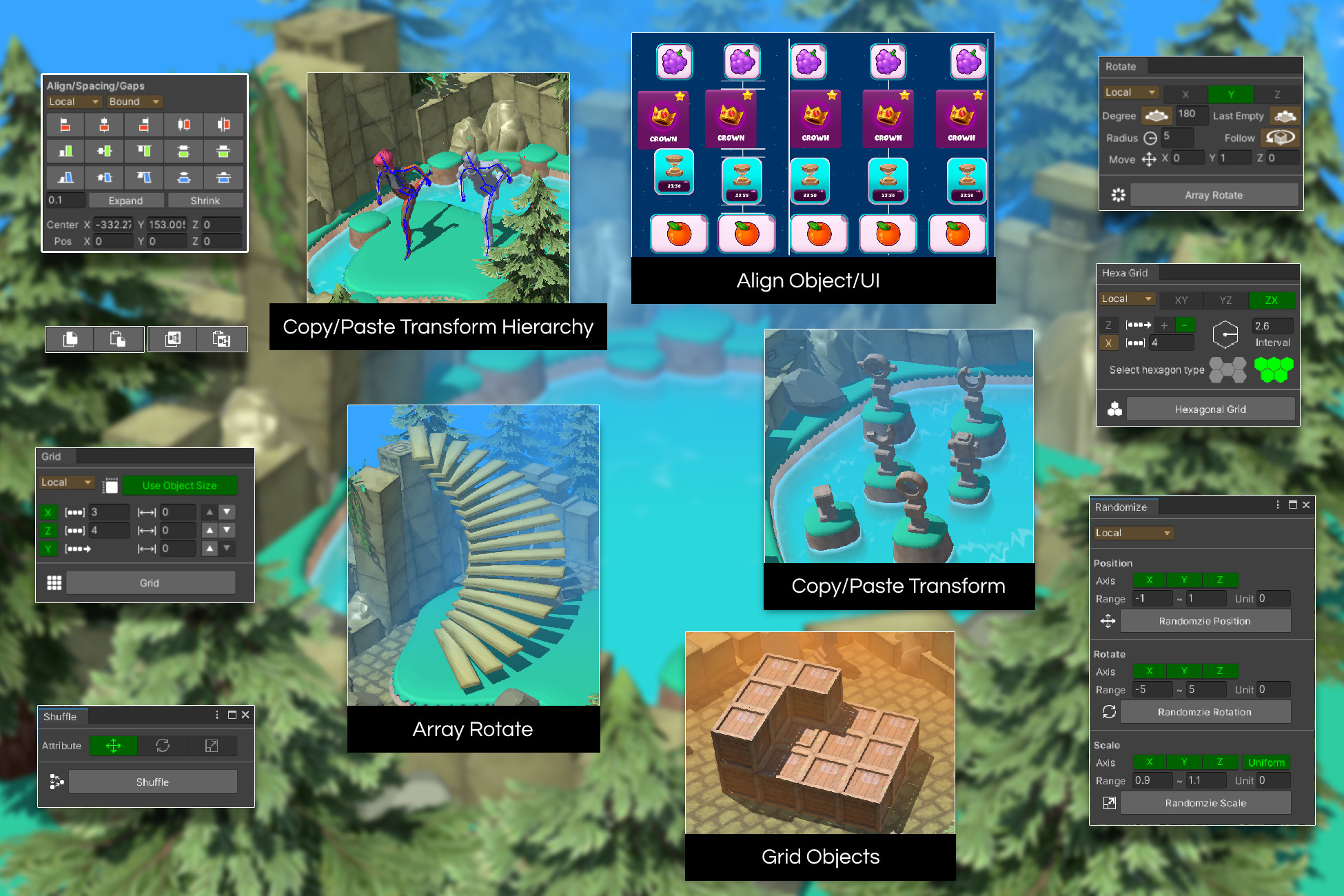
- Align : Transform More provides a range of alignment options to help you organize your objects along the X, Y, or Z axis. Whether you want to align by minimum, center, maximum, same interval, or same gap, Transform More makes it easy to create a well-organized layout.
- Offset : You can now move multiple objects at once along a desired axis, and adjust the spacing between objects
- Rounding Decimal Points : You can remove unnecessary decimal places from transform coordinates.
- Copy/Paste : Transform More makes it easy to copy and paste transform information across multiple objects. Whether you need to copy the position, rotation, or scale of one or more objects, Transform More allows you to quickly copy the information and apply it to other objects in just a few clicks.
- Simple Transform Reset : Transform More makes it easy to repeatedly reset transforms
- Shuffle : With Transform More, you can easily shuffle the position, rotation, and scale information of your selected objects.
- Randomize : Transform More allows you to scatter the position, rotation, and scale of your selected objects within a specific range. This feature is perfect for creating randomized layouts, experimenting with different configurations, or adding a touch of randomness to your project.
- Grid : Transform More makes it easy to arrange your selected objects in a grid layout. You can choose from a variety of grid options, including row and column counts and grid spacing. This feature is perfect for creating organized layouts, aligning UI elements, or positioning game objects with precision.
- Hexa Grid : With Hexa Grid functionality, you can easily arrange objects in a hexagonal grid shape. You can easily adjust the desired axis, distance, direction, and more for the arrangement
- Array Rotate : With Transform More, you can quickly create arc and circle layouts for your selected objects. This feature is perfect for creating radial menus, circular buttons, or decorative elements in your game or UI. You can adjust the radius and angle to get the perfect curve for your design.
- Place to Surface : This feature provides an easy way to place objects onto the surface of another object or ground
- Physics Simulation : This feature helps create natural placement by simulating 3D/2D physical effects of selected objects
(The screenshots are provided for illustrative purposes only and are not included in this asset)
From the publisher's Asset Store listing.
Compatibility
| Unity version | Built-in | URP | HDRP | Custom |
|---|---|---|---|---|
| 2020.3.23f1 | Compatible | Compatible | Compatible | Compatible |
As listed on the Asset Store.