
 View on Asset Store (opens in new tab)
Package details
- Latest version
- Version 1.1
- Last updated
- First released
- Unity version
- 2022.3.16 or later
- Package size
- 9.0 MB
- Files
- 47
- Favorites
- 103
- Views in the past week
- 42
Price tracking
- Last checked
- Tracked since
- Lowest recorded
- Free on
Keywords
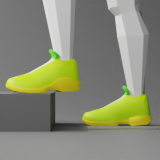
Ropofoo - Foot Controller IK
Ropofoo is a easy to use inverse kinematics controller for foots and knees, which makes charecter movements realistic on any surface.
Price Free
Get it free on Asset Store (opens in new tab)
Affiliate link · Purchases support this site
Price history
Last 6 months
USDAsset preview
1 / 4

Ropofoo - Foot Controller IK screenshot 1


About this asset
Ropofoo has two ways of use:
- Foots placement on any surface calculated with IK system.
- Target IK system for foots and knees.
Approaches can be combined.
Just add Ropofoo - Foot Controller IK on human character to start working. No special settings or animation curves required.
Rotation and position of foots and knees are calculated at the runtime. Smooth movements when it is needed.
From the publisher's Asset Store listing.
Technical details
Key Features:
- Automatic adjustment of legs position and rotation.
- Add foot or knee target to change movements behavior.
- Enabling/Disabling leg will activate transition smoothing.
- Activate "Fix knee" option to avoid not natural behavior.
- Activate "Increased Accuracy" to check surface under the character from toe bones.
- Foot rotations can be constraints.
- Select type of surface checking from raycast and spherecast.
- Ropofoo can be used in "Animate Physics" mode.
Limitations:
- "Animatiom type" must be humanoid.
- Not compatible with "Optimaze Game Object".
Compatibility
| Unity version | Built-in | URP | HDRP |
|---|---|---|---|
| 2022.3.16f1 | Compatible | Not listed | Not listed |
As listed on the Asset Store.