
 View on Asset Store (opens in new tab)
Package details
- Latest version
- 1.3.1
- Last updated
- First released
- Unity version
- 2021.3.5 or later
- Package size
- 78 KB
- Files
- 11
- Favorites
- 7
- Views in the past week
- 6
- Requires
Price tracking
- Last checked
- Tracked since
- Lowest recorded
- Free on
Keywords
Right2Left
switching RTL inside the Unity Editor or Run Time + Create Camel Case For Class Names. use the function SwitchRTL("the text to turn sides"); for changing the text during runtime via Script.
Affiliate link · Purchases support this site
Price history
Last 6 months
USDAsset preview
1 / 6

Right2Left screenshot 1


About this asset
Is the provided content customizable? yes - there is a small interface for the unity editor.
suitable for a particular genre? yes - changing text direction for semic languages.
this package is a small editor that works inside the unity editor and also there is a script that works during runtime.
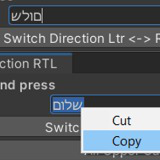
how it works: open the editor from the window menu. It will appear under windows/Change Text Direction RTL. and dock it in a convenient place.
write inside the bar for example: kill all prefabs from older scenes.
then press camel case -> killAllPrefabsFromOlderScenes
and capitalize the first letter KillAllPrefabsFromOlderScenes
then copy the result when you create new script
unity new script -> paste it. done.
When you need to change text direction for example write left to right from within the script editor. call the function SwitchRTL("the text to turn sides");
switching RTL in the Unity Editor And Run Time + Create Camel Case For Function Names... or to write in Arabic, Hebrew, Persian and so... there are two main scripts almost the same. one is the editor script and the other for runtime. you can use the function SwitchRTL("the text to turn sides"); for changing the text during runtime.
From the publisher's Asset Store listing.
Technical details
how it works: open the editor from the window menu. It will appear under windows/Change Text Direction RTL. and dock it in a convenient place.
write inside the bar for example: kill all prefabs from older scenes
then press camel case -> killAllPrefabsFromOlderScenes
and capitalize the first letter KillAllPrefabsFromOlderScenes
then copy the result Before you create a new script.
unity new script -> paste it. done.
Compatibility
| Unity version | Built-in | URP | HDRP |
|---|---|---|---|
| 2021.3.5f1 | Compatible | Compatible | Compatible |
Just Add The text Mesh Pro From the Package Manager.
version 1.3.- Added a button to remove specific characters from the main text in the editor floating menu if needed.
IMPORTANT: Press Enter After Writing !!
Toggle button for using underscore with camel case creation for functions.
Separated Clear buttons for input and Character Text.
As listed on the Asset Store.