
 View on Asset Store (opens in new tab)
Package details
- Latest version
- 1.0
- Last updated
- First released
- Unity version
- 2020.3.30 or later
- Package size
- 3.3 MB
- Files
- 10
- Favorites
- 9
- Views in the past week
- 4
Price tracking
- Last checked
- Tracked since
- Lowest recorded
- $19.99 on
Keywords
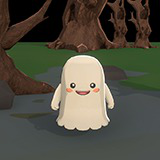
chibi halloween ghost
Make your game spooky but cute! Own a Halloween ghost that can be used for your game!
Affiliate link · Purchases support this site
Price history
Last 6 months
USDAsset preview
1 / 1

chibi halloween ghost video 1 (plays on the Asset Store)
About this asset
Product features:
- Low poly halloween ghost
- Toon shader included in this package
- Animation included (Idle, Float, Peace Sign, Sigh, Attack, Faint, Got Hit, Happy
- Mouth can be changed to frown and happy
- Eyes can be closed and opened
- Eyes can be scripted to blink on intervals
- Cute ghost for a cute yet spooky game
From the publisher's Asset Store listing.
Technical details
- There are no required third party software for this product
- There is already a free toon shader included in this package which will give the model a cute toony look
This ghost model only has:
2,592 vertices
2,473 faces
4,874 tris
File size: 1,871 kb
It contains two (2) textures:
skin
Resolution = 2048 x 2048
File Size = 1,732 kb
PNG Format
emote:
Resolution = 2048 x 2048
File Size = 1.157 kb
PNG Format
There will be two (2) materials which should fit the Textures:
Ghost_Mat which can be used to attach the "skin" Texture
Emotes_Mat which can be used to attach the "emote" Texture
This model also have eight (8) different animations:
Idle
Floating
Peace
Sigh
Happy
Attack
Dead
Hit
There are two toon shaders which are included in this package and they can be found under
1) Assets/Assets - DG_Shader/Toon/Toon_Surface/Outline
This shader can be used to outline the character and can be adjusted in whichever way you feel.
2) Assets/Assets - DG_Shader/Toon/Toon_Surface/Toon_SurfaceChar
This shader can be used to give the character a toony surface
On the model's Skinned Mesh Renderer you may adjust the settings and if it can receive shadows or not. It is recommended to not receive shadows to have a better use of the character's toon shading though it still does work to receive shadows.
Compatibility
| Unity version | Built-in | URP | HDRP |
|---|---|---|---|
| 2020.3.30f1 | Compatible | Not listed | Not listed |
As listed on the Asset Store.