
 View on Asset Store (opens in new tab)
Package details
- Latest version
- 1.1
- Last updated
- First released
- Unity version
- 2021.3.45 or later
- Package size
- 6.3 MB
- Files
- 13
- Favorites
- 16
- Views in the past week
- 24
Price tracking
- Last checked
- Tracked since
- Lowest recorded
- Free on
Keywords
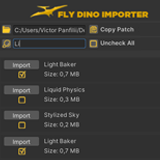
Local Asset Importer
Streamline your asset management process with Local Asset Importer. This powerful utility tool optimizes your workflow by automatically scanning your disk for all .unitypackage files and easy import.
Affiliate link · Purchases support this site
Price history
Last 6 months
USDAsset preview
1 / 5

Local Asset Importer screenshot 1


About this asset
Tired of manually searching through endless folders to find and import .unitypackage files one by one? Local Asset Importer revolutionizes your asset integration process. This powerful editor extension provides a clean, centralized interface to instantly access, manage, and import all local Unity packages stored on your disk.
Stop disrupting your creative flow with tedious administrative tasks. Whether you are migrating assets between projects, restoring backups, or managing a large library of common tools, Local Asset Importer significantly reduces setup time and enhances productivity by centralizing your local asset library.
Core Features
- Automatic Asset Discovery: Point the tool to a root folder, and it will recursively scan all subdirectories to find every available .unitypackage file.
- Intuitive UI & Filtering: View all found packages in a clean, scrollable list directly inside the Unity Editor. Quickly search and filter results to find the exact asset you need in seconds.
- Batch Import Functionality: Select single or multiple packages and import them simultaneously with a single click. No more repetitive drag-and-drop operations.
Who Is This For?
- Developers with Multiple Projects: Easily reuse assets and internal tools across different projects without navigating complex file structures.
- Asset Collectors: Efficiently manage large local libraries of purchased or downloaded assets from various sources.
- Teams: Standardize the import process for shared utilities and art packages within your team.
- Anyone Looking to Save Time: Drastically cut down on the time spent on project setup and asset migration.
From the publisher's Asset Store listing.
Technical details
Core Functionality
- Recursive Folder Scanner: Automatically scans a selected root directory and all its sub-folders to detect every available .unitypackage file.
- Batch Import Interface: Select multiple packages from the generated list and import them all simultaneously. Ideal for project setup and large-scale asset migration.
- Centralized Asset Library View: Displays all found packages in an intuitive, searchable list within the editor window for superior organization and access.
- Save & Load Search Paths: Save frequently used directory paths to quickly access different asset libraries across sessions.
Usability & Integration
- Lightweight Editor Extension: Built to be efficient and non-intrusive, ensuring zero impact on runtime performance or editor speed.
- Drag-and-Drop Support: Offers a drag-and-drop area within the tool's window for quick-adding specific folders to the scan list.
- Broad Compatibility: Fully compatible with modern Unity editor versions (e.g., Unity 2020.x, 2021.x, 2022.x and newer).
Compatibility
| Unity version | Built-in | URP | HDRP | Custom |
|---|---|---|---|---|
| 2021.3.45f1 | Compatible | Compatible | Compatible | Compatible |
As listed on the Asset Store.