
 View on Asset Store (opens in new tab)
Package details
- Latest version
- 1.0
- Last updated
- First released
- Unity version
- 2021.3.4 or later
- Package size
- 9.2 MB
- Files
- 60
- Favorites
- 286
- Views in the past week
- 41
Price tracking
- Last checked
- Tracked since
- Lowest recorded
- Free on
Keywords
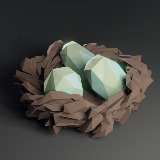
Low Poly Bird: Nests
25 unique stylized bird nests, each setup with LODs - 100% free to use
Affiliate link · Purchases support this site
Price history
Last 6 months
USDAsset preview
1 / 7

Low Poly Bird: Nests screenshot 1


About this asset
This pack includes a collection of 25 unique bird nests, each already setup and ready to use.
Every bird nest consists of three different LODs, so technically there are 75 meshes in this pack!
You are completely free to use the assets from this pack wherever you want!
The nests perfectly fit with the Low Poly Bird characters, so make sure to check them out aswell.
About the Bird Nests:
All the nests where generated with Blender's new geometry node system which makes all nests 100% procedural. If you want to try the Nest Gen out yourself you can do so for free by downloading the source files here: https://pulsarbytes.gumroad.com/l/nestgen
From the publisher's Asset Store listing.
Technical details
Number of meshes: 75
Number of prefabs: 25
LOD information: 3 LODs
Compatibility
| Unity version | Built-in | URP | HDRP | Custom |
|---|---|---|---|---|
| 2021.3.4f1 | Compatible | Compatible | Compatible | Compatible |
For UPR you need to convert the shaders:
- Open your Project in Unity, and go to Edit > Render Pipeline > Universal Render Pipeline.
- According to your needs, select either Upgrade Project Materials to URP Materials or Upgrade Selected Materials to URP Materials.
Documentation: https://docs.unity3d.com/Packages/[email protected]/manual/upgrading-your-shaders.html
As listed on the Asset Store.