
 View on Asset Store (opens in new tab)
Package details
- Latest version
- 1.7
- Last updated
- First released
- Unity version
- 6000.6.2 or later
- Package size
- 7.8 MB
- Files
- 137
- Favorites
- 9
- Views in the past week
- 20
Price tracking
- Last checked
- Tracked since
- Lowest recorded
- $8.99 on
Keywords

OnScreenKeyboard
On Screen Keyboard is an easy-to-use system to create and display keyboards within games.
Affiliate link · Purchases support this site
Price history
Last 6 months
USDAsset preview
1 / 7

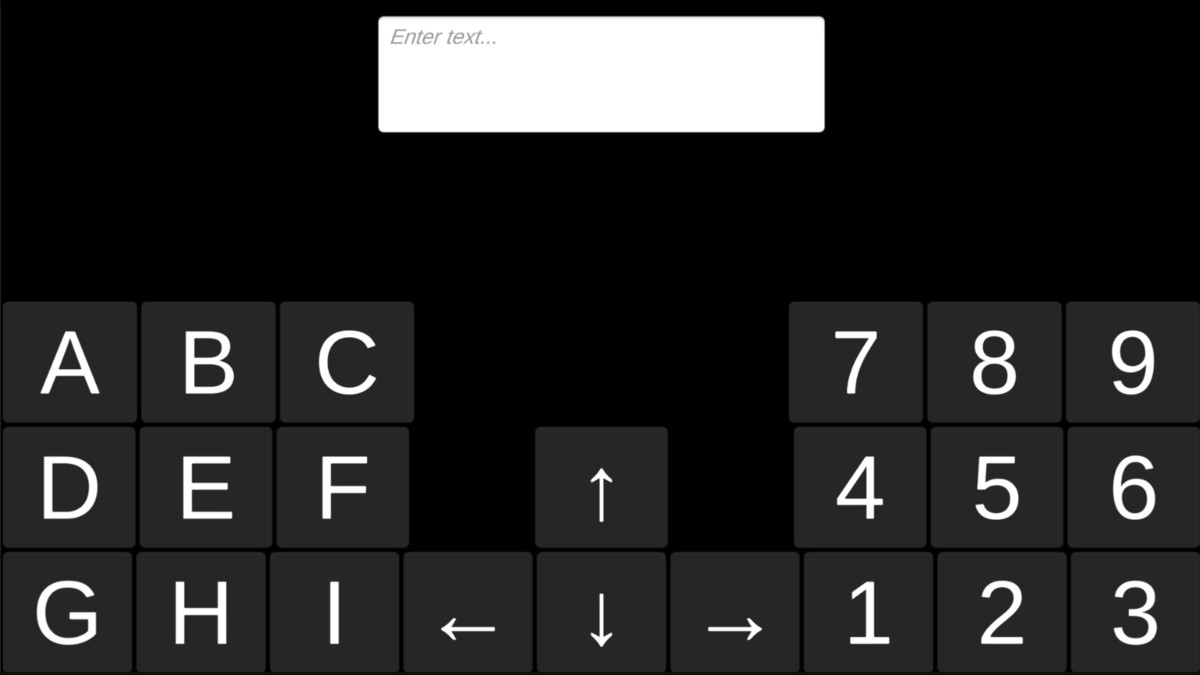
OnScreenKeyboard screenshot 1


About this asset
On-Screen Keyboard is a flexible, fully data-driven virtual keyboard system for Unity - built for touch UIs, kiosks, VR/AR overlays, accessibility flows, and any game or app that needs in-app text input without depending on the OS soft keyboard.
Drop a prefab in your scene, point it at a TextMesh Pro input field, and you have a finger-friendly keyboard with multi-language support, long-press accents, audio + haptic feedback, dynamic shift / caps / language switching, and RTL handling out of the box. Every keyboard is a ScriptableObject - author your own layouts in a tiny text DSL, no prefab editing required.
Why developers pick it
- Zero-code setup. `GameObject → UI → On-Screen Keyboard` scaffolds a fully wired keyboard + TMP input field in one click.
- Production-ready. Object pooling, allocation-free hot path, deterministic timer for tests, custom Inspectors with live previews.
- Pluggable everywhere. Swap the layout, the theme, the composition pipeline, the suggestion source, or the accent popup UI - without forking the package.
- Fully documented C# source code. Read it, extend it, override anything.
Features
- Layouts & languages
- Data-driven layouts - describe keyboards as multi-line strings, no prefab edits.
- Bundled layouts: English, Hebrew, Korean, French, Spanish, German, Russian, Arabic - lower- and upper-case variants where applicable.
- Dynamic layout switching: Shift, Caps Lock, language toggles, custom modifiers via `LayoutChanger`.
- Right-to-Left (RTL) auto-detection per layout - perfect for Hebrew, Arabic, Persian, Urdu.
- Row-weight & column-group DSL for compact symbol rows, side-by-side numpads, and split layouts.
- Text composition
- Korean Hangul syllable composition - assembles Jamo into complete syllable blocks, including all 11 compound finals (겹받침) and 7 compound medials (이중모음).
- Latin dead-key composition - circumflex (`^`), diaeresis (`¨`), grave (`` ` ``), acute (`´` / `'`), tilde (`~`) compose with vowels into precomposed accented characters (e.g. `^` + `e` → `ê`). Drives the bundled French and Spanish layouts.
- Pluggable composition pipeline via `ITextCombiner` - add your own ligatures, locale orthography, or IME rules.
- Composition undo - Backspace after a composition restores the pre-composed buffer instead of breaking the glyph.
- Pre-edit highlighting - visualize in-progress composition (lone dead key, partial Hangul) with TMP underline tags.
- Long-press & accents (zero wiring)
- Hold-to-repeat for backspace, word-backspace, and the four arrow keys.
- Accent popup - long-press `a` → `à á â ä ã å æ ā` strip pops up above the key, clamped inside the keyboard's bounds. Selecting a variant inserts it like any other key.
- Drop in `AccentPopupView` and it just works; or hook the manager event for a fully custom UI.
- Built-in accent table for common Latin diacritics; extend it in one line of code.
- Feedback
- Audio click on every key press, with per-key sound overrides via `KeyDisplay.feedbackClip`.
- Haptic vibration on Android / iOS via `Handheld.Vibrate()`.
- Throttling, master mute, and a settings-UI hookup snippet - all built in.
- Theming
- Per-key visual overrides via `KeyboardButtonsDisplay` - text, icon, colors, tooltip, accessibility label, audio.
- Three built-in palettes (Light / Dark / High Contrast - WCAG AA / AAA compliant).
- Theme generator menu - `Tools → On-Screen Keyboard → Create Theme Presets` scans your layouts and produces themed displayer assets.
- TMP integration
- Companion adapter (`TextboxLeyboardAdapterScript`) translates key events into `TMP_InputField` edits - insert, backspace, word-backspace, enter, arrows, function keys, numpad, escape, etc.
- Tracks the caret across overflowing text.
- Honors the layout's RTL flag automatically.
- Accessibility
- Sticky modifier helper (`Off → Armed → Locked → Off`) for one-handed shift / ctrl / alt input.
- Accessibility label field per key, surfaced for screen readers and switch control.
- Min touch target size enforcement on every key (Apple HIG / Material defaults).
- Editor tooling
- Custom inspectors with live grid previews of every layout / theme / mapping.
- Layout linter with per-line validity badges and asset-import warnings.
- GameObject menu to scaffold a wired keyboard in one click.
- Performance
- Object pooling for keys, rows, and column-group containers across layout switches.
- Allocation-free pointer hot path - plain keys skip the long-press timer entirely.
- Pure helpers for layout, accent layout, sticky modifier, Korean / dead-key composition - fully testable without a Unity scene.
Use cases
- Touch / mobile games with in-app text entry (chat, name entry, search)
- Kiosks, point-of-sale, self-service terminals
- VR / AR overlays where the OS keyboard is unavailable
- Accessibility-first UIs with sticky modifiers and large touch targets
- Multi-language apps (Hebrew, Arabic, Korean, European Latin scripts)
- Educational / language-learning apps
- Custom IME-style input flows (autocomplete suggestions, accent variants, dead keys)
What's included
- Full C# source (no DLLs)
- 8 ready-to-use language layouts (lower + upper case)
- 9 demo scenes - full keyboard, keypad, two keyboards, Mac theme, colorful, Korean, column groups, accents, audio + haptic feedback
- 3 built-in theme presets (Light / Dark / High Contrast)
- TMP-ready prefabs and integration adapter
- Custom Inspectors, GameObject menu, welcome window, layout linter
- Comprehensive documentation and inline XML docs
From the publisher's Asset Store listing.
Compatibility
| Unity version | Built-in | URP | HDRP | Custom |
|---|---|---|---|---|
| 6000.6.2f1 | Compatible | Compatible | Compatible | Compatible |
As listed on the Asset Store.