
 View on Asset Store (opens in new tab)
Package details
- Latest version
- 1.1.0
- Last updated
- First released
- Unity version
- 2021.3.15 or later
- Package size
- 3.0 GB
- Files
- 695
- Favorites
- 3
- Views in the past week
- 6
- Requires
Price tracking
- Last checked
- Tracked since
- Lowest recorded
- $24.49 on
Keywords
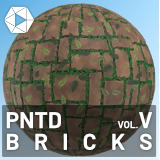
PNTD Stylized Bricks Substances and Materials
Stylized PBR brick Substances and materials for pathways and cities.
Affiliate link · Purchases support this site
Price history
Last 6 months
USDAsset preview
1 / 9

PNTD Stylized Bricks Substances and Materials screenshot 1


About this asset
PNTD Bricks is a highly-customizable set of 64 PBR materials and 12 Substances, designed for hand-painted / stylized environments.
Every Substance has dozens of customization options, with plenty of preset files to offer great starting points.
Check out the rest of the PNTD lineup:
Save over 25% by purchasing these all with the PNTD Mega Pack!
From the publisher's Asset Store listing.
Technical details
Using Substances in Unity requires the Substance3D for Unity asset package.
Every Substance material included can be customized in-editor, and at runtime, and dynamically render from 512x512 to 4096x4096.
If you want to use a static workflow instead, the 12 included Substance presets have been pre-baked as 2K PBR textures with maps for:
- BaseColor
- Normal
- Emissive (where necessary)
- Height
- Metallic
- Roughness
- Ambient Occlusion
Supports built-in and URP workflows.
Additionally, you can use external tools like Substance Player to customize and batch-export the Substances into textures.
For runtime use-cases, a consts file has been included that automatically maps the Substance parameters, and offers in-depth docstrings to give you the documentation as you type.
For further help, see the documentation (polylabs.co) or contact us at [email protected]
Compatibility
| Unity version | Built-in | URP | HDRP |
|---|---|---|---|
| 2021.3.15f1 | Compatible | Compatible | Not listed |
If using URP, don't import the Materials or MaterialsExample, and make sure you have Materials_URP.unitypackage selected. Once imported, open the package to install the URP materials.
As listed on the Asset Store.