
 View on Asset Store (opens in new tab)
Package details
- Latest version
- 1.1
- Last updated
- First released
- Unity version
- 2021.3.6 or later
- Package size
- 1.3 MB
- Files
- 20
- Favorites
- 6
- Views in the past week
- 3
Price tracking
- Last checked
- Tracked since
- Lowest recorded
- $4.99 on
Keywords
Inspector Attributes Editor Style
- Price drop
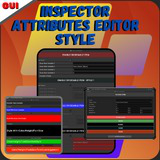
Often your code will get big and messy in the unity inspector, But this problem is over, Now you can organize your inspector simply and easily, making many style changes.
Lowest recorded price
Get 33% off on Asset Store (opens in new tab)Affiliate link · Purchases support this site
Price history
Last 6 months
USDAsset preview
1 / 16

Inspector Attributes Editor Style screenshot 1


About this asset
Having a well-organized code is essential to facilitate the creation of your game. Creating Attributes for the unity inspector is not easy.
But now everything is very simple, with just one line of code, you can create amazing styles and organize your code.
●You can Add Awesome custom headers, modifying color, size, alignment and other things...
●You can add custom fields with several variables, making it easier to view the class in the inspector.
●You can enable or disable editing variables that are not being used.
●You can hide or show in the code the variables that are not being used.
All this with just one line of code for each edition.
New features will be added in future updates.
Suport : https://www.mushroomangelsgames.com/
Email: [email protected]
From the publisher's Asset Store listing.
Technical details
● MushroomAngelsGames_EnableIf - Enable or disable gameobject editing in the inspector menu on Unity.
● MushroomAngelsGames_GroupAtributes - Create a Box that organizes the items in the inspector menu.
● MushroomAngelsGames_Header - Create a header to improve organization in the inspector.
● MushroomAngelsGames_ShowIf - Hide variables that are not being used in the inspector.
Compatibility
| Unity version | Built-in | URP | HDRP | Custom |
|---|---|---|---|---|
| 2021.3.6f1 | Compatible | Compatible | Compatible | Compatible |
The entire inspector customization system is very simple, only compatible with Unity in any version.
There are few compressed files and they do not modify or alter the project settings.
You can use it in any C# class, just importing a single library, and calling its constructor methods.
As listed on the Asset Store.