
 View on Asset Store (opens in new tab)
Package details
- Latest version
- 2.0.0
- Last updated
- First released
- Unity version
- 2019.4.40 or later
- Package size
- 343 KB
- Files
- 10
- Favorites
- 45
- Views in the past week
- 8
Price tracking
- Last checked
- Tracked since
- Lowest recorded
- Free on
Keywords
ProbeGridAndCut
Make a grid of Light Probes, then Cut unwanted ones.
Affiliate link · Purchases support this site
Price history
Last 6 months
USDAsset preview
1 / 9

ProbeGridAndCut screenshot 1


About this asset
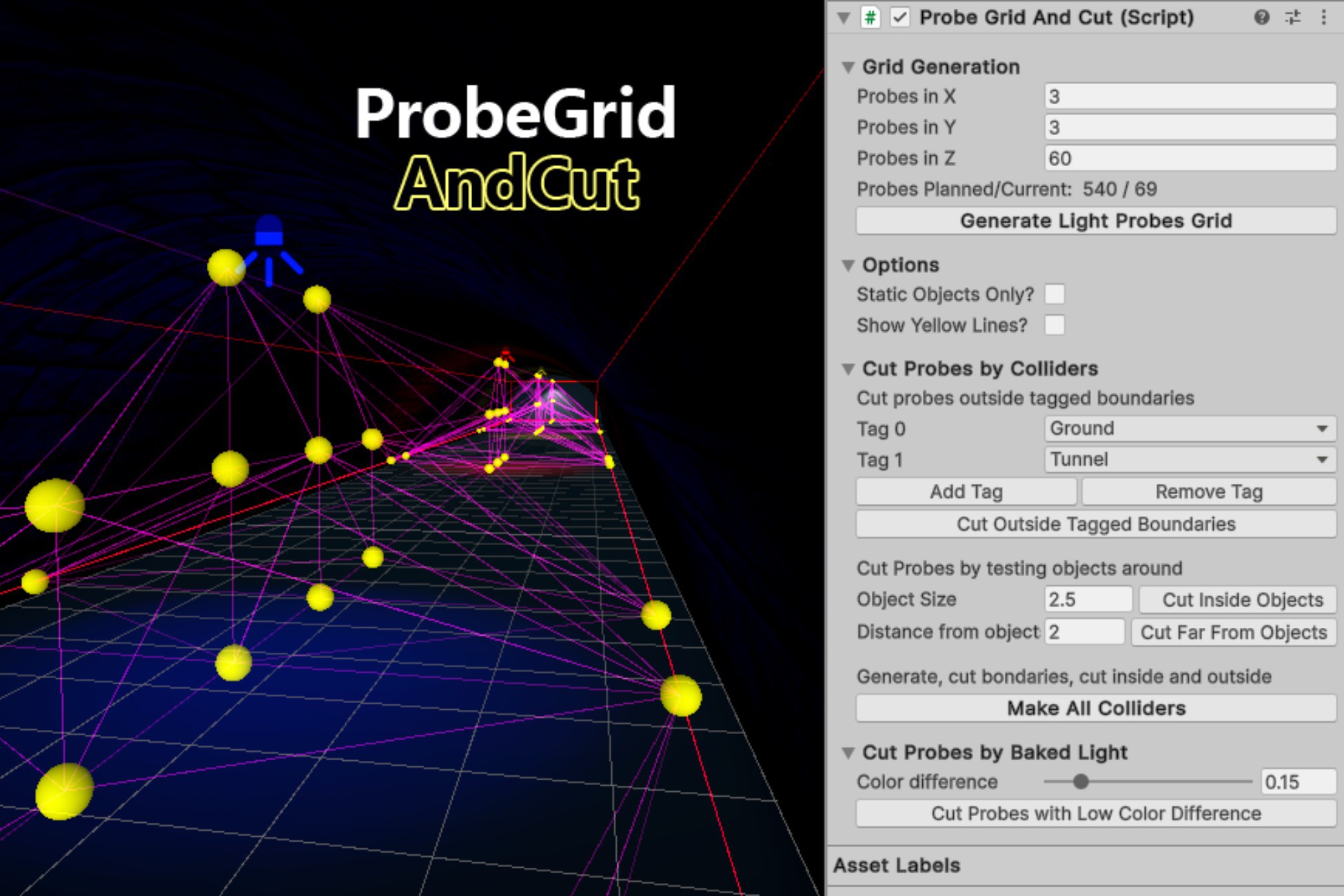
ProbeGridAndCut is a free editor extension that helps on the demanding task of place Light Probes into the scene. It lets you generate a grid of light probes, and then you can delete unwanted ones with provided tools.
New in v2.0
Now you can cut Probes based on Baked Light information!
How to Use
Right click on Hierarchy window -> Light -> Probe Grid And Cut.
You Are in Control of the Grid
ProbeGridAndCut lets you choose the exact number of light probes on each axis without complications.
Cutting Light Probes Based on Colliders
- Cut based on Tags: There are light probes passing through the floor? Just select the tag you used for the ground and cut out those probes!
- Cut probes far from objects: There are no objects near the probe? Maybe is not needed! Select a test radius and cut probes that are far from everything.
- Cut probes inside objects: Oh no, there's a probe inside an object spoiling the lighting! Define the max dimension of the object and get rid of this bad apple.
Cutting Light Probes Based on Lighting
- Cut Probes by Baked Light: Probes that have the same light information of their neighbors are probably useless, so you can cut them all! Useful for scenes with baked shadows and artificial light.
Limitations
ProbeGridAndCut is not designed to work with a huge number of Light Probes, it was made to handle a bunch of relatively small grids (less than 10,000 probes per group).
If you want to place something like 100,000 probes, please split on smaller grids.
For more information please read the Manual
Ending notes
This tool was entirely made on my free time. If you want to support me, please make an awesome asset compatible with URP and publish for free to the community!
From the publisher's Asset Store listing.
Technical details
Compatibility
I made an effort to make this tool compatible with most versions of Unity possible, from Unity 5.6 to the present.
ProbeGridAndCut is independent of the rendering pipeline and platform in use. In the Demo scene, you may have to convert the material to URP or HDRP using Unity's Render Pipieline Converter (or just delete the DemoScene folder).
Github Page
The code is open source, and you can take a look at:
Compatibility
| Unity version | Built-in | URP | HDRP |
|---|---|---|---|
| 2019.4.40f1 | Compatible | Compatible | Compatible |
As listed on the Asset Store.