
 View on Asset Store (opens in new tab)
Package details
- Latest version
- 1.1
- Last updated
- First released
- Unity version
- 2019.4.23 or later
- Package size
- 177 KB
- Files
- 5
- Favorites
- 473
- Views in the past week
- 76
Price tracking
- Last checked
- Tracked since
- Lowest recorded
- Free on
Keywords
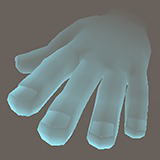
Ghostly Hand Shader Free (VR)
Ghostly Hand shader for VR. No overlapping pixels! Just drag and drop to your hand model and adjust the parameters to your liking.
Affiliate link · Purchases support this site
Price history
Last 6 months
USDAsset preview
1 / 2

Ghostly Hand Shader Free (VR) screenshot 1

About this asset
WARNING: DOES NOT INCLUDE THE HAND MODEL. ONLY SHADER AND MATERIALS
Have you been searching for a non-overlapping transparent shader for your VR game? Search no more! Just drag and drop the materials and adjust the parameters to your liking.
The best thing is, it's completely free! Use it in any way you want. Just credit me as wolderado if you want but it's not required
The shader uses vertex positions so scaling affects the visual.
Supports Built-In & URP
From the publisher's Asset Store listing.
Technical details
- 7 parameters like:
- Color
- Outer Rim effect
- Hand opacity
- Wrist opacity
Parameter descriptions:
Fresnel Bias: Increases the opacity of the whole material
Fresnel Scale: Sets the power (or brightness) of the outer edge (fresnel line)
Fresnel Power: Sets the size of the outer edge should be
Fresnel Color: Material Color
Point2: Sets the smoothness of the transition in the Z-Axis in Vertex Space
Point3: Another point to set the smoothness of the transition in the Z-Axis in Vertex Space
Wrist opacity: Sets the opacity of the other half of the material
The combination of Point2 & Point3 variables produces different results. They indicate how far away in the Z-axis the transitions should occur. For example, you can make the tip of the hands more visible and make the rest smoothly transition (Point2: -1, Point3: 1.5)
Or you can make the transition super hard and make the hand visible from the wrist (Point2: 1, Point3: 8). You can check out example materials in the built-in package for other examples.
Compatibility
| Unity version | Built-in | URP | HDRP |
|---|---|---|---|
| 2020.3.21f1 | Compatible | Compatible | Not listed |
| 2019.4.23f1 | Compatible | Not listed | Not listed |
As listed on the Asset Store.