
 View on Asset Store (opens in new tab)
Package details
- Latest version
- 2.0.0
- Last updated
- First released
- Unity version
- 2020.3.36 or later
- Package size
- 207 KB
- Files
- 10
- Favorites
- 33
- Views in the past week
- 13
Price tracking
- Last checked
- Tracked since
- Lowest recorded
- Free on
Keywords
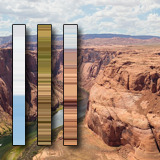
Gradient Picker
Conveniently create gradients by sampling the color at the mouse position on your desktop, directly from within the Unity Editor.
Affiliate link · Purchases support this site
Price history
Last 6 months
USDAsset preview
1 / 5

Gradient Picker screenshot 1


About this asset
Gradient Picker for Unity is an editor extension which allows you to create gradient images directly from within Unity by sampling the color at the mouse cursor.
This works in a way that it's possible to retrieve colors even from outside the Unity Editor, i. e. you can pick gradients from the desktop, photos, etc.
The gradients can be saved as images and used in professional Unity Assets like MicroSplat Global Texturing in order to e. g. give the terrain a native gradient look.
The gradients can also be used to create Presets for Unity's internal gradient picker which facilitates selecting colors.
Export Options
The gradient can be exported as single line texture with various rotation options. The Unity gradient can be exported as texture with custom dimensions which can then be used in e. g. ShaderGraph.
Integrations
Gradient Picker integrates with MicroSplat Global Texturing. It contains presets for the gradients to be exported in a format that MicroSplat supports. After the first export the existing image can be updated at the click of a button in order to achieve a smooth workflow.
Links
Credits
The Asset Store images that were used for sampling from photos were used from Wikipedia.
From the publisher's Asset Store listing.
Technical details
Create gradients by sampling the screen at the mouse positions.
Compatibility
| Unity version | Built-in | URP | HDRP | Custom |
|---|---|---|---|---|
| 2020.3.36f1 | Compatible | Compatible | Compatible | Compatible |
Compatible with Unity 6.
As listed on the Asset Store.