
 View on Asset Store (opens in new tab)
Package details
- Latest version
- 1.0
- Last updated
- First released
- Unity version
- 2020.1.17 or later
- Package size
- 79 KB
- Files
- 7
- Favorites
- 58
- Views in the past week
- 14
Price tracking
- Last checked
- Tracked since
- Lowest recorded
- $9.99 on
Keywords
DrawPath
Affiliate link · Purchases support this site
Price history
Last 6 months
USDAsset preview
1 / 6

DrawPath screenshot 1


About this asset
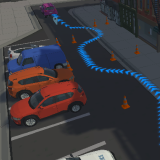
DrawPath is an easy way to draw a list of markers or points along a path on a surface and to animate them.
The tool takes care of curving the markers when the path meanders. The generated path can then be used in the game. The Path can also be animated at runtime at various speeds.
Please note that the images with the city are not a part of this package but are used as an example of how to generate a path in a 3D scene.
Usage
To use the tool, import the package and restart Unity. Then click the tools menu and select the DrawPath option. You can pin the window in the editor to make it easy to switch to. You can then use SHIFT + MIDDLE MOUSE button to drop a pointer and then again to drop a second pointer and so on to generate the path.
Note that some paths may not generate if an incompatible set of options is selected e.g. when the distance between markers is set to high and new points are dropped very close together which would result in no markers being created.
Please see the DrawPath Documentation in the asset for a description of all the options.
From the publisher's Asset Store listing.