
 View on Asset Store (opens in new tab)
Package details
- Latest version
- 2
- Last updated
- First released
- Unity version
- 2019.4.28 or later
- Package size
- 1.5 GB
- Files
- 1,211
- Favorites
- 12
- Views in the past week
- 9
Price tracking
- Last checked
- Tracked since
- Lowest recorded
- $4.99 on
Keywords

Floor Grate Pack V2
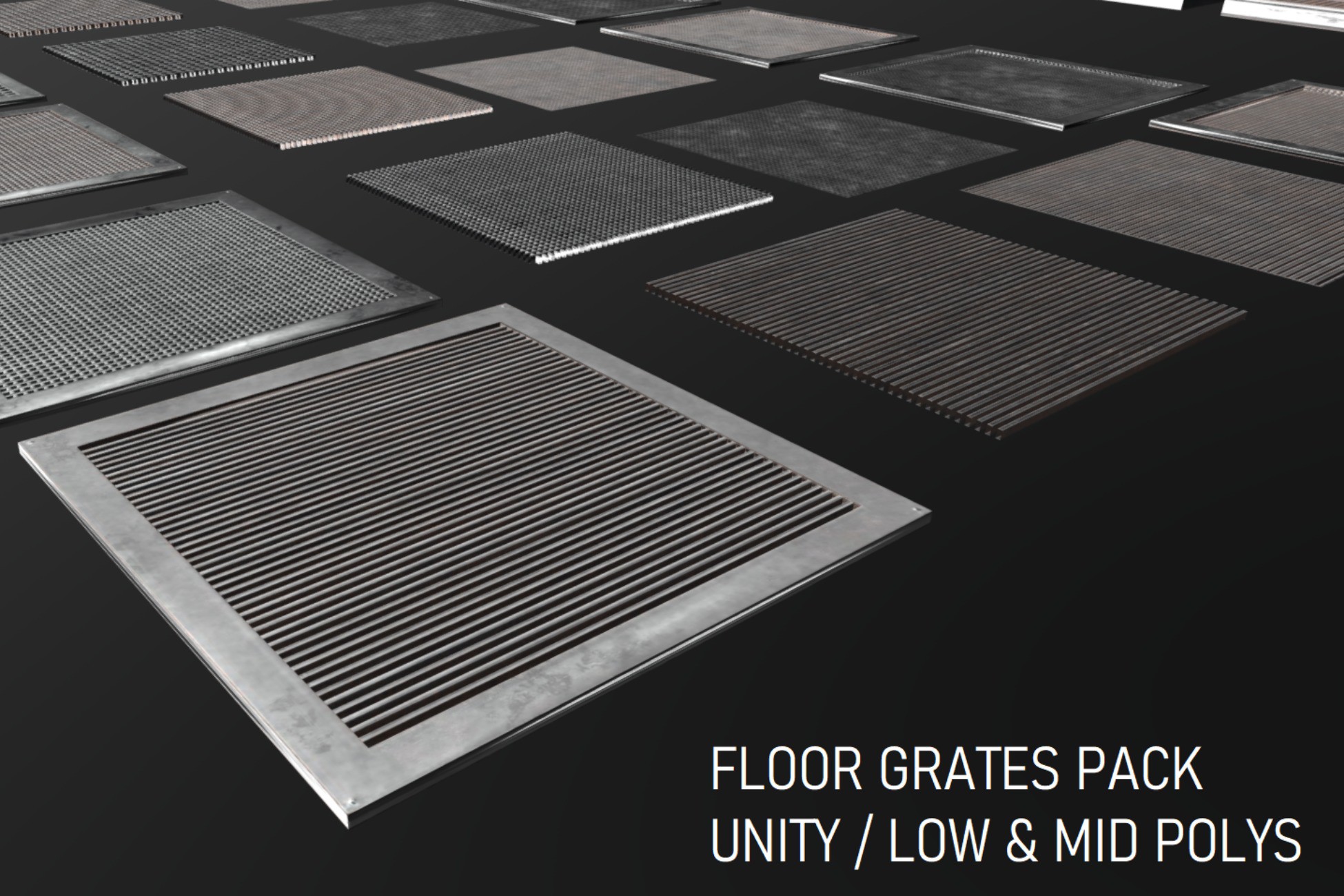
V2 Floor Grate Pack for your games or scenes [Low and Mid Poly]. Modular style with several parts and variations. 50 unique grates and around 200 prefabs.
Affiliate link · Purchases support this site
Price history
Last 6 months
USDAsset preview
1 / 52

Floor Grate Pack V2 screenshot 1


About this asset
Floor Grate Pack for your games or scenes [Low and Mid Poly] -> Modular style with several parts and variations -> 50 unique grates and around 200 prefabs.
Includes plenty of grates for any of your needs. Plus Modular style with several parts if you need that too.
V2 available only for Unity 2020.3.24f1
NOTE FOR THE SKETCHFAB VIEWER/INSPECTOR: several meshes that you see in the viewer [HIGH POLY] are not included on this pack.
->I removed all meshes that go beyond 1k in tris leaving only LOW and MID poly meshes on this pack.
->This pack includes several variations not seen in the viewer.
->Please refer to the screenshots for more information.
I left the inspector in there for you to get a general glimpse at the poly count/quality of the pack. More info on the technical details plus more detailed polycount and included content.
From the publisher's Asset Store listing.
Technical details
------------------------------------------------------------------------------------------
Note for the sketchfab inspector: several meshes that you see in the viewer are not included on this pack [High Poly]. I removed all meshes that go beyond 1k in tris leaving only LOW and MID poly meshes on this pack. Also, this pack includes several variations not seen in the viewer. Please refer to the screenshots for more information.
I left the inspector in there for you to get a general glimpse at the poly count/quality of the pack. More info below.
------------------------------------------------------------------------------------------
V2 available only for Unity 2020.3.24f1
V2 notes / 1/6/2022
V2 includes 50 new grates plus variations:
- 50 grates [1 mesh]
- 50 grate bars [1 mesh]
- Each grate has a variation [no_opacity]
- This makes 200 new prefabs.
PACK CONTENT/DETAILS:
- Texture Resolution: 2048x2048
- Textures PBR [5x maps per mesh]: PNG / Albedo, AO, Height, Metallic, Normal
- Texture Number for the entire pack: 645 Textures
V2 Poly Count:
- Grates 12 to 50: each mesh is 36 tris [Blender statistics]. think of a square with a hole in the middle and a plane in the middle.
- GrateBars 12 to 50: each mesh is about 2 tris [Blender statistics], think of a basic plane but with pbr textures.
- For V1 information, please check the "OLD V1 Information" section below.
The grate bars can be used in conjunction with the bases from V1 in case you need the mesh separated.
Also, several materials, pointing to the GrateBars ones [Grates 12 to 50], work well with basic unity shapes. Shapes like the cube, sphere, cylinder, plane, capsule and quad. These could be used to make other kind of basic models for your maps and scenes. Walls, or floors, even crates possibly may work too, etc. Note: this is not intentional, but an extra on how you could use the contents of this pack. Please refer to the screenshots for more info.
Something important!
1) the material for the grates bars are not rendered double sided!
2) No Custom Lightmaps included. Only meshes with 1x UV channel
Please review screenshots for more information and see if this is what you need before purchasing. Thank you.
V1 content changes in this release
Changed material options from cutout to fade for the following meshes:
M_Grate_1_Bars_LOW
M_Grate_1_Bars_LOW_Clean
M_Grate_5_Bars_LOW
M_Grate_6_Bars_LOW
M_Grate_10_Bars_LOW
M_Grate_11_Bars_LOW
M_Grate_1_LOW
M_Grate_4_LOW
M_Grate_6_LOW
M_Grate_7_LOW
Made changes since the cutout method makes the material dissapear [alpha] in the distance. Fade method works well while in-game and in-editor. Tested under current scene project.
V1 still available, but only for the original package upload version 2019.4.28f1.
Please remember, V2 is not available for the original release version 2019.4.28f1.
------------------------------------------------------------------------------------------
OLD V1 Information:
PACK CONTENT/DETAILS:
Texture Resolution: 2048x2048
Textures PBR [5x maps per mesh]:
PNG / Albedo, AO, Height, Metallic, Normal
Texture Count:
Grate 1 pack -> 50 Textures
Grate 2 pack ->40 Textures
Grate 3 pack -> 40 Textures
Grate 4 pack -> 20 Textures
Grate 5 pack -> 25 Textures
Grate 6 pack -> 20 Textures
Grate 7 pack -> 20 Textures
Grate 8 pack -> 10 Textures
Grate 9 pack -> 10 Textures
Grate 10 pack -> 10 Textures
Grate 11 pack -> 10 Textures
Modular [Optional]
2x Bases that can be used with individual bars
Mid Poly versions included for grate and bars
Low Poly versions included for grate and bars too
Each mesh: 1m x 1m (x / y) - both bases vary in height
Modular Style as a variation for most of them [Included 2x Base Mesh / x12 Bars Mesh]
- Base 1: Uses grates 1 to 4 [First batch - left area]
- Base 5: Uses grates 5 to 11 [Second batch - right area]
Low Polygon full baked floor grates also included. The bar meshes also could be used to build fences or walls for your levels/scenes.
Poly Count
LOW Versions - Go from about 4 tris to about 80 tris max
MID Versions -> Go from about 80+ tris but do not exceed beyond 1k tris
More info about specific poly count below.
Grate 1 pack
SM_Grate_1 --> 200 tris
SM_Grate_1_Bars -> 168 tris
SM_Grate_1_Bars_Clean -> 168 tris
SM_Grate_1_Bars_LOW -> 2 tris
SM_Grate_1_Bars_LOW_Clean -> 2 tris
SM_Grate_1_Base -> 32 tris
SM_Grate_1_Base_Clean -> 32 tris
SM_Grate_1_Clean -> 200 tris
SM_Grate_1_LOW -> 36 tris
SM_Grate_1_LOW_Clean -> 36 tris
Grate 2 pack
SM_Grate_2 -> 368 tris
SM_Grate_2_Bars -> 336 tris
SM_Grate_2_Bars_Clean -> 336 tris
SM_Grate_2_Bars_LOW -> 2 tris
SM_Grate_2_Bars_LOW_Clean -> 2 tris
SM_Grate_2_Clean -> 368 tris
SM_Grate_2_LOW -> 36 tris
SM_Grate_2_LOW_Clean -> 36 tris
Grate 3 pack
SM_Grate_3 -> 736 tris
SM_Grate_3_Bars -> 704 tris
SM_Grate_3_Bars_Clean -> 704 tris
SM_Grate_3_Bars_LOW -> 2 tris
SM_Grate_3_Bars_LOW_Clean -> 2 tris
SM_Grate_3_Clean -> 736 tris
SM_Grate_3_LOW -> 36 tris
SM_Grate_3_LOW_Clean -> 36 tris
Grate 4 pack
SM_Grate_4 -> 384 tris
SM_Grate_4_Bars -> 352 tris
SM_Grate_4_Bars_LOW -> 2 tris
SM_Grate_4_LOW -> 36 tris
Grate 5 pack
SM_Grate_5 -> 464 tris
SM_Grate_5_Bars -> 896 tris
SM_Grate_5_Bars_LOW -> 2 tris
SM_Grate_5_Base -> 32 tris
SM_Grate_5_LOW -> 34 tris
Grate 6 pack
SM_Grate_6 -> 248 tris
SM_Grate_6_Bars -> 216 tris
SM_Grate_6_Bars_LOW -> 2 tris
SM_Grate_6_LOW -> 34 tris
Grate 7 pack
SM_Grate_7 -> 528 tris
SM_Grate_7_Bars -> 496 tris
SM_Grate_7_Bars_LOW -> 2 tris
SM_Grate_7_LOW -> 34 tris
Grate 8 pack
SM_Grate_7_Bars_LOW -> 2 tris
SM_Grate_7_LOW -> 34 tris
Grate 9 pack
SM_Grate_7_Bars_LOW -> 2 tris
SM_Grate_7_LOW -> 34 tris
Grate 10 pack
SM_Grate_7_Bars_LOW -> 2 tris
SM_Grate_7_LOW -> 34 tris
Grate 11 pack
SM_Grate_7_Bars_LOW -> 2 tris
SM_Grate_7_LOW -> 34 tris
Demo Scene: Yes, includes the scene you see in the screenshots.
UV Unwrapping: Yes -> Non overlapping.
Low Polygons are baked from the high polygon
Number of Meshes: 51
Number of Prefabs: 62 including variants
Materials: 1x per mesh
Several materials use the "Cutout" alpha method for the Low Polygon versions
Note for the plane low poly -> They are not double sided. They only render from one side. Refer to the screenshots for more information of what side is rendered.
Important!:
LODs: No
Custom Lightmaps: No