
 View on Asset Store (opens in new tab)
Package details
- Latest version
- 4.8.0
- Last updated
- First released
- Unity version
- 2022.3.22 or later
- Package size
- 147.7 MB
- Files
- 130
- Favorites
- 591
- Views in the past week
- 99
Price tracking
- Last checked
- Tracked since
- Lowest recorded
- $16.50 on
Keywords

InTerra ~ Shaders for Terrain & its Objects
Affiliate link · Purchases support this site
Price history
Last 6 months
USDAsset preview
1 / 12

InTerra ~ Shaders for Terrain & its Objects screenshot 1





About this asset
Essential features for Terrain including advanced Object-Terrain blending.
All Unity versions from 2022.3 to 6000.5 are supported.
Main features:
- Integration of Objects into Terrain
- Tessellation for HDRP & UPR (Note: For URP the full support for Objects integration and Mesh Terrains is from 6000.0 Unity version)
- Parallax Occlusion Mapping
- Tracks
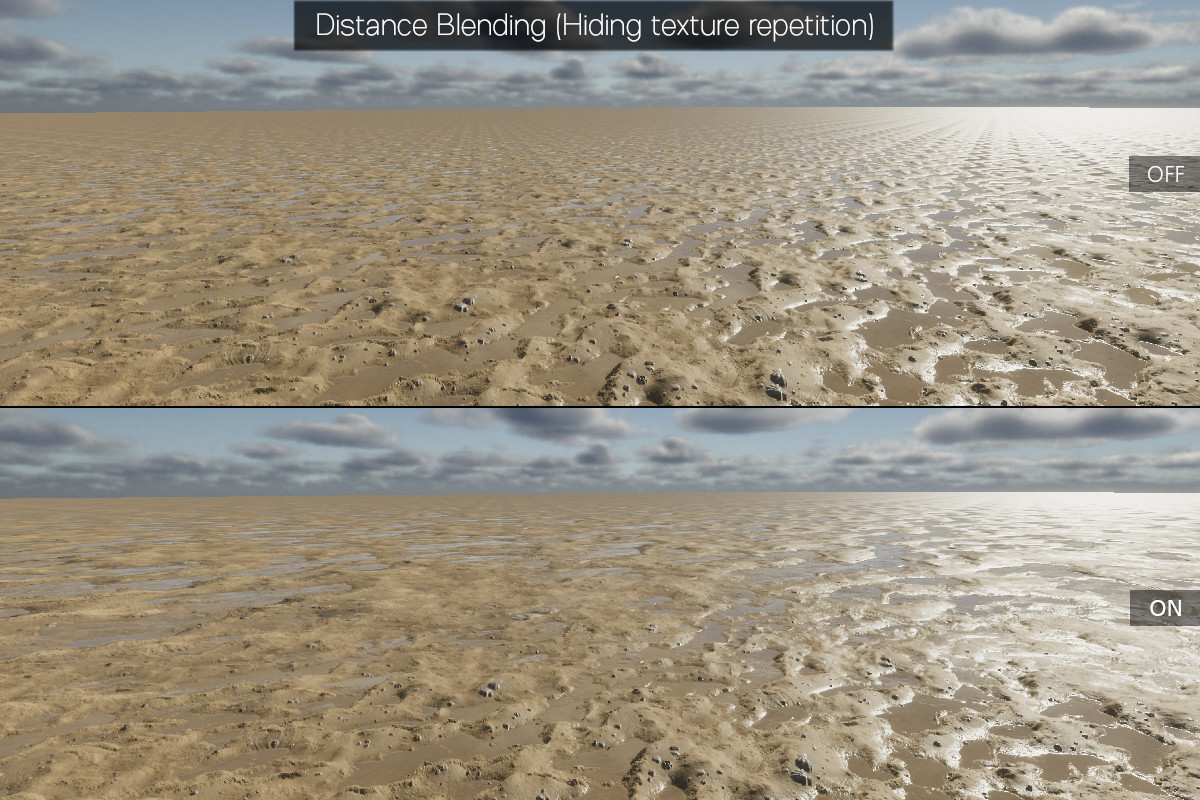
- Distance Blending (Prevents tiling with scaling textures at distance and/or stochastic texturing)
- Triplanar Mapping
- Heightmap Blending
- Puddles with raindrops
- Dynamic Snow Cover
- Color Tint Terrain Texture
- Base Map Support
- Up to 16 Terrain Layers per single pass in URP and HDRP, 8 Layers in Built-in.
- Terrain Layers Mask Map Creator
- Mesh Terrains support (Note: Mesh terrain has to be oriented the same way as Unity Terrain, always aligned with the world axis. For Object integration to work properly you will need Heightmap texture of your Mesh Terrain.)
There are the Standard and Diffuse shaders for the Built-in render pipeline and Lit shaders for URP and HDRP.
Shaders are designed for PC(Windows).
If you have any questions or problems you can visit InTerra Forum Thread or Discord Server.
Note: The 3D model Rock_06 (from Book Of The Dead: Environment) and the Snow texture (from Terrain Tools Sample Asset Pack) used in the demo scene of this asset belongs to Unity and according to my knowledge can be freely used only within the Unity projects. Other demo assets are CC0 license.
From the publisher's Asset Store listing.
Technical details
Object into Terrain Integration shader:
• Easily adjustable Object-Terrain intersection for textures and mesh normals.
• Object-Terrain textures transition based on heightmaps.
• Options for steep slopes texturing - Secondary intersection that allows you to set the intersection for steep slopes separately, you can also apply the Triplanar Mapping to it or the Distortion as an alternative for triplanar with basically zero performance impact.
Note that the steep slopes texturing depend on correctly calculated Object mesh normals !
• Parallax occlusion mapping
• Triplanar mapping Object texturing
• Detail Maps
• Emission
• Tessellation for HDRP & URP (In URP Object integration shader is supported only from 6000.0 Unity version)
• Multiple Terrains possibility - One Object Material can receive data only from one Terrain which is determined by the average position of all Objects using the Material and for multiple Terrains you will need a copy of Material for each Terrain, there is a tool for creating and managing these copies, but currently just as Beta.
Terrain & Mesh Terrain shader (Basically just like Unity Terrain shaders but with additional features):
• Distance Blending - Covering the texture in distance by its scaled up version and/or stochastic texturing
• Triplanar mapping for steep slopes texturing (for the first four layers in Built-in or eight in HDRP) with possibility for only first Layer to be triplanar to improve performance and there is also possibility to apply that one Layer to all steep slopes automatically (and possibility to move any Layer to first position)
• Parallax occlusion mapping
• Tessellation (HDRP & URP Only)
• Tracks that allow the objects with InTerra Tracks script to create the tracks on terrain.
• Heightmap Blending (for the first four Layers in Built-in and URP or eight in HDRP)
• Global wetness, puddles with raindrops and Snow.
• Color tint for Terrain Layers
• Color tint Terrain Texture
• Additional Normal Terrain Texture
The Asset also includes Mask map creator for Terrain Layers
Limitations:
• Non-Uniform scaling of Objects is not supported (some seams might appear when use)
• Seams for integrated Objects might appear just because of the way the shadows are calculated in Unity, in which case an increase of shadow bias might help. Baked/mixed lighting can make seams visible too, but I'm trying to find some workaround. The seams can also appear because of Ambient Occlusion, for example the default setting of URP SSAO highlights the intersection a little.
• Triplanar features will be applied on Terrain Base map only if you do not have more than one pass (four Layer in Built-in and URP, eight in HDRP) and you are using "First Layer Only" - otherwise the calculation would be too heavy and the Base map would become pointless.
Compatibility
| Unity version | Built-in | URP | HDRP |
|---|---|---|---|
| 2022.3.22f1 | Compatible | Compatible | Compatible |
As listed on the Asset Store.