
 View on Asset Store (opens in new tab)
Package details
- Latest version
- 2.6.0
- Last updated
- First released
- Unity version
- 2020.3.33 or later
- Package size
- 69 KB
- Files
- 11
- Favorites
- 31
- Views in the past week
- 17
Price tracking
- Last checked
- Tracked since
- Lowest recorded
- $8.00 on
Keywords

Needle Console - Seamless Integration for Developers
Complex logs made readable (async, coroutines, callbacks) No code changes needed Filter logs by message, line, file, class, package + save presets Seamlessly integrates in Unity's Console
Affiliate link · Purchases support this site
Price history
Last 6 months
USDAsset preview
1 / 8

Needle Console - Seamless Integration for Developers screenshot 1


About this asset
- Improved stacktrace rendering (async methods, multiple invocations are collapsed, formatting is improved for readability)
- Syntax highlighted stacktraces
- Filter logs: Hide or Solo (e.g. by message, line, file, package)
- Log background colors by type (e.g. warning, error, compiler error)
- Log prefixes show where logs are coming from at a glance
- Collapse individual logs but preserve history and context
- Ping script files from log
- Add actional hyperlinks to log messages
- Editor-only logs don't impact final builds while double clicking still opens correct line and file
- Fixes to source code links e.g. when using local packages
- Stacktrace orientation support: Render the stacktrace at the bottom (default) or on the right side
Demystified Stacktraces 🔮 for any log message and exceptions
Logs going into Editor logfiles will also be demystified.
Logs in builds will not be demystified (by design).
.NET stack traces output the compiler transformed methods; rather than the source code methods, which make them slow to mentally parse and match back to the source code.
Demystify outputs the modern C# 7.0 features in stack traces in an understandable fashion that looks like the source code that generated them.
Stacktrace Syntax Highlighting 🎨
We provide default syntax highlighting for Light and Dark Theme. You can also change colors to your liking.
Syntax highlighting comes with a slight performance impact when selecting a log (not when logging it).
- Adjust highlighting colors to your liking.
- Disable specific highlight types by setting the Alpha value of the respective setting to 0.
Log Filtering 🔍
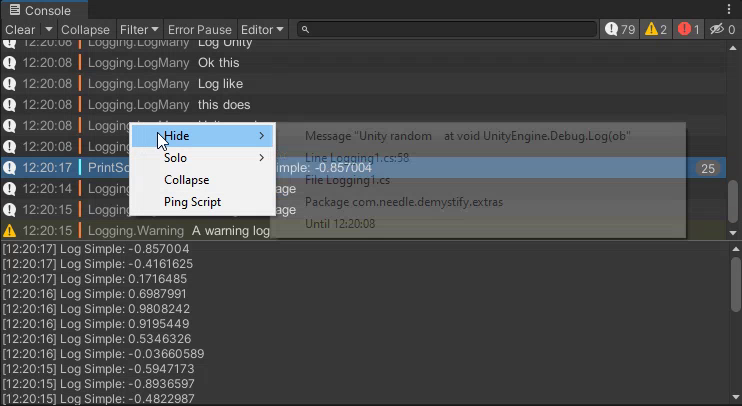
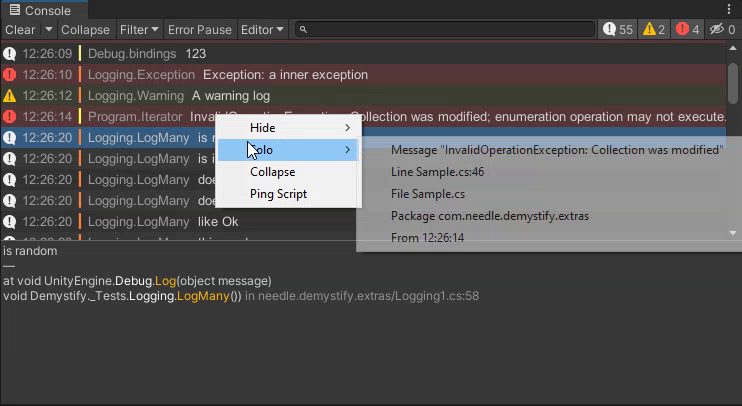
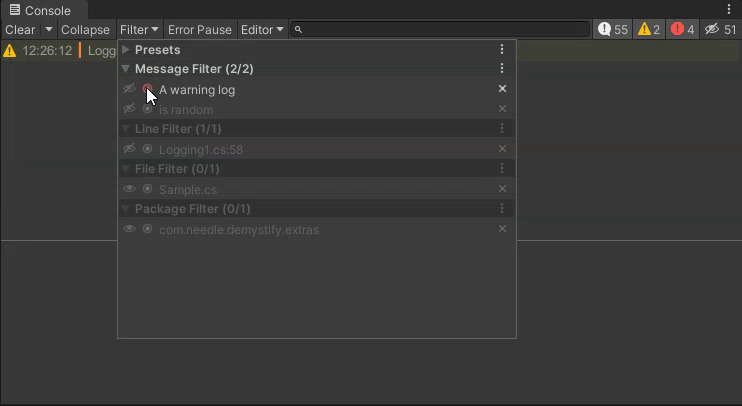
Log filters allow to hide specific logs in your project or only show the logs that matter for you right now. No need to change the way you write Debug.Log messages, it is all available at your fingertips via the console context menu.
- Hide logs by message, file, line, package or even time
- Solo logs: show only log entries that matter to you right now
Collapse individual repeating logs 🍔
Multiple logs from the same source can be collapsed into a single log.
Log history is preserved and can be seen in the stacktrace view when the log is selected.
Prevent spamming your console - keep context visible
Ping script 📯
Right click a console log to ping the source script file
Works with scripts in assets, embedded, local or registry packages
Console Hyperlinks 🔗
Console hyperlinks make logs with rich text usable and extendable.
By default we provide handling for urls and files.
Example to log a clickable link to Unity.com
- Debug.Log(<a href="www.unity.com">Open Unity Website</a>
Example to open a file somewhere on disc:
- Debug.Log(<a href="../project/relative/path.txt">Open some file</a>
Log Background Colors 🚦
- Log background colors can be enabled or disabled to show severity
- Compiler errors receive special treatment and are rendered magenta so that shader programmers will feel right at home (it's great, really!)
Log prefixes 📍
Logs can automatically be prefixed with file- and method-name providing more context at your log output at a glance. Additionally we add a colored bar in front of the log message that shows which logs belong together / come from the same file.
Editor Only logs 📑
Use DebugEditor methods to log messages only in Unity Editor.
No garbage or cpu cycles will be wasted in your standalone application.
It is also possible to implement a class named DebugEditor somewhere in your code to add custom functionality.
NOTE: Double clicking log entries that contain DebugEditor.Log in the console will still open the right file for you.
From the publisher's Asset Store listing.
Compatibility
| Unity version | Built-in | URP | HDRP | Custom |
|---|---|---|---|---|
| 2020.3.43f1 | Compatible | Compatible | Compatible | Compatible |
| 2020.3.33f1 | Compatible | Compatible | Compatible | Compatible |
As listed on the Asset Store.