
 View on Asset Store (opens in new tab)
Package details
- Latest version
- 1.0
- Last updated
- First released
- Unity version
- 2018.4.3 or later
- Package size
- 693.7 MB
- Files
- 271
- Favorites
- 49
- Views in the past week
- 2
Price tracking
- Last checked
- Tracked since
- Lowest recorded
- $14.95 on
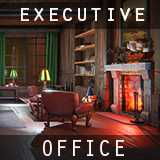
Executive Office
Price $29.95
Buy on Asset Store (opens in new tab)
Affiliate link · Purchases support this site
Price history
Last 6 months
USDAsset preview
1 / 24

Executive Office screenshot 1


About this asset
This is the Executive office. Where deals are made surrounded by statues, comfortable seating and a fireplace to keep things warm.
Includes modular assets to assembled walls + roofing as well as plenty of decor objects to fill out shelves, tables and give your scene a lived in feel.
Asset Features:
60+ assets | Showcase scenes Day + Night | Post Processing settings
Asset list:
• Fireplace wall section + simple particle fire
• Fireplace logs and tools
• Book shelving wall section
• Window wall section
• Doorway wall section
• Roofing section
• Wall sections x5
• Column
Furniture-
• Couch
• Lounge chair
• Office chair
• Tables/Desks x7
Decor-
• Moose statue
• Mountain goat statue
• Bust/head statue + stand
• Eagle statue
• Mountain statue
• Clock x2
• Wall art x8
• Interactive lamp (has script to run on/off light/lamps)
• books x6
• Vases x3
• Paper weight
• Stationary set + pen
• Model ship
(Assets have colliders)
Poly-count for all base assets is a little over 37k
(For low-end hardware and mobile devices, further optimizations may be needed)
Included texture maps:
(512 to 4k)
• Diffuse
• Metal/Smoothness and Specular/Smoothness (RGBA)
• Normal
• Emission (not all assets)
Supported render pipeline:
Standard (2018.4+)
Showcase/Demo scene notes:
Night scene uses real time lighting.
Day scene uses light mapped lighting.
To match look of scenes shown in demo videos and screen-shots use post processing + Deferred + Linear.
Lamps in scenes are interactive and can be turned off/on by entering a collision trigger zone and pressing "e".
(Non interactive lamp prefab is included for simple or custom interactions)
Reviews, feedback, concerns or questions are always welcomed and appreciated! They help me to improve and create higher quality assets.
Asset support contact: [email protected]
Thank You!
Includes modular assets to assembled walls + roofing as well as plenty of decor objects to fill out shelves, tables and give your scene a lived in feel.
Asset Features:
60+ assets | Showcase scenes Day + Night | Post Processing settings
Asset list:
• Fireplace wall section + simple particle fire
• Fireplace logs and tools
• Book shelving wall section
• Window wall section
• Doorway wall section
• Roofing section
• Wall sections x5
• Column
Furniture-
• Couch
• Lounge chair
• Office chair
• Tables/Desks x7
Decor-
• Moose statue
• Mountain goat statue
• Bust/head statue + stand
• Eagle statue
• Mountain statue
• Clock x2
• Wall art x8
• Interactive lamp (has script to run on/off light/lamps)
• books x6
• Vases x3
• Paper weight
• Stationary set + pen
• Model ship
(Assets have colliders)
Poly-count for all base assets is a little over 37k
(For low-end hardware and mobile devices, further optimizations may be needed)
Included texture maps:
(512 to 4k)
• Diffuse
• Metal/Smoothness and Specular/Smoothness (RGBA)
• Normal
• Emission (not all assets)
Supported render pipeline:
Standard (2018.4+)
Showcase/Demo scene notes:
Night scene uses real time lighting.
Day scene uses light mapped lighting.
To match look of scenes shown in demo videos and screen-shots use post processing + Deferred + Linear.
Lamps in scenes are interactive and can be turned off/on by entering a collision trigger zone and pressing "e".
(Non interactive lamp prefab is included for simple or custom interactions)
Reviews, feedback, concerns or questions are always welcomed and appreciated! They help me to improve and create higher quality assets.
Asset support contact: [email protected]
Thank You!
From the publisher's Asset Store listing.