
 View on Asset Store (opens in new tab)
Package details
- Latest version
- 1.0
- Last updated
- First released
- Unity version
- 2018.3.0 or later
- Package size
- 125 KB
- Files
- 11
- Favorites
- 11
- Views in the past week
- 1
Price tracking
- Last checked
- Tracked since
- Lowest recorded
- $9.99 on
Keywords
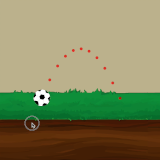
Trajectory Aiming Kit in 2D
Price $9.99
Buy on Asset Store (opens in new tab)
Affiliate link · Purchases support this site
Price history
Last 6 months
USDAsset preview
1 / 4

Trajectory Aiming Kit in 2D screenshot 1


About this asset
Main Features:
Easy to use:
-Add the script to your game object
-That’s it, now you can drag, aim and release to shoot
Advanced Collision Detection:
- detect walls and objects on your path
- show the trajectory after a rebound.
- detect collision from multiple colliders and see the exact path no matter how complex.
Highly customizable:
- You can set the number of points that represent your trajectory
- you can change the color of your trajectory
- you can set the distance between your points
- you can even change the shape of your trajectory point to whatever you like and suits your game
Better control:
- you can set a maximum and minimum force for your projectile
- to cancel a shot, simply drag below the minimum force and the lines disappear.
- you can control the drag sensitivity to make it more comfortable.
-You can Specify the distance between your trajectory points, and many more things.
Wide Support:
- works on touch screens and desktop.
- support unity 2018.3.0 and newer
Easy to use:
-Add the script to your game object
-That’s it, now you can drag, aim and release to shoot
Advanced Collision Detection:
- detect walls and objects on your path
- show the trajectory after a rebound.
- detect collision from multiple colliders and see the exact path no matter how complex.
Highly customizable:
- You can set the number of points that represent your trajectory
- you can change the color of your trajectory
- you can set the distance between your points
- you can even change the shape of your trajectory point to whatever you like and suits your game
Better control:
- you can set a maximum and minimum force for your projectile
- to cancel a shot, simply drag below the minimum force and the lines disappear.
- you can control the drag sensitivity to make it more comfortable.
-You can Specify the distance between your trajectory points, and many more things.
Wide Support:
- works on touch screens and desktop.
- support unity 2018.3.0 and newer
From the publisher's Asset Store listing.