
 View on Asset Store (opens in new tab)
Package details
- Latest version
- 1.3
- Last updated
- First released
- Unity version
- 2019.3.1 or later
- Package size
- 54 KB
- Files
- 9
- Favorites
- 74
- Views in the past week
- 12
Price tracking
- Last checked
- Tracked since
- Lowest recorded
- Free on
Keywords
Audio Visualization
Price Free
Get it free on Asset Store (opens in new tab)
Affiliate link · Purchases support this site
Price history
Last 6 months
USDAsset preview
1 / 2

Audio Visualization screenshot 1

About this asset
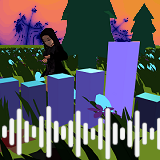
Simple blocks visualizing audio by increasing their y-scale and material color emission.
By default there are eight blocks listening to frequency bands of an audio source.
There is an audio peer instance calculating the necessary samples and bands to be used by many game objects.
— Content —
- AudioPeer prefab & C# script for calculating data from an AudioSource
- AudioSpectrum prefab & C# script creating 8 audio bumper
- AudioBumper prefab & C# script scaling and coloring to data by the AudioPeer
- AudioVisualizationScene for demonstration
— Requirements —
Audio file (eg. mp3) to be visualized.
— Usage —
Open the given scene and add an audio file to the existing AudioSource
and start the game. You can use the AudioPeer's GetFrequencyBand(int freqIndex) method to get a frequency band consisting of several audio samples
or the GetSample(int sampleIndex) method for a single sample.
All band values are normalized floats between 0 and 1. By default there are 512 samples that get devided into 8 frequency bands using their averages.
The values get buffered for a smoother experience.
The code is easy to adjust to be able to change the number of samples or bands.
— Support —
Need help? Contact me on Discord.
— Follow me —
Discord
Instagram
Twitter
Facebook
YouTube
— Content —
- AudioPeer prefab & C# script for calculating data from an AudioSource
- AudioSpectrum prefab & C# script creating 8 audio bumper
- AudioBumper prefab & C# script scaling and coloring to data by the AudioPeer
- AudioVisualizationScene for demonstration
— Requirements —
Audio file (eg. mp3) to be visualized.
— Usage —
Open the given scene and add an audio file to the existing AudioSource
and start the game. You can use the AudioPeer's GetFrequencyBand(int freqIndex) method to get a frequency band consisting of several audio samples
or the GetSample(int sampleIndex) method for a single sample.
All band values are normalized floats between 0 and 1. By default there are 512 samples that get devided into 8 frequency bands using their averages.
The values get buffered for a smoother experience.
The code is easy to adjust to be able to change the number of samples or bands.
— Support —
Need help? Contact me on Discord.
— Follow me —
Discord
YouTube
From the publisher's Asset Store listing.