
 View on Asset Store (opens in new tab)
Package details
- Latest version
- 1.0
- Last updated
- First released
- Unity version
- 2019.2.1 or later
- Package size
- 1.4 MB
- Files
- 30
- Favorites
- 46
- Views in the past week
- 2
Price tracking
- Last checked
- Tracked since
- Lowest recorded
- $4.99 on
Area Selector
- Price drop
Discount -38%
Previous price
$7.99
Price $4.99
Lowest recorded price
Get 38% off on Asset Store (opens in new tab)Affiliate link · Purchases support this site
Price history
Last 6 months
USDAsset preview
1 / 6

Area Selector screenshot 1


About this asset
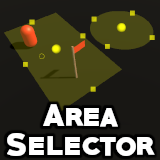
Unity Asset allowing to easily define zones of the world in the scene view. With this, you can patrol units, spawn objects, detect the presence in a zone and so on!
Getting Started
1. Add the "AreaSelector" script component to any GameObject
2. With the GameObject selected, you can now click on "Add New Area" button displayed on the scene view and in the component
3. This will spawn an area in scene view, near to the GameObject ; you can drag its middle handle to move its position
4. You can drag its squared handles to change its size
5. You can change it to a square or a disc, depending on your needs, using the top left buttons
6. You can add new areas to cover all the surface you want
7. You can now request a random point in this area by script, detect if a position is inside, etc...
See the included documentation for more details.
Getting Started
1. Add the "AreaSelector" script component to any GameObject
2. With the GameObject selected, you can now click on "Add New Area" button displayed on the scene view and in the component
3. This will spawn an area in scene view, near to the GameObject ; you can drag its middle handle to move its position
4. You can drag its squared handles to change its size
5. You can change it to a square or a disc, depending on your needs, using the top left buttons
6. You can add new areas to cover all the surface you want
7. You can now request a random point in this area by script, detect if a position is inside, etc...
See the included documentation for more details.
From the publisher's Asset Store listing.