
 View on Asset Store (opens in new tab)
Package details
- Latest version
- 3.0
- Last updated
- First released
- Unity version
- 2020.3.42 or later
- Package size
- 65.6 MB
- Files
- 74
- Favorites
- 69
- Views in the past week
- 9
Price tracking
- Last checked
- Tracked since
- Lowest recorded
- $7.00 on
Keywords
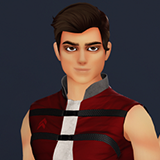
Rhett Cosmo: Stylized Sci-Fi Character
Rhett Cosmo is a mecanim-ready sci-fi character and he's ready for any of your stylized, toonish projects.
Affiliate link · Purchases support this site
Price history
Last 6 months
USDAsset preview
1 / 1

Rhett Cosmo: Stylized Sci-Fi Character screenshot 1
About this asset
NOTE: This version does not contain any animations, but the rig has been tested with several asset store animation packages, character controllers and Mixamo.
Rhett is a stylized character with a sci-fi look. His skin and hair are painted by hand, while her clothing and accessory surfaces are comprised of dirty leathers, vinyls and scuffed metals. He is a game-ready, rigged character full of features: facial expression/lip-sync blendshapes, rigged hair for use with physics assets, and a selection of textures and styles to customize to your preference.
This asset is updated regularly, but you will always maintain access to previous versions via www.stellargameassets.com!
From the publisher's Asset Store listing.
Technical details
FEATURES
Textures are 2048x2048 and include diffuse, normal, metallic, and AO. Most styles also include roughness maps for your use in other render pipelines or with custom shaders.
- Basic blendshapes (blink, smile, sad, angry, shock, smirk, and lipsync-compatible phomenes)
- Four hair colors (black, blond, brown, silver)
- Eight eye colors
- Six clothing colors
- Three skin styles (basic, goth, injured)
- POLYGON COUNT: 16K tris.
Compatibility
| Unity version | Built-in | URP | HDRP |
|---|---|---|---|
| 2020.3.42f1 | Compatible | Compatible | Compatible |
This package was deployed using Built-In. Demo scene lighting may need to be adjusted for clarity if using HDRP. Materials can be updated by the Unity Editor in URP or HDRP (Edit > Rendering).
As listed on the Asset Store.