
 View on Asset Store (opens in new tab)
Package details
- Latest version
- 1.0
- Last updated
- First released
- Unity version
- 2019.2.1 or later
- Package size
- 11.8 MB
- Files
- 25
- Favorites
- 64
- Views in the past week
- 1
Price tracking
- Last checked
- Tracked since
- Lowest recorded
- $4.99 on
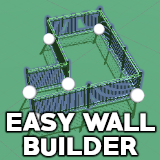
Easy Wall Builder
Affiliate link · Purchases support this site
Price history
Last 6 months
USDAsset preview
1 / 6

Easy Wall Builder screenshot 1


About this asset
Level design tool for easily positioning many instances of your own prefabs (walls, fences, barriers, trees, ...) simply by moving handles.
You can use several prefabs for the same wall to add diversity to your creations.
A unique optimized collider can be generated for each wall instead of using the prefabs ones.
Getting Started:1- Create an empty Game Object
2- Add "WallBuilder" script component
3- Place your wall prefab (at least one) in the "Block Prefabs" property
4- If needed, check "Use Z as length axis" depending the orientation of your wall prefab.
5- Set the "Block size" property depending on the size of your prefab and depending on the space you want between each block.
6- In the scene view, you can now move the handles to generate walls from the prefab.
In the inspector, in the WallBuilder component, click on "Add crossing point" to add more points.
If all wall blocks are perpendicular to the direction of the wall, check the "Use Z As Length Axis" box to rotate the blocks by 90°.
Check "Should Stretch" if your prefabs can be stretched to perfectly fill the area between 2 points.
Mouse over each property for more information.
All the models in the screenshots/video are included.
From the publisher's Asset Store listing.